
A tablet for playing games does not need flagship power, but it does need the right balance: a screen big enough to see the game, enough storage for several titles, a battery that lasts a long session, and a chip that keeps casual games smooth. The differences between budget tablets sit in the screen, the memory, the storage and the app store. The wrong tablet stutters on games it should handle, runs out of space after three installs, or locks you out of the games you actually want.


This guide is for casual gamers who want a tablet for puzzle games, racing games and streaming, for parents buying a first gaming tablet for a child, and for anyone who wants a spare screen for games without spending flagship money. The two tablets below were chosen from the names and specifications on their Amazon pages, and each one takes a different route to affordable gaming, so you can compare them on screen, storage, battery and apps.
Quick Picks
As an Amazon Associate we earn from qualifying purchases
| Product | Best for | Key spec from title |
|---|---|---|
| Amazon Fire HD 8 | A light tablet for casual games and streaming | 8-inch HD display, up to 13-hour battery |
| Samsung Galaxy Tab A7 Lite | A full Android tablet with Google Play | 8.7-inch display, 5100 mAh battery |
How to Choose
Check the screen size and resolution
A tablet screen decides how much of the game you can see and how comfortable it is to hold for a long session. An eight-inch screen is easy to hold in one hand and fits a small bag, while a slightly larger screen shows more detail in racing and adventure games. Resolution matters too: a 1280 by 800 display looks sharp at this size, and a higher resolution is wasted on a small screen. Hold the tablet in your mind for an hour of play: if it is too heavy or too large, your hands will tire before the battery does. An eight-inch screen fits a small bag and one hand.
Count the storage and the expansion
Games take space, and a tablet with only 32 GB of storage fills up fast once you install several titles and download updates. Check whether the tablet takes a microSD card, because a card up to 1 TB turns a small tablet into a game library without deleting titles to make room. Also check the memory: a tablet with 3 GB or 4 GB of RAM runs casual games smoothly, while a tablet with less memory stutters when you switch between a game and a browser. Storage and memory decide whether the tablet still plays well a year from now. A tablet with 3 GB of RAM runs casual games smoothly.
Look at the battery for long sessions
A gaming tablet needs a battery that lasts through a long session without a cable, because a tablet tethered to a wall is not a portable games machine. Both tablets here are rated for long use on a charge, with batteries that cover hours of play, video and reading. Check the battery figure on the listing and the charging time, because a tablet that takes hours to refill is frustrating after a long session. A tablet with a USB-C port charges faster and uses the same cable as a phone, which is one less lead to carry. A tablet that takes hours to refill is frustrating after a long session.
Confirm the games you want are available
The app store decides which games you can actually install, and this is the biggest difference between the two tablets here. A full Android tablet with Google Play runs almost every game in the Android catalogue, while a tablet with its own app store offers a smaller selection and no official Google Play. Check whether the games you want are in the tablet’s store before you buy, because a tablet that cannot install your favourite game is useless no matter how good its screen and battery are. A full Android tablet with Google Play runs almost every game in the catalogue.
The 2 Best Options
Amazon Fire HD 8
The Amazon Fire HD 8 is the lightest and simplest gaming tablet here, built for casual games and streaming in a compact eight-inch body. Its 8-inch HD display at 1280 by 800 is sharp for its size, and the hexa-core 2.0 GHz processor with up to 4 GB of RAM keeps casual games and video smooth. Battery life runs up to 13 hours, and storage runs to 32 GB or 64 GB with a microSD slot for up to 1 TB more. At 11.88 ounces it is easy to hold. It uses the Amazon Appstore rather than Google Play, so check your games are available there first.
Specs
- 8-inch HD display, 1280 x 800 resolution, IPS
- Hexa-core 2.0 GHz processor
- 3 GB or 4 GB RAM
- 32 GB or 64 GB storage, microSD up to 1 TB
- Battery life up to 13 hours
- Weight 11.88 ounces
- USB-C charging
- 12th generation, 2024 release
- Amazon Appstore, no Google Play
Best for: Casual games, streaming and reading on a light tablet with a long battery life.
Watch out for: It has no Google Play, so check that the games you want are in the Amazon Appstore first.
Samsung Galaxy Tab A7 Lite
The Samsung Galaxy Tab A7 Lite is the full Android tablet in this guide, with Google Play and a metal frame in a compact 8.7-inch body. Its 8.7-inch TFT display runs at 1340 by 800, and the MediaTek octa-core chip with 3 GB of RAM handles casual games and streaming. Storage is 32 GB with microSD up to 1 TB, and the 5100 mAh battery averages 11 hours of use. It carries 8 MP and 2 MP cameras, Bluetooth 5.0 and a 3.5 mm jack, and its metal frame survives drops better than plastic. It is the tablet for a gamer who wants the full Android catalogue.
Specs
- 8.7-inch TFT display, 1340 x 800 resolution
- MediaTek octa-core processor
- 3 GB RAM, 32 GB storage
- microSD expansion up to 1 TB
- 5100 mAh battery, average 11 hours
- 8 MP rear camera, 2 MP front camera
- Bluetooth 5.0, 3.5 mm headphone jack
- Sturdy metal frame
- Android 11, Google Play
Best for: A full Android gaming tablet with Google Play, a metal frame and expandable storage.
Watch out for: The 3 GB of RAM limits heavy multitasking, so close background apps before a demanding game.
Which One Fits Your Situation
You want the lightest tablet for casual games
Pick the Amazon Fire HD 8. At 11.88 ounces with an eight-inch screen it is easy to hold for a long session, and its battery runs up to 13 hours for games, video and reading. It suits puzzle games, streaming and reading, and its low weight makes it comfortable for children and for long sessions on the couch. Its battery runs up to 13 hours for games, video and reading.
You want the full Android game catalogue
Pick the Samsung Galaxy Tab A7 Lite. Its Google Play store runs almost every Android game, while the Fire HD 8 is limited to the Amazon Appstore. The metal frame survives drops, the 8.7-inch screen shows more of the game, and the microSD slot grows storage to 1 TB for a large game library. The larger screen shows more of the game at once.
You buy a first gaming tablet for a child
Pick the Samsung Galaxy Tab A7 Lite. Its metal frame handles drops better than plastic, Google Play gives access to the games children actually ask for, and the 8.7-inch screen is big enough to see the game clearly. Add a case and a screen protector, and it will survive a year of daily play. Its sturdy frame and Google Play access suit a child’s first gaming tablet.
You mostly stream video and play light games
Pick the Amazon Fire HD 8. Its long battery life, light body and sharp eight-inch screen suit streaming and casual games, and its tight link to Amazon services makes it a natural fit for Prime Video and Kindle reading. It is the tablet for a relaxed evening rather than a competitive session. Its tight link to Amazon services makes it natural for Prime Video and Kindle reading.
Common Mistakes
- Buying a tablet without checking whether your games are in its app store. A tablet that cannot install your favourite game is useless, whatever its screen and battery.
- Choosing a tablet with too little storage, then deleting games to make room for updates.
- Ignoring the battery and buying a tablet that needs a cable halfway through a session.
- Picking the heaviest tablet for a child, whose hands tire before the battery runs out. A light tablet suits small hands and long sessions.
- Forgetting a case and a screen protector, because a dropped tablet ends a gaming session fast.
More Tablet Gaming Gear Worth Considering
If the two tablets above leave you wanting more power or a better way to hold and control the screen, these options cover tablets, controllers and stands.
Samsung Galaxy Tab A9+ 11-inch 64GB

An 11-inch Android tablet with a larger display and quad speakers, suited to casual and mid-range mobile games.
Samsung Galaxy Tab A11+ 6GB RAM 128GB

A newer mid-range Samsung with expandable storage and a long-lasting battery for extended play.
GameSir X5s Bluetooth Phone Controller

A Hall effect controller that works with Android devices and supports Bluetooth play. A handy upgrade when touch controls feel limiting.
Lamicall Adjustable Tablet Stand
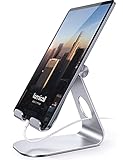
A sturdy foldable stand that holds a tablet at several angles. Good for propping the screen up for games that need only a few taps.
Frequently Asked Questions
Can a budget tablet run games well?
Yes, for casual games. Puzzle games, racing games, card games and streaming run smoothly on a tablet with a hexa-core or octa-core chip and 3 GB or 4 GB of RAM. Demanding 3D games with high graphics settings need more power and more memory, so they may stutter or run hot on a budget tablet.
How much storage do I need for games on a tablet?
A tablet with 32 GB of storage holds several casual games, but large titles and updates fill it fast. A microSD card up to 1 TB solves that, because both tablets here take one. Install your most-played games on the internal storage for the fastest loading, and move the rest to the card.
Does the Fire HD 8 have Google Play?
No, the Fire HD 8 uses the Amazon Appstore and does not include Google Play. Many popular games and apps are in the Amazon Appstore, but not every Android game is available there. Check that the games you want are in the Amazon Appstore before you buy, or choose the Galaxy Tab A7 Lite, which has full Google Play access.
How long does a gaming tablet battery last?
Both tablets here are rated for long use: the Fire HD 8 runs up to 13 hours for reading, browsing, video and music, and the Tab A7 Lite averages 11 hours. Gaming drains a battery faster than reading, so a long gaming session will shorten those figures. Lower the screen brightness and close background apps to stretch the battery.






Write Your Review
No reviews yet. Be the first to share your experience!