
Cooperative multiplayer games turn a laptop into a shared evening: two or more players work together against the game instead of against each other, whether that means surviving a zombie horde, building a base, or solving puzzles. The best co-op games are the ones your whole group can run, play and enjoy together, and that means matching the game to the weakest laptop in the group, not the strongest. This guide explains how to choose co-op games for laptops, and which kinds of co-op play best together.
This guide is for friends, families and flatmates who want to play together on laptops, whether in the same room or online. It covers how to judge a co-op game before buying, which kinds of co-op suit different groups, and how to keep a session running smoothly when not every laptop is equally powerful. It also explains how to check the player count and the save system, so the whole group can play.
As an Amazon Associate we earn from qualifying purchases
How to Choose
Match the game to the weakest laptop in the group
Co-op only works when everyone can run the game, so the weakest laptop in the group sets the limit. Check the minimum system requirements against every machine before buying, not just your own, and remember that minimum means the game will run, not that it will run well. Favour games with a low preset and a resolution scaler, since these options let a weaker laptop keep up. A game that one friend cannot run is a game nobody plays, so check every machine before anyone buys.
Decide between local and online co-op
Cooperative games come in two forms, and the choice decides how your group plays. Local co-op puts two or more players on one laptop or on laptops in the same room, which suits families and flatmates sharing a screen. Online co-op connects players over the internet, which suits friends in different places but needs a stable connection for everyone. Check whether the game supports cross-play between stores, since friends who buy from different shops may not be able to join the same session. A game with both local and online modes suits the widest group, since it works in the same room and across the internet.
Check how many players the game supports
Co-op games support different group sizes, and the number decides whether your whole group can play at once. Some games support two players only, which suits a couple or a pair of friends, while others support four, six or even more, which suits a larger group. Check the player count on the store page, and check whether extra players join as full partners or as spectators, since a spectator role suits no one for long. A game built for four players feels empty with two, and a game built for two feels chaotic with six.
Look at the session length and the save system
A co-op game should fit the time your group actually has, so check how long a session lasts and how the game saves. Some games run in short rounds of twenty minutes, which suits an evening after work, while others need hours per session and a shared save file. Check whether the game lets a player drop in and out, since real groups have people arriving late and leaving early. A game that punishes a missing player will frustrate the group faster than any difficult boss. A game that lets a player drop in and out suits a group with different schedules and late arrivals.
Co Op Games That Play Best Together on Laptops
Start with survival crafting games for a group project
Survival crafting games give a group a shared project: gather resources, build a base, and survive the night together. Each player takes a role, from builder to hunter to cook, and the game rewards teamwork more than individual skill. Look for survival games with a low preset and modest requirements, since the whole group must run the game. These games suit long evenings and regular sessions, since the base grows a little further every time the group plays. A survival game with a shared base also gives every player a role, from builder to hunter to cook. A survival game with a shared project also suits a group that plays on a regular evening each week. A game with a low preset also lets the weakest laptop keep up, which keeps the whole group together.
Try cooperative puzzle and adventure games
Cooperative puzzle and adventure games suit groups who want to talk and think together rather than fight. Each player sees a different part of the puzzle, so the group must communicate to solve it, and the game rewards patience more than reflexes. Look for puzzle adventures with two-player co-op and simple controls, which suit mixed groups where not everyone plays games regularly. These games also run on modest laptops, since they favour art style over raw graphical power. A puzzle adventure with two-player co-op also suits a pair who like to think together rather than fight. A game with simple controls also suits mixed groups where not everyone plays games regularly.
Play horde shooters and wave defence with friends
Horde shooters and wave defence games put the group against waves of enemies, and they are the most forgiving co-op genre for mixed skill levels. A weaker player can hold a doorway while a stronger player roams, and the game scales the challenge to the group. Look for horde games with four-player co-op and a low preset, which run on most laptops. These games suit short, intense sessions, since each round lasts twenty minutes or so and the group can stop after any wave. A horde game with four-player co-op and a low preset runs on most laptops, which keeps the group together. A game with short rounds also suits an evening after work, since the group can stop after any wave.
Build together in sandbox and farming games
Sandbox and farming games let a group build something together at its own pace, with no fail state and no pressure. Each player tends a different part of the farm or the town, and the game rewards steady cooperation over weeks of play. Look for farming simulators and sandbox builders with online co-op, which suit families and casual groups. These games run on modest hardware, since they favour a relaxed pace and a charming art style over demanding graphics. A farming simulator with online co-op also suits families and casual groups who play a few times a week. A sandbox builder with no fail state also lets the group build at its own pace without pressure.
Play co-op roguelikes and party games for short sessions
Co-op roguelikes and party games suit a group that meets for a short session and wants something new every time. Each run brings a new map, new enemies and new rewards, so no two sessions play the same, and the simple graphics keep the hardware demands low. Look for roguelikes with two-player or four-player co-op, and party games with short rounds that let everyone join in. These games suit mixed groups where not everyone plays regularly, since the rules are simple and the game rewards teamwork more than individual skill. A roguelike that builds a new dungeon every run gives endless replay from a tiny download, and a party game with short rounds lets the group stop after any round. Try the short-session games first, since they show quickly whether the whole group can run and enjoy the same title.
Which One Fits Your Situation
You play with one friend on two laptops
Start with cooperative puzzle adventures and two-player survival games. These genres suit a pair, reward communication, and run on modest laptops. Check that both machines meet the minimum requirements, and favour games with a low preset so the weaker laptop keeps up with the stronger one. A puzzle adventure with two-player co-op also suits a pair who like to think together.
You play with a family in the same room
Pick local co-op puzzle games and sandbox builders. These games suit mixed ages and skill levels, need no internet connection, and let everyone share one screen or sit side by side. Favour games with simple controls and a relaxed pace, since the youngest player sets the difficulty. A sandbox builder with no fail state also lets the youngest player build without pressure.
You play online with friends in different places
Pick horde shooters and survival crafting games with online co-op. Check that everyone buys the game from the same store or that the game supports cross-play, and favour games with a stable connection requirement. A game that lets players drop in and out suits a group with different schedules. Check that everyone buys the game from the same store, or that the game supports cross-play between stores.
You want a long-running game for a regular group
Pick a survival crafting game or a farming simulator with a shared world. The group builds a base or a farm together over weeks, each session adds a little more, and the game rewards steady cooperation. Check the save system first, since a shared world needs a host who plays regularly. A shared world that grows a little each session also rewards a group that meets every week.
Common Mistakes
- Buying a co-op game that the weakest laptop in the group cannot run at all on any settings
- Ignoring the player count and buying a two-player game for four friends who all want to play
- Choosing online co-op when the group shares one room and one screen together
- Picking a game with hour-long sessions for a group with twenty minutes after work
- Forgetting to check cross-play between stores before everyone buys the game
Controllers and Gear for Couch Co-Op on a Laptop
Many co-op games are much better with two gamepads and a bigger screen. These accessories make a laptop-based game night easier.
Logitech F310 Wired Gamepad

A wired USB gamepad that works with a wide range of PC games. A good, inexpensive pick for a second player.
Xbox Wireless Gaming Controller
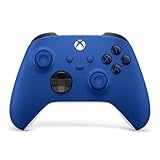
A widely supported controller that connects to PC over Bluetooth or USB. Many PC co-op games recognize it right away.
8BitDo SN30 Pro Bluetooth Controller
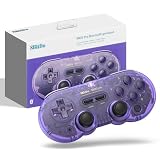
A compact retro-style controller with Hall effect sticks, good for platformers and arcade co-op games.
Anker USB C Hub 7-in-1

A hub that adds USB ports and HDMI output so you can connect extra controllers and send the game to a TV from a thin laptop.
Kootek Laptop Cooling Pad

A cooling stand that helps a laptop stay stable during long play sessions with friends.
Frequently Asked Questions
What is the best co-op game for laptops?
It depends on your group. Survival crafting games suit a regular group that wants a shared project, puzzle adventures suit a pair who like to think together, and horde shooters suit a larger group that wants short, intense sessions. Match the game to the weakest laptop first, then to the group’s size and schedule. A puzzle adventure suits a pair, a horde shooter suits a larger group, and a survival game suits a regular group.
Can I play co-op games on a low spec laptop?
Yes, many co-op games run well on modest laptops, including puzzle adventures, farming simulators and older horde shooters. Check the minimum requirements against every machine in the group, favour games with a low preset and a resolution scaler, and avoid modern open-world co-op games that need a dedicated graphics card. Older horde shooters and farming simulators run well on modest laptops, since they favour art style over raw power.
Do co-op games need an internet connection?
Online co-op needs a stable connection for every player, while local co-op needs none. Check whether the game supports local play on one laptop or on laptops in the same room, since families and flatmates often play without the internet. A game with both local and online modes suits the widest group, since it works with and without the internet.
How many players can play co-op together?
It depends on the game. Some co-op games support two players only, while others support four, six or more. Check the player count on the store page before buying, and check whether extra players join as full partners. A game that gives extra players a full role suits a larger group better than one that leaves them watching. A game built for four players feels empty with two, and a game built for two feels chaotic with six.








Write Your Review
No reviews yet. Be the first to share your experience!