
Our Short List of 3

- Best for: A first curved screen, or a second monitor for a bedroom setup.
- 27-inch curved monitor, 1500R curve
- Full HD 1920 x 1080 resolution
- 100Hz refresh rate, 1ms response
- 100 percent sRGB coverage

- Best for: One screen that covers office work by day and 4K play by night.
- 27-inch 4K UHD (3840 x 2160) Rapid IPS panel
- Dual mode: 4K at 160Hz / Full HD at 320Hz — the 320Hz figure is the Full HD mode
- 0.5ms response time
- AMD FreeSync Premium

- Best for: Competitive play at QHD where a 240Hz panel makes a real difference.
- 27-inch QHD IPS panel, 2560 x 1440
- 240Hz native via DisplayPort, 260Hz overclocked
- 0.3ms response time
- NVIDIA G-SYNC Compatible, Adaptive-Sync
All 5 Picks at a Glance
| Product | Specs | Action |
|---|---|---|
| Sceptre 27-Inch Curved Gaming Monitor (C275W-FW100T) |
| Check price on Amazon |
| MSI MAG 272URDFA E16 27-Inch 4K Gaming Monitor |
| Check price on Amazon |
| AOC Q27G41ZE 27-Inch QHD Gaming Monitor |
| Check price on Amazon |
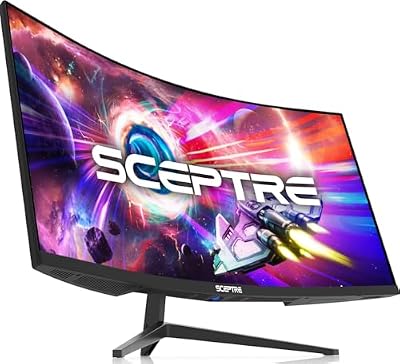 Sceptre 34-Inch Curved Ultrawide Monitor (C345B-QUT168) |
| Check price on Amazon |
 ASUS ROG Swift PG32UCDP 32-Inch 4K OLED Gaming Monitor |
| Check price on Amazon |
Updated Nov 2026 ✅
Cyber Monday turns monitor shopping into a race against the clock, and the real decision is not grabbing the biggest screen on the page. It is matching the panel to the games you play and the graphics card already in your case: a fast Full HD screen for competitive shooters, a sharp 4K panel for story-driven games, or a wide curved display that doubles as a workspace. Buy the wrong combination and you pay for refresh rate your card cannot feed, or resolution your eyes cannot use at your desk distance.
This guide is a short list picked by need, not every monitor on sale. It covers five screens: a budget curved starter, a dual-mode 4K workhorse, a high-refresh QHD pick, a 34-inch ultrawide, and a flagship OLED. It is written for first-time builders, competitive players, and anyone replacing an old screen this sale season. Deals change fast, so check the listing and the current price on Amazon before you buy, and confirm the ports and size fit your setup.
Quick Picks
As an Amazon Associate we earn from qualifying purchases
| Product | Best for | Key spec from title |
|---|---|---|
| Sceptre 27-Inch Curved (C275W-FW100T) | A first curved screen on a modest setup | 27-inch curved 1500R, 100Hz, Full HD |
| MSI MAG 272URDFA E16 | One screen for workdays and 4K play | Dual-mode 4K 160Hz / Full HD 320Hz |
| AOC Q27G41ZE | Fast QHD play without a flagship card | 240Hz native, 260Hz overclocked, QHD IPS |
| Sceptre 34-Inch Curved Ultrawide (C345B-QUT168) | Wide view for racing and multitasking | 34-inch ultrawide, 3440×1440, up to 180Hz |
| ASUS ROG Swift PG32UCDP | No-compromise 4K OLED flagship | 4K 240Hz OLED, dual-mode Full HD 480Hz |
How to Choose
Match Resolution and Refresh Rate to Your Graphics Card
A monitor can only show what your graphics card can draw, so start with the card, not the screen. A mid-range card drives Full HD at high refresh rates with ease, while 4K at 240Hz needs a top-tier card and a game that supports it. Dual-mode screens like the MSI in this guide split the difference: sharp 4K for slow, pretty games and Full HD at 320Hz when every frame counts. Check the refresh rate your card reaches in your favorite games before you pay for speed you cannot use, and remember that a higher resolution also means smaller text and menus at the same screen size.
Pick the Panel Type for How You Play
Panel type decides color, contrast, and how motion looks, and each type has a real trade-off. IPS panels give wide viewing angles and steady colors, which suits shared desks and color-sensitive work. OLED panels deliver deep blacks and near-instant response, which suits dark, cinematic games, though static menus and taskbars need care over time. Curved screens wrap the image around you and suit racing and flight games, while flat screens suit competitive play where straight edges matter. Pick the panel for the games you play most, not the one with the longest spec sheet.
Check the Ports Before You Fall in Love
A monitor is only as useful as the cable that feeds it, so read the port list before you buy. The ultrawide Sceptre in this guide lists DisplayPort inputs only, which is fine if your card has DisplayPort to spare and a problem if it does not. The AOC reaches its full 240Hz through DisplayPort, so use that input for competitive play, and the MSI still carries a VGA port for an older second machine. Count the outputs on your graphics card, match them to the monitor’s inputs, and confirm the cable you need is in the box before checkout.
Measure the Desk, Not Just the Screen
Screen size means little until you know where the monitor will sit. A 27-inch screen fits most desks and keeps the whole image in view at arm’s length, while a 34-inch ultrawide needs a deep desk and a mount or stand that holds its weight. Curved screens also need space on the sides, since the curve pushes the edges toward you and a wall or shelf behind the desk can get in the way. Measure the width and depth of your desk, check the stand’s footprint and tilt range, and confirm the screen clears any shelf above it before the box arrives.
The 5 Best Options
Sceptre 27-Inch Curved Gaming Monitor (C275W-FW100T)
- Best for: A first curved screen, or a second monitor for a bedroom setup.
- 27-inch curved monitor, 1500R curve
- Full HD 1920 x 1080 resolution
- 100Hz refresh rate, 1ms response
- 100 percent sRGB coverage
A first curved screen, or a second monitor for a bedroom setup.
Full HD on a 27-inch screen looks softer up close than QHD or 4K, so sit at arm’s length or farther.
The Sceptre New Curved 27-inch Gaming Monitor 1500R 100Hz HDMI X2 DisplayPort 1ms 100% sRGB, Build-in Speakers Machine Black 2025 (C275W-FW100T Series) is the entry point in this list, and it suits a first curved screen or a second monitor for a bedroom setup. The 1500R curve pulls the edges of the 27-inch panel toward you, the 100Hz refresh rate keeps everyday play smooth, and the built-in speakers cover casual sessions without a headset or desk speakers. Two HDMI ports plus DisplayPort mean it connects to a console and a PC at once, and the Full HD panel keeps the demands on your graphics card modest. It is the pick for buyers who want the curved look without flagship money.
MSI MAG 272URDFA E16 27-Inch 4K Gaming Monitor
- Best for: One screen that covers office work by day and 4K play by night.
- 27-inch 4K UHD (3840 x 2160) Rapid IPS panel
- Dual mode: 4K at 160Hz / Full HD at 320Hz — the 320Hz figure is the Full HD mode
- 0.5ms response time
- AMD FreeSync Premium
One screen that covers office work by day and 4K play by night.
The 320Hz figure applies to Full HD mode only — 4K mode runs at 160Hz.
The msi MAG 272URDFA E16 27-inch 3840 x 2160 (UHD) Gaming Office Monitor, 320Hz, AMD FreeSync Premium, HDR Ready, HDMI, VGA Port, VESA, Tilt, 0.5ms, Black is the flexible pick in this list, because it changes character with the game. In 4K mode it runs at 160Hz for sharp, story-driven play, and in Full HD mode it jumps to 320Hz for competitive shooters where every frame matters. The 27-inch Rapid IPS panel keeps colors steady from wide angles, FreeSync Premium smooths out uneven frame rates, and DisplayHDR 400 brightens highlights in supported games. It also works as an office screen between sessions, with a tilt stand and VESA mounting for a clean desk setup.
AOC Q27G41ZE 27-Inch QHD Gaming Monitor
- Best for: Competitive play at QHD where a 240Hz panel makes a real difference.
- 27-inch QHD IPS panel, 2560 x 1440
- 240Hz native via DisplayPort, 260Hz overclocked
- 0.3ms response time
- NVIDIA G-SYNC Compatible, Adaptive-Sync
Competitive play at QHD where a 240Hz panel makes a real difference.
The stand tilts only, with no height or swivel adjustment, so budget for a VESA arm if you need it.
The AOC 27″ Gaming Monitor QHD 260Hz Overclocked IPS NVIDIA G-SYNC Q27G41ZE | 2560×1440 Computer Monitor, 240Hz Native / 260Hz OC, NVIDA G-SYNC Compatible, 0.3ms, HDR, VESA, Audio Out, 3-Yr Warranty is the speed pick for players who want high refresh rates without stepping up to a 4K card. Its QHD IPS panel runs at 240Hz through DisplayPort and overclocks to 260Hz, with a 0.3ms response that keeps fast motion clean. G-SYNC compatibility smooths out frame-rate dips, and the 2560 x 1440 resolution is the sweet spot for mid-range and upper mid-range cards that would struggle at 4K. The stand tilts only, so plan on the included tilt or a VESA arm if you need height changes.
Sceptre 34-Inch Curved Ultrawide Monitor (C345B-QUT168)
- Best for: Racing and flight games, or replacing two screens with one wide one.
- 34-inch curved ultrawide, 21:9, 3440 x 1440 (WQHD)
- R1500 curve
- Up to 180Hz / 165Hz refresh rate
- 1ms response time
Racing and flight games, or replacing two screens with one wide one.
The listing shows DisplayPort inputs only — confirm your graphics card has a free DisplayPort before buying.
The Sceptre 34-inch Curved ultrawide WQHD Monitor (3440 × 1440), R1500, up to 180Hz/165Hz, DisplayPort x2, 99% sRGB, 1ms, Built-in Speakers, Machine Black, 2025 (C345B-QUT168) trades a second monitor for one wide screen. The 34-inch ultrawide panel stretches 3440 pixels across a 21:9 view, so racing games fill your vision and a workday fits a game guide beside a browser without a second screen. The 1500R curve keeps the far edges in view, the panel runs up to 180Hz, and built-in speakers handle casual sessions. It is the pick for players who want immersion first and a cleaner desk second, and for anyone whose setup has room for a wide screen.
ASUS ROG Swift PG32UCDP 32-Inch 4K OLED Gaming Monitor
- Best for: A high-end rig where image quality matters as much as speed.
- 32-inch WOLED panel, 4K (3840 x 2160)
- Dual mode: 4K at 240Hz / Full HD at 480Hz
- 0.03ms response time
- Custom heatsink, OLED Anti-Flicker
A high-end rig where image quality matters as much as speed.
OLED panels can suffer burn-in from static elements, so vary your content and use the panel’s care features — and feeding 4K at 240Hz needs a powerful graphics card.
The ASUS ROG PG32UCDP 32 Inch 4K 240Hz OLED Gaming Monitor | Dual Mode FHD 480Hz, Custom Heatsink, 0.03ms, G-SYNC Compatible, 99% DCI-P3, True 10-bit, USB-C 90W, 3yr Warranty is the flagship of this list, and it is built for players who want the best image first. The 32-inch WOLED panel shows true blacks and vivid color, runs 4K at 240Hz, and switches to Full HD at 480Hz when competitive speed matters more than pixels. A custom heatsink manages heat from the OLED panel, G-SYNC compatibility smooths frame pacing, and the USB-C port delivers 90W to a laptop. It needs a powerful graphics card to feed 4K at 240Hz, so it suits a high-end rig rather than a first build.
Which One Fits Your Situation
Your First Curved Screen on a Modest Setup
Pick the Sceptre C275W-FW100T. Its 27-inch curved panel and 100Hz refresh rate give you the curved look and smooth everyday play without asking much of your graphics card, and the built-in speakers mean you can start playing the day it arrives. Two HDMI ports plus DisplayPort cover a PC and a console, so it works as the only screen in a small room.
You Play Competitive Shooters Most Nights
Pick the AOC Q27G41ZE. Its 240Hz native refresh rate and 0.3ms response keep fast motion readable, QHD is sharp enough to spot distant movement, and the panel does not demand a flagship card the way 4K does. If you also work from the same desk, the MSI dual-mode screen is the backup choice, since it switches to Full HD at 320Hz for ranked nights.
You Want One Wide Screen Instead of Two
Pick the Sceptre C345B-QUT168. Its 34-inch ultrawide view fits a game beside a chat window, or a spreadsheet beside a browser, without a second monitor and a second cable. The curve keeps the far edges readable, and the 180Hz refresh rate keeps racing games smooth. Check first that your graphics card has a free DisplayPort, since the listing shows DisplayPort inputs only.
You Want the Best Image and Have the Card to Feed It
Pick the ASUS ROG PG32UCDP. Its 4K OLED panel delivers the deepest blacks and the most vivid color in this list, the dual mode drops to Full HD at 480Hz for competitive nights, and the USB-C port charges a laptop at 90W. It only makes sense with a powerful graphics card, so confirm your card can push 4K at high refresh rates before you buy.
Common Mistakes
- Buying a 4K 240Hz screen for a card that cannot push 4K at high refresh rates — check your card’s real frame rates first.
- Forgetting to check ports: the ultrawide Sceptre lists DisplayPort inputs only, and the AOC needs DisplayPort for its full 240Hz.
- Reading “320Hz” on the MSI listing and expecting it at 4K — that speed is the Full HD mode, while 4K mode runs at 160Hz.
- Placing a 34-inch ultrawide on a shallow desk and finding the curve crowds your keyboard — measure the desk first.
- Leaving an OLED on the same static screen for hours — vary your content and use the panel’s care features to guard against burn-in.
Frequently Asked Questions
Do Cyber Monday monitor deals sell out fast?
Yes, popular models can sell out during the sale, and stock and prices change through the day. If a monitor in this list fits your setup, check the listing and the current price on Amazon before you decide, and confirm the size, ports, and refresh rate on the listing page rather than trusting a sale banner.
Is the MSI monitor really 320Hz?
No, not at 4K. The MSI MAG 272URDFA E16 runs 4K at 160Hz, and its 320Hz speed applies to Full HD mode only. That dual mode is the point: sharp 4K for story-driven games, then Full HD at 320Hz when you need maximum speed. Pick the mode that matches the game you are playing.
Do I need a new graphics card for these monitors?
Not always. The Sceptre curved screen and the AOC QHD panel run well on mid-range cards, and the ultrawide is happy at 1440p. The two 4K screens are the demanding ones: the MSI at 160Hz and the ASUS at 240Hz both need a strong card to show their best. Match the monitor to the card you already own before you buy.
Is OLED burn-in something I should worry about?
OLED panels can keep a faint image from static elements left on screen for long stretches, so it is worth thinking about. Vary what you watch, hide taskbars and static menus when you can, and use the panel’s built-in care features. The ASUS in this list carries a 3-year warranty with burn-in coverage, which is the safety net to look for on any OLED.








Write Your Review
No reviews yet. Be the first to share your experience!