
- Top Pick: Liene M100 4×6'' Photo Printer, Phone Printer 100 Sheets & 3 Cartridges, Full-Color Photo, Portable Instant Photo Printer for iPhone Android, Thermal Dye Sublimation, Wi-Fi Picture Printer 100 Papers
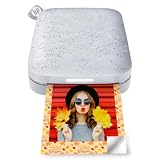
- Best Value: HP Sprocket Portable Photo Printer (2nd Edition) – Instantly print 2×3" sticky-backed photos from your phone – [Luna Pearl] [1AS85A]
- Premium Choice: Liene Pearl N200 Pro Portable Photo Printer, Instant Mini Picture Printer for iPhone Smartphone, Thermal Dye Sublimation, Bluetooth Sticker Printer 50 Sheets 2×3 Adhesive Paper & 5 Cartridges, Gold
The best portable smartphone printer depends on the print you want: Fujifilm Instax Link models suit fans of instant-film charm, Canon Ivy and Zoemini ink-free printers suit sticker-style snapshots, and dye-sublimation printers such as the HP Sprocket Studio Plus or the Canon Selphy Square line suit people who prioritise durable, higher-quality prints.
As an Amazon Associate we earn from qualifying purchases at no extra cost to you.


Three Print Technologies, Three Types of Buyer
Portable photo printers fall into three families, and each has clear strengths. Understanding them is more useful than comparing model names.
- Instant film (Fujifilm Instax Link): the phone sends the image to the printer, which exposes it onto Instax film that develops chemically. Prints have the classic instant-photo look with a white border. Film cost per print is higher and image quality is more retro than sharp.
- ZINK or ink-free thermal (Canon Ivy, Zoemini, HP Sprocket, Kodak Step): special paper contains colour crystals activated by heat, so no ink or ribbon is needed. Many models give sticky-back prints, and devices are very small. Colour range is usually softer than dye-sub.
- Dye-sublimation (HP Sprocket Studio Plus, Canon Selphy Square QX10 and QX20, Kodak Dock and Kodak Mini Shot with 4Pass): heat transfers dye from a ribbon and a clear overcoat protects the print. Results are generally sharper and more durable, but the cartridge and paper sets are bulkier.
At a Glance
| Model | Technology | Maker-stated print size | Best for |
|---|---|---|---|
| Fujifilm Instax Mini Link 3 | Instant film | Instax Mini format | Social prints, party use |
| Fujifilm Instax Link Wide | Instant film | Instax Wide format | Landscape shots, group photos |
| Fujifilm Instax Square Link | Instant film (hybrid digital) | Instax Square format | Square-crop fans |
| Canon Ivy 2 | ZINK, ink-free | 2 x 3 inches | Pocketable sticker prints |
| Canon Zoemini 2 / Zoemini S2 | ZINK, ink-free | 2 x 3 inches | Compact travel use |
| HP Sprocket Select | ZINK, ink-free | About 2.3 x 3.4 inches | Larger ink-free prints |
| HP Sprocket Studio Plus | Dye-sublimation | 4 x 6 inches | Quality prints from home or events |
| Canon Selphy Square QX20 | Dye-sublimation | Square prints, about 2.7 inches | Durable square prints |
| Kodak Mini 2 Retro | Dye-sub with 4Pass | About 2.1 x 3.4 inches | Compact quality-minded users |
Sizes and format names are those the makers list; models are sometimes sold with different names in different regions, so match the full model name on the box before buying.
What to Look At When Choosing
Print size and format
A 2 x 3 inch print fits a wallet or journal; a 4 x 6 inch print works for frames. Think about where the photos end up. If you plan to stick them in a scrapbook, sticky-back ink-free paper is convenient. If you want frames and gifts, a larger dye-sub format suits better.
Cost per print
This varies by technology and is usually the real long-term expense. Instant film and ZINK paper are priced per pack, while dye-sub sets bundle ribbon and paper. Compare cost per print rather than the printer price, and think about how many photos you will realistically make each month.
Print quality and durability
ZINK prints can look softer and can be more sensitive to heat and bending. Dye-sub prints include a protective layer and are generally considered more resistant to fingerprints and water, as makers describe. Instax prints have the classic analog look that many people want, with limits on sharpness.
App and connectivity
Most models connect by Bluetooth to a free app, which offers filters, borders, collage layouts and sometimes augmented reality. Larger printers add Wi-Fi. Confirm your phone’s operating system version is supported, and read recent reviews on the app, because the app experience can vary.
Battery and portability
Smaller printers have built-in rechargeable batteries rated for a certain number of prints per charge, as listed by the maker. Dye-sub models are bulkier and some need mains power. If you travel, check weight and whether the unit uses USB-C charging.
Pick X If You…
| You want… | Choose |
|---|---|
| Fun party prints with a retro feel | Fujifilm Instax Mini Link 3 |
| Wide group-shot prints | Fujifilm Instax Link Wide |
| Tiny, sticker-style prints without ink | Canon Ivy 2 or Zoemini 2 |
| Frame-ready 4 x 6 prints | HP Sprocket Studio Plus |
| Square prints with a durable coating | Canon Selphy Square QX20 |
| A retro design with 4Pass quality | Kodak Mini 2 Retro |
Budget, Mid-Range and Premium
Entry-level ink-free printers from Canon, HP and Kodak sit at the budget end and are enough for casual use. Instax Link models land in the mid-range, with film as a continuing cost. Premium buyers tend to choose dye-sub devices with larger prints, since the printer costs more but each print looks better and lasts longer.
Alternatives
- Compact home photo printer: a tabletop inkjet or the Canon Selphy CP series prints larger sizes, but is not truly pocketable.
- Instant camera: a Polaroid or Instax camera prints straight from the camera and skips the phone entirely.
- Print service: if you only want a handful of photos each year, an online or in-store print service may cost less overall than owning a device.
Common Mistakes
- Buying on printer price while ignoring the cost of refills.
- Expecting lab-quality prints from ink-free paper.
- Mixing paper types. Only use the paper or film the maker lists for your model.
- Not checking app compatibility with your phone.
- Printing low-resolution or heavily compressed images and blaming the printer.
Frequently Asked Questions
Do portable smartphone printers need ink?
ZINK models such as Canon Ivy and HP Sprocket Select use special paper and no ink. Dye-sub printers use a ribbon cartridge, and Instax devices use chemical film. Each type has its own consumable.
How long do ZINK prints last?
Makers describe them as durable for everyday use, but like most photos they should be kept away from heat and direct sunlight. Frame or store them in an album for the best results.
Which portable printer has the best photo quality?
Dye-sublimation models are generally considered the sharpest and most durable in this category, as reviewers often note. Instant film has its own look that many people like for different reasons.
Can I print from a computer as well as a phone?
Some models offer USB or Wi-Fi printing, while others only work with a phone app over Bluetooth. Look at the connectivity list in the maker’s specifications.
Are portable photo printers good for kids?
Many are simple to use and appeal to children, but supervise with batteries, charging and small parts. Read the maker’s safety guidance and age notes for the specific model.
How many prints do I get on one battery charge?
This varies by model and conditions. Makers list a number of prints per charge, and real results can differ with print type and battery age. Carry a USB-C cable if you plan a long session.







Write Your Review
No reviews yet. Be the first to share your experience!