
- Top Pick: VIZIO 50-inch Quantum Pro 4K 120Hz QLED HDR10+ Smart TV with Dolby Vision, Active Full Array, 240Hz @ 1080p PC Gaming, WiFi 6E, Apple AirPlay, Chromecast Built-in, M50QXM-K01, 2023 Model
- Best Value: VIZIO 43-inch Quantum 4K QLED HDR Smart TV w/Dolby Vision HDR, 120fps @1080p PC Gaming, WiFi 6, Bluetooth Headphone Capable, Apple AirPlay, Google Cast Built-in (VQD43M-0801, New)
- Premium Choice: Hisense 65" U6 Pro Series Mini‑LED ULED 4K UHD HDR Gaming AI Smart Fire TV (65U6SF Pro, 2026 New) – Hi-QLED, Native 144Hz, Motion Rate 480, Dolby Vision IQ · Atmos, HDR10+, Glare-Free, Alexa+
For gaming, pick the Vizio model that lists a native 120Hz panel, HDMI 2.1 with variable refresh rate and the V-Gaming Engine: the higher-end Quantum and MQX-class lines suit PS5 and Xbox Series X players, while the V-Series suits casual or budget-tier gaming, where a 60Hz panel is enough.
As an Amazon Associate we earn from qualifying purchases at no extra cost to you.


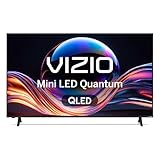
What matters for TV gaming
Four things shape a gaming TV: refresh rate, input lag, adaptive sync and HDMI bandwidth. Current consoles can output 4K at 120Hz, which needs a panel and an HDMI 2.1 port that accept it. Vizio markets its V-Gaming Engine as a set of features including auto low-latency mode, variable refresh rate and AMD FreeSync, and the company lists higher-end models as supporting 4K at 120Hz on some HDMI inputs. Because specifications differ by model year and size, read the specification page for the exact size you plan to buy.
At a glance
| Vizio line | Panel type | Gaming features (maker lists) | Best for | Limits |
|---|---|---|---|---|
| Quantum / MQX series | QLED with local dimming, higher-end | 120Hz panel on supported sizes, V-Gaming Engine, VRR, ALLM | PS5 and Xbox Series X owners who want 4K 120Hz | HDMI 2.1 may be on only some ports; read the port notes |
| Quantum Pro / premium QLED | Brighter QLED with more dimming zones | Higher peak brightness and gaming mode | Bright rooms and HDR games | Premium tier |
| OLED (Vizio OLED lines) | OLED | Fast response, VRR support listed on gaming-oriented models | Dark rooms and cinematic games | Retention care, lower peak brightness than top QLEDs |
| V-Series | Edge-lit LED, 60Hz | Basic gaming mode and FreeSync listed on some sizes | Budget tier, casual play, Switch | No 4K 120Hz, limited dimming |
| M-Series | Mid-range LED with dimming zones | Gaming features vary by model year | Mid-range balance | Check whether the panel is native 60Hz or 120Hz |
Vizio has shifted its model families across years and its lineup is part of Walmart since the acquisition, so line names and sizes may differ by model year. Treat this as a map of tiers, and confirm the exact model on the maker’s spec page.
Specs to confirm before buying
Native 120Hz versus “effective” refresh
Some TVs advertise an “effective refresh rate” that relies on motion interpolation. For gaming you want a native 120Hz panel, usually written in the specification as 120Hz, rather than a marketing-labelled number.
HDMI 2.1 ports
Not every port may support the full bandwidth. Look at the port list to see which inputs carry 4K at 120Hz and eARC, and plug the console into that port.
Variable refresh rate and ALLM
VRR smooths tearing when frame rates vary. Auto Low Latency Mode switches the TV to its low-latency picture setting when a console starts a game. Both are included in the V-Gaming Engine on many models, per Vizio, but confirm the details for your model and whether VRR works for your console.
Input lag
Independent outlets such as RTINGS publish measured input lag in game mode for many Vizio models. Look at those numbers for your size and compare them with other TVs, rather than relying on marketing statements.
HDR and brightness
Higher-end Vizio QLEDs list more dimming zones and higher peak brightness. Entry models support HDR formats but may lack the brightness to make them pop, so treat HDR labels carefully.
Smart platform
Vizio uses its SmartCast and, on newer sets, a Vizio operating system built around Walmart’s ecosystem. Streaming apps and cloud gaming services vary by platform, so confirm the apps you want.
Console and PC notes
| Device | What to look for on a Vizio |
|---|---|
| PS5 | An HDMI 2.1 port for 4K 120Hz, and ALLM. Enable game mode and review the console’s video output settings. |
| Xbox Series X | 4K 120Hz and VRR support, FreeSync listed on some models, and ALLM |
| Nintendo Switch | Any model works; a V-Series is enough because the console outputs up to 1080p on a TV |
| Gaming PC | A native 120Hz panel and HDMI 2.1; check whether the TV accepts 4K 120Hz with chroma 4:4:4 |
Budget tiers
| Tier | What to expect |
|---|---|
| Budget | V-Series: 60Hz, gaming mode, useful for casual play and Switch |
| Mid-range | Dimming zones, brighter picture, some 120Hz models |
| Premium | Quantum or OLED lines with 120Hz panels, VRR and higher brightness |
Pick this if you…
| You… | Choose |
|---|---|
| Own a PS5 or Xbox Series X and play 4K 120Hz | A Quantum or MQX-class model with a native 120Hz panel |
| Play in a dark room | A Vizio OLED model, if available in your size |
| Play in a bright living room | A Quantum Pro or similar high-brightness QLED |
| Only play Switch or older consoles | A V-Series model |
| Want a PC on a big screen | A model with HDMI 2.1 and a native 120Hz panel |
Alternatives to Vizio
- LG C-series OLED: reviewers often cite it for low input lag, 4K 120Hz on all HDMI 2.1 ports and wide VRR support.
- Samsung QLED and Neo QLED: strong gaming feature sets, with the Samsung Gaming Hub for cloud gaming.
- Hisense and TCL mini-LED TVs: competitive mid-range alternatives with 120Hz and VRR, with some lines going to 144Hz.
Common mistakes
- Buying a 4K TV that is only 60Hz and expecting 4K 120Hz from a console.
- Plugging a console into an HDMI port that does not carry full bandwidth.
- Forgetting to enable the TV’s game mode and the console’s matching options.
- Relying on an effective-refresh badge instead of the panel spec.
- Buying a size without checking that smaller sizes of the same line have fewer dimming zones.
Frequently Asked Questions
Are Vizio TVs good for PS5 and Xbox Series X?
Higher-end Vizio models that list a native 120Hz panel, HDMI 2.1 and VRR suit current consoles well. Lower tiers are fine for 60 frames per second play. Always read the spec page for your size.
Do Vizio TVs have low input lag?
Independent reviewers publish input lag measurements for many models in game mode. Many fall in the range considered responsive, but figures vary by model and setting, so look up the specific TV.
Does Vizio support FreeSync and G-Sync?
Vizio lists AMD FreeSync on many gaming-oriented models. Compatibility with NVIDIA G-Sync varies, so check the details for a PC setup.
Is OLED or QLED better for gaming?
OLED offers deep contrast and fast pixel response, while QLED offers higher brightness. Dark-room players may prefer OLED, and bright-room players may prefer QLED.
Which HDMI port should I use?
Use the port that the maker marks as supporting 4K 120Hz or HDMI 2.1, and connect the console directly rather than through an older receiver.
Can I use a Vizio as a PC monitor?
Yes, if it accepts the resolution and refresh rate you want. Sit further back than at a monitor, and make sure text looks sharp with the TV in its PC or game picture mode.





Write Your Review
No reviews yet. Be the first to share your experience!