
A large game library changes what matters in a desktop. When hundreds of titles compete for space, storage capacity comes first, loading speed comes second, and the processor and graphics card decide how well each of those games actually plays. A machine with a small drive forces constant deleting and reinstalling, while a roomy, fast drive keeps your whole collection a click away. The right build treats the library itself as the workload, not an afterthought.
This guide is for players with sprawling Steam, Epic and Battle.net libraries, collectors who revisit older titles, and anyone who hates waiting on downloads to replay a favourite. The four desktops below were chosen from the names and specifications shown on their Amazon product pages, with attention to storage size, drive speed, processor strength and room to expand. Use the buying criteria to match a machine to the size of the library you already own.
Quick Picks
As an Amazon Associate we earn from qualifying purchases
| Product | Best for | Key spec from title |
|---|---|---|
| Skytech Chronos 3 | A huge library with flagship graphics | Ryzen 7 7800X3D and 2TB Gen4 NVMe SSD |
| iBUYPOWER Y40 PRO | A big library in a showpiece case | Ryzen 7 7800X3D and 2TB NVMe SSD |
| CyberPowerPC Gamer Supreme | The newest processor for a growing library | Ryzen 7 9800X3D and 2TB PCIe 4.0 SSD |
| Skytech Azure 3 | Maximum graphics power with storage to add later | Ryzen 7 7800X3D and RTX 5080 16GB |
How to Choose
Storage Capacity Comes First
Modern games are large, and a library of dozens of titles can pass a terabyte without trying, so capacity is the first number to check. A 2TB solid-state drive holds a broad rotation of current games with room for updates and future installs, while a 1TB drive suits a smaller collection or a player who rotates titles often. Three of the four desktops in this guide ship with 2TB drives, and the fourth is the pick for players who plan to add a second drive themselves.
Drive Speed and Loading Times
Capacity alone is not enough: a fast drive also shortens loading screens, texture streaming and the time it takes to install a game in the first place. The Gen4 NVMe drives in this guide read data far faster than older SATA drives, which matters when you jump between several large games in one session. Check the drive type in the listing rather than the size alone, since a slow 2TB drive still makes a big library feel sluggish and unresponsive. That check takes a minute and saves hours of slow loading later.
Processor and Graphics Balance
A large library spans many genres, from strategy games that lean on the processor to shooters that lean on the graphics card, so a balanced build plays all of them well. The Ryzen 7 7800X3D and 9800X3D in this guide handle simulation and strategy logic with their large cache, while the RTX 5070, 5070 Ti and 5080 cards cover high settings at 1440p and beyond. Pairing a strong processor with a weak card, or the reverse, leaves part of your library underpowered and uneven for years.
Cooling, Ventilation and Safe Power Use
A desktop that serves a large library runs long sessions across many different games, so cooling and power delivery deserve attention. The Skytech listings in this guide name an 850W Gold ATX 3 power supply and a 360mm liquid CPU cooler, both built to sustain heavy loads without throttling. Keep the intake and exhaust vents clear, leave space around the case, set the tower on a hard flat surface, and use the supplied power cable. Shut the machine down before moving it or opening the side panel to add a drive.
The 4 Best Options
Skytech Chronos 3

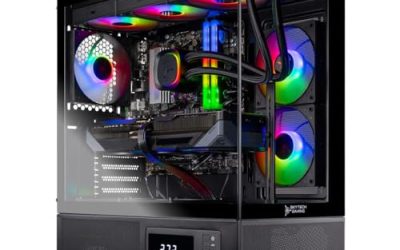
The Skytech Chronos 3 is the top pick for a large library because it pairs the biggest graphics card in this guide with a roomy 2TB drive. Its Ryzen 7 7800X3D processor keeps strategy and simulation titles smooth, while the RTX 5080 with 16GB of video memory handles demanding games at high settings and wide resolutions. With 32GB of DDR5 memory, a 2TB Gen4 NVMe drive and a 360mm liquid cooler, it is built to hold a large collection and play any part of it well.
Specs
- AMD Ryzen 7 7800X3D processor, 4.2 GHz with 5 GHz turbo
- NVIDIA GeForce RTX 5080 graphics card with 16GB
- X670 motherboard
- 2TB Gen4 NVMe M.2 SSD
- 32GB DDR5 RAM at 6000 MHz with RGB lighting
- 850W Gold ATX 3 power supply
- 360mm ARGB liquid CPU cooler
- Windows 11 Home, Wi-Fi
Best for: A large library played at high settings with a flagship graphics card.
Watch out for: Confirm the spare drive slots if you expect the library to outgrow 2TB over time.
ASIN: B0F165ZK4F — https://www.amazon.com/dp/B0F165ZK4F
iBUYPOWER Y40 PRO

The iBUYPOWER Y40 PRO suits players who want a big library in a case that looks good on display. Its Ryzen 7 7800X3D processor and RTX 5070 graphics card cover a wide range of genres at 1440p, and the 2TB NVMe drive holds a broad rotation without constant reinstalling. With 32GB of DDR5 memory, a tempered glass RGB case and a keyboard and mouse in the box, it arrives ready to host a long evening of jumping between favourite titles.
Specs
- AMD Ryzen 7 7800X3D processor
- NVIDIA GeForce RTX 5070 graphics card with 12GB
- 32GB DDR5 RGB memory at 5200 MHz
- 2TB NVMe SSD
- Tempered glass RGB gaming case
- WiFi ready, Windows 11 Home
- Keyboard and mouse included
Best for: A broad library in a showpiece case with a full set of accessories.
Watch out for: Check the case dimensions and desk space before ordering, since the Y40 PRO is a large tower.
ASIN: B0DYDFGJ8X — https://www.amazon.com/dp/B0DYDFGJ8X
CyberPowerPC Gamer Supreme

The CyberPowerPC Gamer Supreme is the pick for players whose library keeps growing and who want the newest processor in this guide. Its Ryzen 7 9800X3D chip carries the latest large-cache design, and the 2TB PCIe 4.0 drive gives a big collection room to expand without deleting older favourites. The RTX 5070 Ti with 16GB of video memory and 32GB of DDR5 memory keep demanding titles smooth, while the WiFi-ready build fits a desk away from the router.
Specs
- AMD Ryzen 7 9800X3D processor
- NVIDIA GeForce RTX 5070 Ti graphics card with 16GB
- 32GB DDR5 memory
- 2TB PCIe 4.0 SSD
- WiFi ready
- Windows 11 Home
Best for: A growing library on the newest processor in this guide with room to spare.
Watch out for: Confirm the spare drive slots and memory slots if you plan to expand the machine later.
ASIN: B0DXVDBW3F — https://www.amazon.com/dp/B0DXVDBW3F
Skytech Azure 3

The Skytech Azure 3 is the strongest graphics option here for players who prioritise visual quality and plan to add storage themselves. Its RTX 5080 with 16GB of video memory is the most capable card in this guide, and the Ryzen 7 7800X3D processor keeps simulation and strategy games smooth beside it. The 1TB drive holds a focused rotation, so this pick suits players who install a handful of favourites at a time and add a second drive when the library grows.
Specs
- AMD Ryzen 7 7800X3D processor, 4.2 GHz with 5 GHz turbo
- NVIDIA GeForce RTX 5080 graphics card with 16GB
- 32GB DDR5 RAM at 6000 MHz with RGB lighting
- 1TB NVMe M.2 SSD
- 850W Gold ATX 3 power supply
- 360mm ARGB liquid CPU cooler
- Windows 11 Home, Wi-Fi
Best for: Maximum graphics power for a focused rotation, with a second drive added later.
Watch out for: The 1TB drive fills fast in a large library, so budget for an extra drive from the start.
ASIN: B0F6MXR6D5 — https://www.amazon.com/dp/B0F6MXR6D5
Which One Fits Your Situation
Your Library Has Hundreds of Installed Games
Choose the Skytech Chronos 3. The 2TB Gen4 NVMe drive holds a large installed rotation, and the RTX 5080 with 16GB of video memory plays the most demanding titles in it at high settings. The 32GB of memory and liquid cooling also keep long sessions across many different games smooth, so you can jump from a shooter to a strategy title without closing everything down.
You Revisit Old Favourites Regularly
Choose the iBUYPOWER Y40 PRO. A 2TB drive keeps older titles installed alongside new releases, so a nostalgic evening never starts with a long download. The Ryzen 7 7800X3D and RTX 5070 handle a wide range of eras well, and the included keyboard and mouse mean the machine is ready the moment it arrives on your desk.
Your Library Grows Every Month
Choose the CyberPowerPC Gamer Supreme. The newest processor in this guide and the 2TB drive give a steadily expanding collection room to breathe, while the 16GB graphics card and 32GB of memory keep new releases playable at high settings. Check the spare slots before you buy so the next upgrade is a simple drive addition rather than a replacement.
You Play a Few Favourites at Maximum Quality
Choose the Skytech Azure 3. Its RTX 5080 delivers the best visuals in this guide for a focused rotation of games you play every week, and the 7800X3D keeps those sessions smooth. Plan a second drive early so the library can grow around the graphics power instead of being limited by the 1TB drive it ships with.
Common Mistakes
- Buying a 1TB drive for a library that already needs far more space than that.
- Judging a desktop by its graphics card while ignoring how much storage the library needs.
- Filling the drive completely and leaving no room for updates, saves and new installs.
- Deleting games to make room instead of adding a second drive when the slots allow it.
- Forgetting to back up save files before moving a library to a new machine.
Frequently Asked Questions
How much storage do I need for a large game library?
A 2TB drive is the starting point for a large library, since it holds a rotation of games with room for updates. A 1TB drive works for a smaller collection or for players who rotate titles, but it needs management. If your library exceeds 2TB, choose a desktop with a spare slot and add storage as it grows.
Is a 2TB SSD faster than a 1TB SSD?
Capacity and speed are separate qualities, so a 2TB drive is not automatically faster than a 1TB one. What matters is the drive type: the Gen4 NVMe drives in this guide load games and stream textures faster than older SATA drives. Check both the capacity and the drive type in the listing before you decide.
Can I add a second drive to these desktops?
Most mid-tower desktops in this guide have room for an extra drive, but the exact slots vary by model and motherboard. Check the product listing and the case layout for a spare M.2 slot or drive bay before you buy. Adding a second drive is usually the cheapest way to grow a library without replacing the machine.
Does a bigger library need a stronger processor?
Not directly, since storage holds the library and the processor runs the game you are playing right now. A large library still benefits from a strong processor because it spans many genres, and the Ryzen 7 7800X3D and 9800X3D in this guide cover strategy, simulation and action games alike. Balance the processor with the graphics card instead.




Write Your Review
No reviews yet. Be the first to share your experience!