
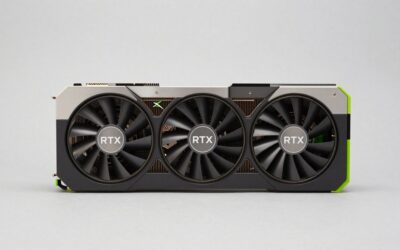
An enthusiast-class graphics card is a high-end model built for demanding resolutions, maximum graphics settings and features like ray tracing, with generous memory, high power draw and large coolers. In practice, the label usually points to the upper tiers of a product family, from the performance-focused cards just under the flagship up to the flagship itself.
No official industry standard defines the term, so it helps to understand what typically separates one tier from another. This guide breaks the lineup into entry, mainstream, performance, enthusiast and flagship tiers, explains the characteristics that move a card up the ladder, and shows how to decide which tier fits your monitor and workload. It uses qualitative descriptions rather than specific model numbers, because the lineup changes with each generation and the market moves quickly.
The Tiers at a Glance
Manufacturers do not publish tier names, but most product families follow a similar ladder. The table below describes the general pattern. Check the manufacturer’s current documentation for the actual models in any generation.
| Tier | Typical target | Memory class | Power and size |
|---|---|---|---|
| Entry | 1080p at moderate settings, esports and everyday use | Smaller frame buffer, often 8GB class | Low power, compact, sometimes no extra power connector |
| Mainstream | 1080p high settings, entry-level 1440p | 8GB to 12GB class | Moderate power, dual-slot designs |
| Performance | 1440p at high settings with ray tracing options | 12GB to 16GB class | Higher power, larger coolers |
| Enthusiast | High-refresh 1440p and 4K, strong ray tracing | 16GB class and up | Substantial power, thick triple-slot coolers common |
| Flagship | 4K at maximum settings, creative and AI workloads | The largest frame buffer in the family | Highest power, biggest coolers, strongest power supply needs |
Tier boundaries move over time. A card that was a flagship several generations ago may perform like a modern mainstream card today, so context matters more than the label.
What Pushes a Card Into the Enthusiast Tier
Several factors, working together, define a high-end card. None of them alone is enough to earn the label.
Resolution and refresh rate target
The clearest dividing line is the display the card is designed for. Enthusiast cards aim at high-refresh 1440p or 4K gaming, where the GPU must render millions of pixels many times per second. A card built for 1080p can often run these displays, but it will rely more on lower settings or upscaling.
Memory capacity and bandwidth
Higher tiers carry more video memory and faster memory interfaces. More capacity matters for high-resolution textures, heavy ray tracing and creative work, while wide, fast memory helps with data-heavy workloads. A common sign of the enthusiast tier is a frame buffer in the 16GB class or more.
Feature set
High-end cards typically run the full feature suite of the generation, including ray tracing hardware, AI upscaling and frame generation, and the latest video encoders. Lower tiers often have the same features but fewer compute units, so they apply them more slowly.
Cooling and build quality
Enthusiast cards are physically bigger. Large heatsinks, multiple fans, vapor chambers, reinforced backplates and metal brackets are typical. Premium partner models may add dual BIOS switches, extra power phases and factory overclocks.
Power, Size and System Requirements
Moving up the ladder increases demands on the rest of the PC. A flagship may draw several times the power of an entry card, and it needs a higher-capacity power supply, better case airflow and enough physical space.
- Power supply: the card maker publishes a suggested wattage for the whole system. Enthusiast tiers usually call for a unit well above the minimum needed by lower tiers, so check the manufacturer’s current documentation.
- Connectors: many high-end cards use a 16-pin high-power connector or several 8-pin plugs. Make sure your power supply supplies the right cables.
- Case fit: check the length, thickness in slots and clearance for the power plug before buying.
- Cooling and noise: a high-end card produces more heat, so front intake and rear or top exhaust fans matter.
- Processor balance: a very fast GPU paired with a slow CPU leaves performance unused, especially at lower resolutions.
Is the Enthusiast Tier Right for You?
The extra capability is only valuable if you use it. Consider your actual setup before stepping up.
Match the card to the monitor
A 1080p 60 Hz monitor rarely benefits from an enthusiast card, since the extra performance goes unused. A 4K or high-refresh 1440p monitor can make full use of it.
Match the card to the workload
Gamers who want ray tracing at high settings, creators who edit high-resolution video or render 3D scenes, and people running local AI models are the groups that gain most. Casual gaming and general use do not need this tier.
Think about the whole system
Budget the power supply, case and cooling together with the card. Needing a new supply or case to fit a card changes the total cost of the upgrade, and a performance-tier card can sometimes deliver nearly the experience you want with fewer changes.
Marketing Words Versus Real Capability
Product names can mislead. Terms such as “gaming,” “OC,” “extreme” and “elite” are branding by the partner company and do not indicate a tier. Two cards with the same name and different suffixes can sit in different positions in the lineup, so always read the actual specification: core count, memory size and type, memory bus width, board power and cooler size.
Another trap is assuming a higher number always means higher tier. Model numbers differ between generations, and a newer lower-tier card may match an older higher-tier one in some respects while lacking in others, such as memory capacity or bus width.
How Generations Reshape the Tiers
A tier is relative to its own generation. When a new family launches, the new mainstream card often matches or beats the previous generation’s performance tier, and the previous flagship slips down the ladder. This is why a used high-end card from a few years back can still serve as a capable enthusiast option, while a brand-new entry card may not match it in raw speed.
Features move down the ladder as well. Technologies that began as flagship-only, such as ray tracing hardware and AI upscaling, now appear across most of the lineup. What still separates tiers is how many compute units the card has to run those features, how much memory it carries, and how much power it can sustain.
For shoppers, the useful habit is to compare cards by capability rather than by name. Ask what resolution and refresh rate the card is designed for, how much video memory it has, whether it supports the features you want, and what the maker lists for board power and suggested power supply. Those answers place any card on the ladder, regardless of marketing language.
Sound levels and efficiency are also worth a look. Enthusiast cards often run quieter than their power draw suggests, because large coolers move a lot of air slowly. Some partner designs include a quiet BIOS mode, and many cards use fan-stop behavior at low load. Reading independent reviews of a specific model, beyond its specification, is the best way to learn how a particular cooler behaves.
Related guides
- What Does Manage Gpu Performance Counters Mean On Nvidia Hardware
- Low Profile Nvidia Graphics Cards For Small Form Factor Pcs
- Nvidia App Error Your System Configuration Is Not Supported
Frequently Asked Questions
What is an enthusiast-class graphics card?
It is a high-end card aimed at high-refresh 1440p and 4K gaming, strong ray tracing and demanding creative work. It usually has large memory, high power draw and a big cooler.
How is a flagship different from enthusiast class?
The flagship is the top card in a family, with the largest memory, the most compute units and the highest power draw. The enthusiast tier sits just beneath it and offers much of the capability with lower demands.
Do I need an enthusiast card for 1440p gaming?
Not always. A performance-tier card handles 1440p well at high settings, and an enthusiast card mainly helps with very high refresh rates, maximum ray tracing and future-proofing.
What else do I need to upgrade with a high-end card?
A suitable power supply, a case with room and airflow, and a processor that does not hold the card back. Check the card maker’s current documentation for the exact requirements.



Write Your Review
No reviews yet. Be the first to share your experience!