
- Top Pick: GIGABYTE GeForce RTX 5070 Gaming OC 12G Graphics Card, 12GB 192-bit GDDR7, PCIe 5.0, WINDFORCE Cooling System, GV-N5070GAMING OC-12GD Video Card
- Best Value: NVIDIA GeForce RTX 5080 Founders Edition
- Premium Choice: PNY NVIDIA GeForce RTX™ 5070 Epic-X RGB™ OC Triple-Fan Graphics Card | 12GB GDDR7, 192-bit, Boost Speed: 2685 MHz, SFF-Ready, PCIe® 5.0, 2.4-Slot, NVIDIA Blackwell Architecture, DLSS 4.5
NVIDIA build planning starts with one decision that shapes everything else: which GeForce GPU anchors your system, and how the rest of the parts support it. If you are putting together a PC around an NVIDIA graphics card, you want to match the GPU to your goals, avoid bottlenecks, and time your purchase well. This review-style guide walks through choosing the right card, balancing the supporting components, and deciding whether now is a smart moment to build.
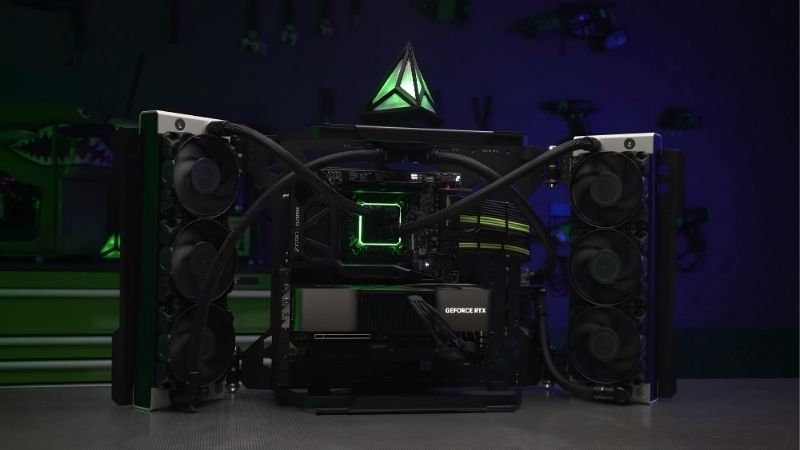
Planning an NVIDIA Build: Choosing the Right GPU
The GPU is the heart of any gaming or creative NVIDIA build, and it is where the majority of your budget and performance decision lives. Getting this choice right, matched to your resolution and goals, is what determines whether the rest of the build feels balanced or wasteful.
Matching the GPU to Your Resolution and Goals
The single most important factor in choosing a GPU is the resolution and refresh rate you actually play at. A 1080p high-refresh gamer has very different needs from a 4K enthusiast, and buying far more or far less card than your display demands is the most common budgeting mistake.
For 1080p and entry 1440p, a mainstream card like a 5060 Ti is a sensible anchor, while high-refresh 1440p is the home of the 5070 and 5070 Ti. Serious 4K gaming is where a 5080 earns its place. Matching the tier to your display keeps every dollar working rather than paying for frames you cannot see.
Your goals beyond gaming matter too. If you edit video, render 3D, or experiment with local AI, memory capacity becomes a priority, which can push you toward a higher-VRAM card even at a given performance tier.
A useful way to frame this is to start from the display and work backward. Decide the resolution and refresh rate you want to drive, then pick the lowest GPU tier that comfortably achieves it, and only then build the rest of the system around that card. Starting from the monitor rather than the GPU prevents the common trap of buying an expensive card that your display cannot show off, or a weak one that leaves your screen underfed.
NVIDIA GPU Tiers Explained
The current GeForce lineup spans a clear ladder. The 5060 Ti targets mainstream 1080p and 1440p, with a valuable 16 GB memory option; the 5070 and 5070 Ti serve high-refresh 1440p and capable 4K; and the 5080 is a genuine high-end 4K card.
Each step up the ladder brings more performance, and usually more memory and power draw, at a higher price. The right choice is the lowest tier that comfortably meets your resolution and workload, since paying for a higher tier only makes sense if you will actually use the extra capability.
Partner brands like Asus, Gigabyte, and PNY each offer these GPUs in different cooler and price configurations. The underlying silicon is set by NVIDIA, so those partner differences come down to cooling, aesthetics, factory overclocks, and price rather than a change in performance class.
VRAM, DLSS, and Future-Proofing
Memory capacity is one of the most important future-proofing decisions in a build. As game texture budgets grow, a larger buffer like 16 GB protects your card from being forced to lower settings sooner, which is why the memory configuration often matters as much as raw speed.
DLSS 4 with Multi Frame Generation is a major reason to build around a current NVIDIA card. This AI-powered feature can substantially boost frame rates in supported games, effectively stretching the performance of whatever tier you choose and extending the useful life of the build.
The forward-looking angle is real: NVIDIA keeps expanding its AI feature set through driver updates, so a card you buy today often gains performance in supported games later. Building around this ecosystem means your system can improve over time purely through software.
Balancing the Rest of Your NVIDIA Build
A powerful GPU held back by mismatched components is wasted money, so the rest of the build must support the card you chose. Balancing the CPU, memory, power, and cooling is what turns a good GPU into a good system.
CPU, RAM, and Avoiding Bottlenecks
The CPU must be capable enough to feed the GPU, or the graphics card will sit partially idle waiting for the processor, a situation known as a bottleneck. The goal is balance: pairing a mainstream GPU with a mainstream CPU, and a high-end GPU with a stronger one.
At higher resolutions the GPU does more of the work, which relaxes the CPU requirement somewhat, while at 1080p a fast CPU matters more for high frame rates. Matching the pair to your resolution avoids both overspending on a CPU you cannot use and starving a powerful GPU.
Memory should be sufficient and reasonably fast, with a sensible amount of system RAM to keep modern games and applications happy. This is rarely where you want to economize, since insufficient RAM can undermine an otherwise well-chosen build.
A simple sanity check helps here: your CPU, GPU, and memory should sit in roughly the same tier of quality. If one component is dramatically weaker than the others, it becomes the ceiling for the whole system, and you end up paying for capability you cannot access. Balance beats raw spec sheets, and a well-matched mid-range build often feels better than an unbalanced one with a single expensive part.
Power Supply and Case Requirements
The power supply must comfortably feed your chosen GPU with headroom for transient spikes. A mainstream card is happy with a modest unit, while a high-end card demands significantly more, so size the PSU to the GPU tier rather than guessing.
Quality matters as much as wattage. A reliable unit from a reputable maker protects your components and runs efficiently, and undersizing the PSU is a frequent, avoidable cause of instability, so this is not the place to cut corners.
The case must physically fit your GPU, which is where many builds run into trouble. Check the card’s length and thickness against your case’s maximum GPU clearance, and account for front radiators and drive cages that reduce usable space.
Cooling and Airflow for Your GPU
A GPU can only perform its best if it can shed heat, and that depends heavily on case airflow rather than the card alone. A case with good intake and exhaust keeps the GPU in a healthy thermal band, letting it hold boost clocks and stay quiet.
The most common cooling mistake is starving the GPU of fresh air in a poorly ventilated case. Adding an intake fan is often a bigger improvement than any card-level tweak, since ambient case temperature is the variable that most affects how any GPU cooler performs.
For higher-tier cards that draw more power, plan cooling accordingly with adequate airflow and space around the card. A well-ventilated case is one of the cheapest ways to protect the performance of an expensive GPU.
Is Now a Good Time for an NVIDIA Build?
Beyond choosing parts, timing is a fair question, especially given the 2026 market. Understanding the trade-offs and the pricing landscape helps you decide whether to build now or wait.
Pros and Cons of Building Around NVIDIA
The advantages of an NVIDIA build are concrete: the deepest AI feature set with DLSS 4, strong ray tracing, broad software and game support, and ongoing improvements through driver updates. For most gamers and creators, these strengths make GeForce a safe, capable foundation.
The trade-offs are worth acknowledging. NVIDIA cards can carry a price premium over some competitors at a given raw-performance level, and at certain tiers rivals offer more memory or rasterization for the money. Weighing those alternatives is part of a smart build decision.
The balanced verdict is that an NVIDIA build is an excellent default for buyers who value the feature ecosystem and future software gains, while budget-focused buyers should still compare competing options at their target tier before committing.
2026 Pricing and Component Costs
The market context matters for any build right now. Graphics card and component prices trended upward and have not fully released that pressure, though the steep climb of late 2025 eased into relative stability, even as analysts warn volatility is not over. Prices stabilized rather than fell.
Memory in particular has been a cost driver, which affects both the GPU and the system RAM in your build. New supply is opening up, with OEMs able to source memory from suppliers like CXMT and Micron building two fabs in Idaho, but those plants are not expected to run until 2027 to 2028, so meaningful relief is years away rather than imminent.
The practical read is that a build you need now is unlikely to get much cheaper soon. Waiting exposes you to volatility with little near-term upside, which nudges most builders toward assembling their system while pricing is stable.
Who Should Build Now and Who Should Wait
You should build now if your current system is genuinely holding you back, you have chosen a balanced set of parts, and you want to enjoy the performance and features today rather than gambling on a distant price drop. For most people with a real need, acting now is the sensible choice.
You can reasonably wait if your existing system still meets your needs and you have no pressing reason to upgrade. In that case you lose nothing by holding, but waiting purely in hope of cheaper hardware is a weak plan given how far off real relief is.
One more consideration favors building sooner for many people: a balanced system bought today starts paying you back immediately in better performance and new features, while a hypothetical future discount is uncertain and may be modest even if it arrives. If the parts you want are available at stable prices and your need is real, the value of using the system now usually outweighs the gamble of waiting, which is why most builders in this market are better off proceeding than holding out.
See More:
- NVIDIA GeForce Game Ready Driver
- NVIDIA CUDA Toolkit Archive
- Gigabyte GeForce RTX 5070 Windforce OC
- AMD Radeon RX 9070 XT vs NVIDIA GeForce RTX 5070
- PNY GeForce RTX 5070 Ti Triple Fan
Conclusion
A successful NVIDIA build starts with matching the right GeForce GPU to your resolution and goals, then balancing the CPU, memory, power supply, case, and cooling so nothing holds the card back. The GeForce ecosystem rewards you with DLSS 4, strong ray tracing, and ongoing software gains, making it a capable foundation for gaming and creative work alike. With 2026 pricing stable but unlikely to fall soon, timing an NVIDIA build for a genuine need rather than a distant discount is the practical move, so check current GPU and component options through the link below before you start.
Frequently Asked Questions
How do I choose the right GeForce card for my monitor?
Match the GPU to resolution and refresh rate. For 1080p high refresh, an RTX 5060 or 5060 Ti is sufficient. For 1440p at 144Hz, target an RTX 5070 or 5070 Ti. For 4K high refresh gaming, plan on an RTX 5080 or above. Buying beyond your display wastes money.
How much power supply do I actually need?
Follow NVIDIA’s system recommendation for your card and add headroom for the CPU. Roughly 550W suits a 5060, 650W a 5070, 750W a 5070 Ti, and 850W a 5080. Choose an ATX 3.1 unit with a native 12V-2×6 cable so you avoid adapters and handle transient spikes safely.
Will my CPU bottleneck the GPU?
It can, especially at 1080p where the CPU submits more draw calls per second. As a rule, pair mid-range GPUs with a current six or eight core CPU and high-end GPUs with a fast eight core part. At 4K the GPU does most of the work and CPU choice matters far less.
How much VRAM should I look for in 2026?
Treat 8GB as the 1080p floor, 12GB as comfortable for 1440p, and 16GB as the sensible minimum for 4K or for creative and local AI workloads. Capacity ages worse than shader performance, so when two cards cost the same, the one with more memory usually stays useful longer.
What is the most common mistake in a new build?
Not checking physical clearance. Modern triple-fan cards run 300 to 350mm long and three slots thick, and the power connector needs additional depth behind it. Verify case GPU length, radiator interference, and side panel clearance before ordering, and confirm CPU cooler height at the same time.
As an Amazon Associate we earn from qualifying purchases at no extra cost to you.












Write Your Review
No reviews yet. Be the first to share your experience!