
Nvidia Tesla P4 8GB is one of the internet’s favourite budget secrets, but it is widely misunderstood, so let us be clear from the start: this is not a gaming card. The Tesla P4 is a compact, low-power datacenter accelerator built for inference and video processing, now available cheaply on the used market and popular in home labs. It has no display outputs, relies on server-style airflow, and runs on the older Pascal architecture. This review explains exactly what the Nvidia Tesla P4 8GB is, what it genuinely excels at in 2026, and where its real limitations lie, so you know whether it fits your project.


Prime
Limited Time
PNY NVIDIA Tesla T4 Datacenter Card 16GB GDDR6 PCI Express 3.0 x16, Single Slot, Passive Cooling
What The Nvidia Tesla P4 8GB Actually Is
Before deciding whether the Tesla P4 is right for you, it is essential to understand what kind of card it really is, because it differs fundamentally from a normal graphics card. It was engineered for a completely different job than gaming, and that shapes everything about how it can be used. Here is what sits behind the name.
As an Amazon Associate we earn from qualifying purchases at no extra cost to you.




A Datacenter Card, Not A Gaming GPU
The Tesla P4 was designed for datacenters, where it handled AI inference and video transcoding at scale rather than rendering games on a monitor. This origin is the single most important fact about the card. Approaching it as a cheap gaming GPU leads only to disappointment.
Crucially, it has no display outputs at all, meaning you cannot plug a monitor into it directly. In a desktop, it works only as a headless accelerator alongside a display source, such as integrated graphics or another card. This alone rules it out for a conventional gaming build.
Understanding this purpose reframes the whole review. Judged as a gaming card it fails, but judged as the cheap inference and transcoding accelerator it actually is, it can be genuinely excellent value. Everything below follows from that distinction.
Specs And Design
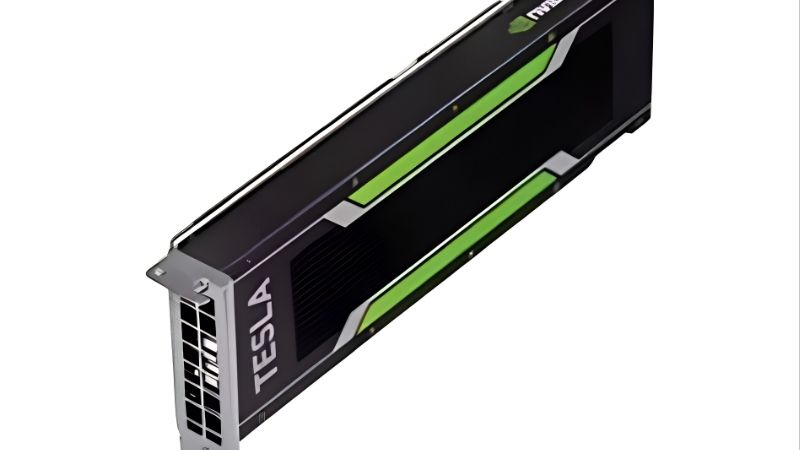
The Tesla P4 is built on Nvidia’s Pascal architecture with 8GB of GDDR5 memory, packaged in a compact, single-slot, low-profile form factor. It draws only around 75W entirely from the PCIe slot, needing no extra power connector. This efficiency and small size made it ideal for dense servers.
That server heritage brings a catch for home users: the card is passively cooled and relies on the strong, directed airflow of a server chassis. In a normal desktop without that airflow, it will overheat unless you add a dedicated cooling solution. This is a defining practical consideration.
Its 8GB of memory and modest power give it real capability for lightweight accelerated tasks, within the limits of its older architecture. The design is a study in efficiency for its intended environment, which is exactly why it needs care when repurposed elsewhere. Form follows its datacenter function.
What It Was Built For
The card’s original purpose was accelerating AI inference and high-density video transcoding in professional deployments. It was never meant to render frames for a gamer, but to process workloads efficiently at scale. That focus explains both its strengths and its unusual limitations.
Its dedicated video engine makes it capable at encoding and decoding streams, which is the foundation of its popularity in home media servers today. This is a genuine, practical strength that carries over well to the home lab. It is the card’s most compelling modern use.
For inference, the P4 supports efficient lower-precision computation that suits many machine-learning tasks, within its memory and generation limits. That capability is why hobbyists still pick it up for experimentation. Understanding its intended role is the key to using it wisely.
What It Is Good For In 2026
Repurposed thoughtfully, the Tesla P4 still offers real value years after release, provided you match it to the right task. This section covers the two jobs it does best in a home setting and weighs its overall strengths and weaknesses. These are where the card earns its keep today.
Media Transcoding For Home Servers
The Tesla P4’s standout modern use is hardware video transcoding in home media servers like Plex and Jellyfin. Its dedicated encoding engine offloads the heavy work of converting video streams from your processor, enabling smooth playback across devices. For media enthusiasts, this is its killer application.
Because it draws so little power and takes only a single slot, it slots neatly into compact home server builds. Owners value being able to add capable transcoding without a power-hungry, bulky card. That efficiency is a large part of its home-lab appeal.
Do note that as an older card, its video engine supports the formats of its era well but lacks the newest codec acceleration. For mainstream transcoding needs, though, it remains highly effective and superb value. It covers the common cases most home servers actually face.
In practice this means the card comfortably handles the day-to-day job of a home media server, offloading transcodes so your processor stays free for everything else. For the price of a used P4, that capability is difficult to beat, which is precisely why it has become such a well-known recommendation in home-lab and self-hosting communities.
Light AI Inference And Experimentation
For hobbyists exploring machine learning, the Tesla P4 offers an affordable way to accelerate light inference workloads. Its support for efficient lower-precision computation suits many smaller models and experiments. As a cheap entry point into accelerated AI, it has genuine appeal.
The 8GB of memory and older Pascal architecture do set real limits, however, particularly for large modern models that demand far more VRAM. It is best suited to smaller models and learning projects rather than cutting-edge work. Matching your ambitions to its capacity is essential.
For tinkerers who want to learn and run modest workloads without spending much, the P4 is a reasonable tool. Just approach it as an affordable experimentation platform rather than a serious modern AI accelerator. Set that expectation and it can be rewarding.
It is a useful stepping stone for learning the tooling and workflows of accelerated computing without a large outlay. Once you understand its ceiling, you can decide whether your projects have outgrown it and warrant a newer, higher-memory card, which is a far cheaper way to learn that lesson than buying an expensive accelerator first.
Pros And Cons Of The Tesla P4
Weighing the card’s genuine strengths against its real limitations gives a clear, honest picture for prospective buyers.
Pros: very low used prices, excellent power efficiency at around 75W, a compact single-slot design, capable video transcoding, and useful light-inference ability.
Cons: no display outputs, a need for added cooling in desktops, older Pascal architecture, limited 8GB GDDR5 memory, and a driver setup less straightforward than consumer cards.
Taken together, these lists confirm that the Tesla P4 is a specialist tool rather than an all-rounder. For transcoding and light inference in a home lab it is superb value, but for anything resembling gaming or heavy modern AI it is the wrong card entirely.
Limitations, Value, And Verdict
Before buying, it is vital to be clear-eyed about the Tesla P4’s practical hurdles, because they catch out many first-time buyers. This final section covers the real limitations, who the card suits, and a clear verdict. Understanding these points is what separates a happy owner from a frustrated one.
The Real Limitations To Plan For
The biggest hurdle is cooling, since the passively cooled card expects server airflow it will not find in a normal desktop. Most home users add a small 3D-printed shroud and fan to keep it safe, which is an essential extra step. Skipping it risks overheating the card.
The lack of any display output is the other defining limitation, meaning the card must work alongside a separate display source. You will need integrated graphics or another GPU to actually see your screen. This makes the P4 a companion accelerator, never a standalone solution.
Finally, driver setup can be less straightforward than with consumer cards, sometimes requiring datacenter drivers and a little configuration. This is manageable for enthusiasts but can frustrate newcomers. Factoring in this setup effort is part of buying the card wisely.
Who Should And Should Not Buy It
You should consider the Tesla P4 if you are building a home media server or want a cheap platform for light AI experimentation, and you are comfortable adding cooling and doing some setup. For that specific, technical audience, it is outstanding value. It rewards those who know what they are getting.
You should avoid it entirely if you want a gaming card, need display outputs, or expect a simple plug-and-play experience. For those needs, even a cheap modern consumer GPU is a far better choice. Matching the card to a suitable project is absolutely essential here.
See More:
- RTX 4060 vs RTX 5060
- M4 GPU benchmark
- RTX 5060 Ti benchmark
- 5060 Ti 16GB vs 9070 XT
- RTX 5050 vs RTX 5060
Final Verdict On The Tesla P4
The Nvidia Tesla P4 8GB is a superb-value specialist for the right home-lab task, excelling at media transcoding and light inference at a very low used price. For enthusiasts who understand its headless, server-oriented nature, it is a genuinely rewarding bargain.
For everyone else, though, its lack of display outputs, cooling demands, and aging architecture make it the wrong tool. Judge it by what it is, an efficient inference and transcoding accelerator, and it can be excellent, but only within that clearly defined role.
In short, the Nvidia Tesla P4 8GB is a niche bargain that shines at home-server transcoding and light AI inference, provided you accept its lack of display outputs and its need for added cooling. It is emphatically not a gaming card, so match it to the right project. If you actually need a display or gaming GPU instead, browse suitable modern graphics cards through the link below to find the right fit.
Frequently Asked Questions
Can I use a Tesla P4 as my main gaming graphics card?
Not directly. The Tesla P4 has no display outputs at all, so it cannot drive a monitor on its own. It is designed as a compute and transcoding accelerator that renders headlessly, and in a desktop you would still need an integrated GPU or a second card to output video, which makes it a poor choice for gaming.
How do I cool a passively cooled Tesla P4 in a normal PC case?
The P4 ships with a passive single-slot heatsink that expects the high static pressure airflow of a rackmount server chassis. In a tower case you must add a 3D printed shroud with a 40mm or 50mm blower fan, or a pair of 80mm fans ducted over the fins. Without forced air the card quickly hits its thermal limit and throttles hard.
Is 8GB of GDDR5 enough for local AI models?
Eight gigabytes fits small quantised language models around 7B parameters at 4-bit, plus Stable Diffusion 1.5 workloads. However the P4 uses the Pascal GP104 die, whose FP16 throughput is heavily reduced and which lacks tensor cores entirely. Modern frameworks expecting bf16 or FP8 will fall back to slow paths, so newer cards are far more efficient per watt.
What power connector and PSU does the Tesla P4 need?
None, which is one of its best traits. The card is rated at just 75 watts and draws everything through the PCIe x16 slot, so no auxiliary power cable is required. Almost any modern power supply of 400 watts or more can handle it, and it slots neatly into low power home servers and small form factor Plex or Jellyfin boxes.
Does the Tesla P4 still get driver updates in 2026?
It sits on NVIDIA data center Pascal branches rather than the consumer Game Ready line, and Pascal has moved into long term legacy status with security fixes rather than new features. Linux users generally have the smoothest experience through the data center driver packages, while Windows requires manually selecting the Tesla driver rather than a standard GeForce release.










Write Your Review
No reviews yet. Be the first to share your experience!