
Go to nvidia.com, click the account icon in the top-right corner, choose Sign Up, and register with an email address or an existing Google, Apple, or Discord login. Confirm the verification email, pick a display name, and the account is live in about two minutes. You do not need an NVIDIA account to download GeForce drivers.
- Do You Need an NVIDIA Account Just to Download Drivers?
- How to Create an NVIDIA Account: The Step-by-Step
- Email, Google, Apple, or Discord: Which Sign-In to Pick
- What an NVIDIA Account Actually Unlocks
- Turn On Two-Factor Authentication
- Age and Regional Requirements
- Troubleshooting Common Signup Problems
- Frequently Asked Questions
Do You Need an NVIDIA Account Just to Download Drivers?
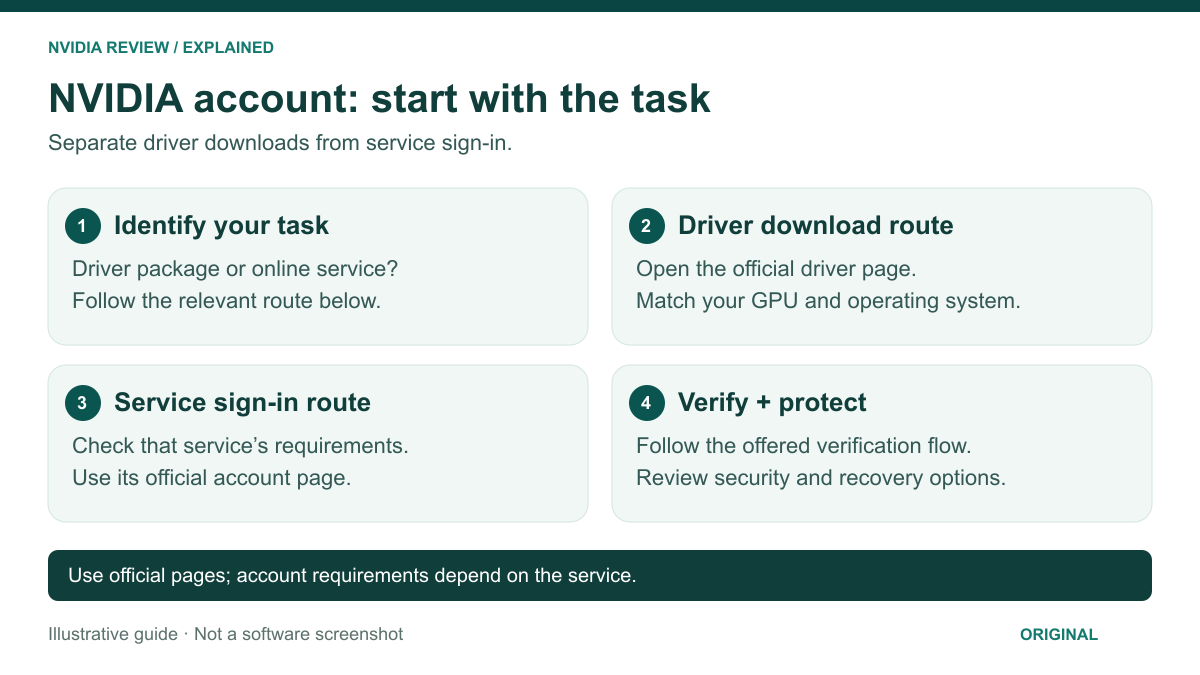
No. This is the most common misunderstanding, so clear it up first. Every GeForce Game Ready and Studio driver is a free, no-login download from NVIDIA’s driver page: pick your GPU, operating system, and driver branch, and the installer downloads immediately. No email, no password, no verification step.
Where the confusion comes from is the NVIDIA app, the desktop software that replaced GeForce Experience. The app installs and updates drivers perfectly well while signed out, but it puts a persistent “Log in” prompt in the corner and gates a few features behind an account. People see that prompt, assume drivers are locked, and go hunting for a signup page. They are not locked. If all you want is a clean driver update, skip the account entirely and use the manual download or the app’s Drivers tab.
An account becomes useful the moment you want anything beyond drivers: cloud gaming, rewards, Founders Edition eligibility, or syncing settings across two machines.
How to Create an NVIDIA Account: The Step-by-Step
- Open the signup page. Head to nvidia.com and click the person-shaped account icon at the top right, then Sign Up. You can also start from inside the NVIDIA app or from the GeForce NOW site. All three routes create the same single account — there is no separate “GeForce account” any more, despite what older forum posts say.
- Choose how you want to sign in. You can register with an email address and password, or use Google, Apple, or Discord as your identity provider. Pick deliberately: this choice is awkward to reverse later, and it determines how password resets and 2FA work for the life of the account.
- Fill in the details. Email, password, date of birth, country. Those last two are not decorative — they drive age-gating and which regional services, promotions, and store stock you see.
- Accept the terms and set marketing preferences. The terms are mandatory; the marketing checkbox is not. Declining it restricts nothing, but you will miss early notice on Founders Edition restocks.
- Verify your email. NVIDIA sends a confirmation link. Click it and the account is fully active. Until you do, some services will treat the account as provisional and refuse to let you redeem anything.
- Sign in to the NVIDIA app. Click Login and the app hands off to your browser to authorize. Once confirmed, the app picks up the session and rewards, giveaways, and settings sync switch on.
Email, Google, Apple, or Discord: Which Sign-In to Pick
The four options are functionally equivalent once you are logged in, but they behave differently when things go wrong. Here is the honest trade-off:
| Method | Best for | Password reset | Watch out for |
|---|---|---|---|
| Email + password | People who want NVIDIA isolated from other accounts | NVIDIA reset email | You manage the password yourself; use a manager |
| Fastest setup on Windows and Android | Handled by Google | Losing Google access locks you out of NVIDIA too | |
| Apple | Mac and iPhone users, privacy-focused | Handled by Apple | Hide My Email relays can complicate support tickets |
| Discord | Gamers already living in Discord | Handled by Discord | Discord bans or compromises cascade to your NVIDIA login |
If you are unsure, use email and password with a password manager. It is the only option that does not make a second company a single point of failure for your GPU account.
What an NVIDIA Account Actually Unlocks
Here is what you get, in rough order of how much people actually care:
- GeForce NOW. The cloud gaming service requires an account, full stop. Free, Performance, and Ultimate tiers all attach to it, along with your library links to Steam, Epic, Xbox, and Ubisoft. This is the number-one reason most people sign up, and it is worth weighing against a local desktop GPU.
- NVIDIA app extras. Signing in enables rewards redemption, settings sync between machines, and access to bundles. Core features — driver updates, the performance overlay, ShadowPlay-style capture, and per-game optimization — work signed out.
- Driver and download history. Your account records what you downloaded and when — handy when a new branch breaks something and you need the last known-good version for a clean rollback.
- Founders Edition eligibility. NVIDIA has repeatedly used account verification and age as anti-bot filters on limited FE stock. Creating an account on restock day is a losing strategy — make it now and let it age.
- Giveaways, bundles, and rewards. Game bundles shipped with new cards, Rewards drops, and community giveaways all redeem through the account, and unverified accounts are rejected at the redemption step.
Turn On Two-Factor Authentication
Do this immediately after signup. An NVIDIA account can hold bundle codes, a GeForce NOW subscription, and a payment method — it is a real target, not a throwaway forum login.
Open account settings on nvidia.com, find the security section, and enable two-step verification. NVIDIA supports authenticator codes (Google Authenticator, Authy, 1Password, any TOTP app) as well as email codes. Prefer the authenticator: email codes are only as strong as your inbox, and whoever has your email already has both factors. Save recovery codes offline. If you signed in with Google, Apple, or Discord, secure 2FA on that provider too.
Age and Regional Requirements
NVIDIA applies a minimum age based on your country — typically 13 in the United States and 16 in parts of the EU under GDPR rules. Enter a date of birth below the threshold and signup stops; the flow will not let you back up and change it, because the attempt is logged against the browser session.
Country matters too. GeForce NOW availability, membership pricing, store shipping, and bundles are all region-scoped, with some regions served by partner-operated data centers. Enter your real country of residence — using a VPN to pick a cheaper region is a reliable way to get a subscription cancelled and a refund refused.
Troubleshooting Common Signup Problems
The verification email never arrives
Wait five minutes, then check spam and the promotions tab. The usual culprits are a typo in the address, a corporate mail filter, or an Apple Hide My Email relay that has since been disabled. Use “resend verification” on the login page first; if two resends fail, register with a mainstream provider such as Gmail, Outlook, or iCloud, since custom-domain and disposable addresses get filtered most often.
“An account already exists with this email”
You almost certainly made one years ago through GeForce Experience, a driver download form, or a game bundle redemption. Do not create a second account on a different email — that fragments your bundle codes and purchase history. Use Forgot password instead. If the reset email also fails to arrive, the account may be tied to a Google or Apple login, so try the social sign-in button with that same address before contacting support.
The NVIDIA app login loop
You click Login, the browser says success, and the app still shows you as signed out. This is a session handoff failure, not a bad password. Fix it in this order: close the app fully from the system tray and reopen it; sign in using your default browser rather than a private window; temporarily disable a VPN or strict tracker-blocking extension, since the handoff uses a local callback that some privacy tools block; and confirm your system clock is correct, because token validation fails on a skewed clock. If it still loops, reinstall the app — a corrupted local session cache is the usual last cause, and none of your display or 3D settings are lost in a reinstall.
Frequently Asked Questions
Is an NVIDIA account free?
Yes, creating an NVIDIA account costs nothing and there is no paid tier for the account itself. You only pay if you subscribe to a GeForce NOW Performance or Ultimate membership, or buy hardware from the NVIDIA store. The free account still covers driver history, the NVIDIA app’s signed-in features, rewards redemption, giveaways, and the GeForce NOW free tier, which runs with session limits and queue times but no charge.
Can I change the email address on my NVIDIA account later?
You can update the email in your account settings, and NVIDIA will send a confirmation to the new address before the change takes effect. However, if you originally registered through Google, Apple, or Discord, the email is controlled by that provider and cannot be changed on NVIDIA’s side. In that case you would need to change it with the provider, or create a fresh account and contact support about migrating entitlements.
Do I need an NVIDIA account to use the NVIDIA app?
No. The NVIDIA app installs, checks for, and applies drivers without any login, and the performance overlay, game recording, and automatic game optimization all work signed out. Logging in adds rewards redemption, promotional bundles, and settings sync across multiple PCs. The persistent login prompt in the app’s corner is an invitation, not a requirement, and you can safely ignore it indefinitely.
Does having an NVIDIA account improve my chances of buying a Founders Edition card?
It is a prerequisite rather than an advantage. NVIDIA has used verified, non-new accounts as an anti-bot filter during limited Founders Edition drops, so an unverified account created minutes before a restock is more likely to be blocked at checkout. Create and verify the account well in advance, add a valid address, and check that marketing emails are enabled so you receive restock notifications.
What happens if I delete my NVIDIA account?
Deletion is permanent and takes your GeForce NOW library links, any active membership, unredeemed bundle codes, rewards, and download history with it. Cancel any paid membership first, since deleting the account does not automatically refund a billing period. Your GPU and drivers are unaffected — the hardware and the NVIDIA app keep working exactly as before, because neither depends on an account to function.

Write Your Review
No reviews yet. Be the first to share your experience!