
Most PC games are controlled with a keyboard, a mouse, or a gamepad, but a smaller and distinctive category of games uses a webcam as the controller. Instead of pressing a button to jump, dodge, or cast an action, the player moves in front of a camera, and the game reads that movement as input. For anyone searching for the best games that work with webcams, the important first step is understanding that this is not a single genre with a single ranked list. It is a control method that appears across party games, fitness titles, augmented reality experiences, horror games, streaming overlays, and experimental indie projects, each using the camera in a different way and with very different hardware demands.
- What Webcam Games Actually Are
- How Camera Control Works Under the Hood
- The Main Types of Webcam Game Experiences
- What You Need to Play Webcam Games on a PC
- Setting Up for Reliable Tracking
- Privacy, Safety, and Comfort Considerations
- How to Choose the Right Webcam Game for You
- Common Problems and Simple Fixes
- Webcams and Setup Gear for Camera-Controlled Games
- Frequently Asked Questions
- Conclusion
Because webcam support is rarely the headline feature of a game, it is also easy to misunderstand. Some games require a camera for every action, some use it only for a single mode, and others simply show the player on screen during a stream without letting the camera affect gameplay at all. This guide explains how webcam games actually work, what kinds of experiences exist, what equipment and room setup they need, and how to judge whether a camera-based game is worth your time. It focuses on general, verifiable principles rather than a fixed product list, because support changes with updates, platforms, and operating system permissions.
As an Amazon Associate, we earn from qualifying purchases.
What Webcam Games Actually Are
A webcam game is any game in which a live camera feed is used as part of the experience. That definition covers several quite different designs. In the simplest form, the game watches for movement in a defined area of the frame. When it detects motion in that area, it triggers an action, such as swatting a target, catching a falling object, or steering by leaning left or right. These games need no special depth sensor, because ordinary two-dimensional video is enough to detect that something moved and roughly where it moved.
A second form uses body or face tracking. The software estimates the position of the player’s head, hands, or upper body and maps those positions to an on-screen character or cursor. This is more demanding than simple motion detection, because the game must separate the player from the background and follow key points smoothly enough that the control feels responsive. Modern implementations often rely on machine learning models that run on the computer itself, which is one reason graphics hardware and processor performance can matter even in games that look visually simple.
A third form is augmented reality play, where the live camera image becomes the game world. Enemies, objects, or effects appear on top of the player’s room, and the player interacts by moving, reaching, or positioning objects in front of the lens. A fourth form is social rather than mechanical: the camera places the player’s face or room into the game for streaming, virtual avatars, or multiplayer video, while the actual controls remain a keyboard or gamepad. These video-presence games are often described as webcam games in store listings even though the camera does not steer the gameplay, so checking the description of how the camera is used is essential before buying or downloading anything.
How Camera Control Works Under the Hood
Understanding the technology helps explain both the appeal and the limitations of webcam games. A standard webcam delivers a stream of still frames many times per second. The game compares consecutive frames to find areas that changed, and that comparison is the basis of motion detection. If a region of the image changes quickly, the software treats it as movement. Early webcam games leaned heavily on this approach because it runs on modest hardware and works with almost any camera.
Face and body tracking add another layer. Instead of only asking what changed, the software looks for recognizable patterns, such as a face, a pair of eyes, or the outline of raised hands, and then tracks their position from frame to frame. When the tracking is stable, a game can let a player aim by turning the head, raise a shield by lifting both hands, or duck to avoid an obstacle. When the tracking is unstable, because of poor light, a cluttered background, or a camera positioned too far away, the same game can feel unresponsive or erratic. The difference between a good and a bad webcam game is often less about graphics and more about how forgiving the tracking is when conditions are imperfect.
Latency is the other hidden factor. Every step between movement and response takes time: capture, processing, game logic, and display. Small delays are tolerable in relaxed party games, but fast action needs the whole chain to be quick. That is why successful webcam games are designed around broad, clear gestures rather than precise, rapid inputs, working with the camera’s strengths instead of pretending it is a gamepad.
The Main Types of Webcam Game Experiences
Motion and party games are the most approachable category. They present short challenges in which players wave, jump, pose, or race through simple actions, often with several people taking turns in front of one camera. Because the controls are intuitive, they suit families and casual groups who may not know standard game controls. The trade-off is depth: sessions tend to be light and repetitive by design, which is a strength for a party and a weakness for someone looking for a long campaign.
Fitness and movement games use the camera to encourage physical activity. They may count repetitions, follow a routine, or score the player on range and timing of movement. A webcam is well suited to this role because it can watch the whole upper body without requiring the player to hold or wear anything. Accuracy varies widely, though, and these games should be treated as motivation and entertainment rather than as a precise measurement tool. Comfortable clothing, a clear floor area, and sensible pacing matter more than squeezing out a high score.
Augmented reality and experimental games are where webcam play is most inventive. Indie developers use ordinary cameras to build games that react to printed cards, household objects, drawings, or the player’s own room. These projects can be genuinely original, but they are also the most sensitive to setup. A game that expects a plain background or a specific object may behave unpredictably in a busy room. Reading the stated requirements carefully, including camera placement and lighting notes, prevents most disappointment.
Horror games sometimes use a camera differently, reading reactions or placing the player inside the scene to heighten tension, sometimes alongside microphone input. Players uncomfortable being watched should check these details in advance, because the camera may be central rather than optional. Streaming and avatar software, which maps facial expressions to a virtual character while the player plays something else, overlaps with gaming but is not itself a camera-controlled game.
What You Need to Play Webcam Games on a PC
The core requirement is a working webcam, either built into a laptop or connected as a separate USB device, that your operating system recognizes and that the game is permitted to access. Beyond that basic point, resolution is less important than consistency. A steady, clear image at a moderate resolution is usually more useful to a tracking system than a sharper image that drops frames or struggles in dim light. Frame rate stability, a clean lens, and a camera that holds its position all contribute more to reliable control than headline specifications alone.
Your computer also has to process the video while running the game. Simple motion-detection titles place little demand on the system, but body-tracking and augmented reality games run continuous image analysis alongside rendering, so a capable processor and modern graphics card help keep both tasks smooth. Closing other applications that use the camera avoids conflicts in which one program holds it and the other receives nothing.
Room setup is the third requirement, and the one players most often overlook. The camera needs to see the part of the body the game expects, usually the head and shoulders or the full upper body, with space to move without leaving the frame. A plain, contrasting background helps tracking separate the player from the room, and even, front-facing light beats a bright window behind the player, which can turn the player into an unreadable silhouette. Small adjustments to camera height, distance, and lighting usually improve a webcam game more than any in-game setting.
Setting Up for Reliable Tracking
A good setup routine takes only a few minutes. Start by placing the camera at roughly eye level for seated games, or higher and tilted down for standing games that need to see arm movements. Sit or stand where you intend to play and use the game’s calibration screen, if it provides one, or your camera app preview to confirm that your head, shoulders, and hands stay visible when you lean in each direction. If your hands leave the frame during a test gesture, move back or widen the camera’s view rather than compensating with bigger movements during play.
Next, fix the lighting. A lamp in front of you, slightly above eye level, gives the camera an evenly lit face and body to track. Avoid a dark room lit only by a bright monitor, since shifting screen brightness makes exposure change constantly. Then clear the play area: remove obstacles you could step on, and remember that anyone walking through the background can be detected as movement by simpler games.
Finally, grant permissions deliberately. Modern operating systems ask before an application can use the camera, and browsers do the same for web-based games. Allow access only for the game you intend to play, and close the game or revoke access when you are finished if that is your preference. Many webcams include a physical shutter or an indicator light; using the shutter when the camera is not in use is a simple, hardware-level habit that does not depend on any software behaving correctly.
Privacy, Safety, and Comfort Considerations
Because a webcam shows your room and anyone in it, privacy deserves the same attention as performance. Before playing, consider what is visible behind you: documents, photographs, house numbers through a window, or other people who did not agree to appear. Rearranging the camera angle or using a plain backdrop solves most of these issues. For games that record, stream, or share video, read the relevant settings before the first session rather than after, and check whether clips are stored locally, uploaded, or both.
Physical comfort matters as well. Camera games encourage standing, reaching, and repeated gestures, but sessions should still include breaks. Keep the play area free of cables and furniture edges, and stop if a game demands movements that strain your neck, shoulders, or back. Players with limited mobility should look for games supporting seated play and head or hand tracking rather than full-body movement.
Children require extra care. An adult should review any camera-based game before a child plays it, confirm what the camera is used for, check whether it connects to the internet or includes chat, and stay within earshot during play.
How to Choose the Right Webcam Game for You
Start with the control style, not the theme. Decide whether you want full camera control, a game that mixes camera input with a keyboard or gamepad, or a game where the camera is mainly for presence and streaming. The store description and the game’s settings menu usually make this clear; if a game lists a webcam as recommended rather than required, the camera is probably optional or limited to one mode. Matching the control style to your expectations prevents the most common disappointment, which is buying a conventional game and finding the camera adds little, or buying a motion game and finding it demands more space and energy than you wanted.
Then check the practical requirements. Look for stated needs such as a specific operating system, a minimum camera capability, a standing play area, or an internet connection for browser-based play. Consider who will play with you: single-player tracking games, turn-based party games, and online social games deliver very different evenings from the same hardware. Reading recent player discussions can reveal whether tracking is forgiving or finicky, but treat individual complaints and praise as signals rather than proof, since camera experiences depend heavily on each player’s room and equipment.
Value is the last filter. Many webcam experiences are short, inexpensive, or bundled with other modes, which can be entirely fair for a party game played a few times a year. Free browser-based motion games are a sensible way to test whether you enjoy camera control before spending anything, provided you are comfortable granting the site camera access and you close the tab when finished.
Common Problems and Simple Fixes
If a game does not detect your camera at all, confirm that no other application is using it, check the operating system’s privacy settings for that program, and reconnect a USB camera before relaunching the game. If the game detects the camera but tracking is jittery, improve front lighting, move closer, simplify the background, and clean the lens. If inputs trigger when nobody is playing, look for moving objects in the frame, such as a fan, a pet, or a television in the background, and reduce the game’s sensitivity if it offers that option.
Performance problems usually come from running too much at once. Lowering graphical settings, closing unused capture software, and letting tracking run at the recommended resolution can restore smoothness. Persistent problems across several games point back to the camera or the room rather than to any single title, so fix the shared cause first.
Webcams and Setup Gear for Camera-Controlled Games
Camera games depend on a clear, well-lit image. A decent webcam, a stable mount and some extra light make tracking more reliable than a built-in laptop camera in a dim room.
Logitech C920x HD Pro Webcam

A widely used 1080p webcam with a built-in stereo microphone. It gives motion-tracking games a sharp, steady image and works with most PC software.
EMEET C960 1080P Webcam with Microphone

A lower-cost 1080p webcam with two built-in mics and a wide field of view. A good starter option for casual camera games and video calls.
InnoGear Webcam Stand Arm
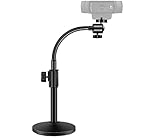
A desk mount that lets you position the camera at chest or head height and angle it toward the play space. A stable position matters for consistent tracking.
AceTaken Webcam Floor Tripod Stand

A tall floor tripod that places the camera further back so your whole body fits in frame. Useful for full-body movement games.
Cyezcor Clip-On Ring Light

A small clip-on light that evens out lighting on your face and body. Better lighting often improves tracking more than a more expensive camera.
Frequently Asked Questions
Do I need a special camera to play webcam games?
No special gaming camera is generally required. Most webcam games are designed for ordinary built-in laptop cameras or standard USB webcams, because developers want the widest possible audience. What matters most is a stable image, adequate front lighting, and a camera position that keeps your head, shoulders, and hands in frame. A camera with a wider field of view can help in a small room, and a model that performs well in low light can make evening sessions easier, but tracking quality depends as much on your setup and the game’s software as on the camera itself.
Can webcam games work without an internet connection?
Many installed PC webcam games work entirely offline, because the camera processing happens on your own computer. Browser-based games are the main exception: they need a connection to load, although the video itself is typically processed locally in the browser rather than sent to a server. Multiplayer and streaming features need a connection by definition. If staying offline matters to you, check whether the specific game requires an account or a connection before downloading it, and remember that the absence of a connection does not remove the need to manage camera permissions on your own machine.
Are webcam games accurate enough for fast, competitive play?
Generally, no, and they are not usually designed to be. Camera input involves capture, processing, and display delays, and it lacks the tactile precision of a mouse or gamepad, so serious competitive games rarely rely on it as the primary control method. Webcam games shine in genres built around broad gestures, timing, posing, fitness, and social play, where a small delay does not ruin the experience. Some hybrid games use the camera for expressive or secondary actions while keeping precise controls on a standard device, which is often the best balance for players who want both accuracy and novelty.
How can I protect my privacy while playing games that use a camera?
Use a camera with a physical shutter or cover it when you are not playing, grant camera permission only to games you trust and only while you play them, and review each game’s settings for recording, streaming, or sharing features before your first session. Position the camera so it shows as little of your room as practical, remove sensitive items from the background, and check your operating system’s privacy panel periodically to see which applications have camera access. For children, an adult should review the game first, disable chat or sharing features where possible, and supervise play.
Conclusion
Webcam games are best understood as a family of experiences united by one idea: the camera is part of how you play. The strongest examples work with the camera’s strengths, using clear gestures, forgiving tracking, and game designs that reward movement and expression rather than split-second precision. The weakest examples bolt camera support onto a conventional design and leave players fighting lighting, framing, and delay.
With the right expectations, ordinary hardware is enough. Give the camera a clear, well-lit view of you, leave space to move safely, manage permissions with care, and choose games whose control style matches the session you want, whether a lively party, a light workout, or an inventive augmented reality experiment. Start with a simple or free motion game to learn what your room and camera can do, and you will quickly know whether deeper webcam experiences deserve a place in your PC library.







Write Your Review
No reviews yet. Be the first to share your experience!