
- Top Pick: ASRock Radeon RX 9060 XT Challenger 16GB OC, RDNA 4, 3290MHz Boost, 16GB GDDR6 128-bit, PCIe 5.0, Dual Fans, 0dB Silent, LED Indicator, DisplayPort 2.1a, HDMI 2.1b
- Best Value: GIGABYTE Radeon RX 9070 XT Gaming OC 16G Graphics Card, PCIe 5.0, 16GB GDDR6, GV-R9070XTGAMING OC-16GD Video Card
- Premium Choice: GIGABYTE GeForce RTX 5080 Gaming OC 16G Graphics Card, WINDFORCE Cooling System, 16GB 256-bit GDDR7, GV-N5080GAMING OC-16GD Video Card
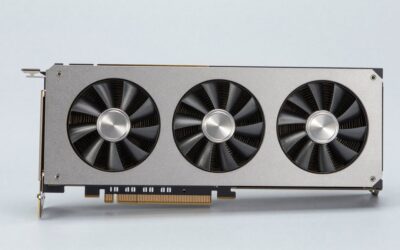
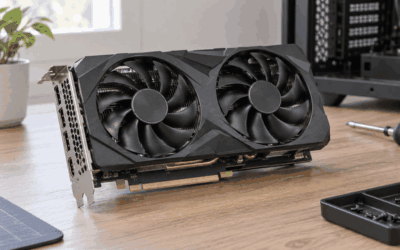
The 1440p gaming graphics card sits in the sweet spot of modern PC gaming, delivering a huge jump in visual clarity over 1080p without demanding the brute-force horsepower a 4K rig requires. In 2026 the field is more competitive than ever, with NVIDIA and AMD both fielding cards that push high refresh rates at maximum settings. This roundup breaks down the best 1440p gaming graphics card options so you can match your monitor, your budget, and your favorite games.
As an Amazon Associate I earn from qualifying purchases.
As an Amazon Associate we earn from qualifying purchases at no extra cost to you.






Choosing the right GPU for 1440p means balancing raw rasterization performance, ray tracing capability, upscaling support, and VRAM headroom. Below you will find five standout cards, followed by detailed guidance on what actually matters at this resolution. If you are still weighing resolutions, our take on the 4K gaming graphics card tier is worth a look before you commit.
Top Picks for the Best 1440p Gaming Graphics Card
| Product | Best For | Standout Feature | Rating |
|---|---|---|---|
| NVIDIA GeForce RTX 5070 Ti | High refresh 1440p | DLSS 4 with multi-frame generation | 4.9/5 |
| AMD Radeon RX 9070 XT | Best value rasterization | 16GB VRAM at a fair price | 4.8/5 |
| NVIDIA GeForce RTX 5070 | Balanced mainstream builds | Efficient power draw | 4.7/5 |
| AMD Radeon RX 9070 | Competitive esports 1440p | Strong price-to-frame ratio | 4.6/5 |
| NVIDIA GeForce RTX 5060 Ti 16GB | Budget-conscious 1440p | Generous VRAM buffer | 4.5/5 |
Why 1440p Is the Smart Resolution Choice
1440p, also called QHD, packs roughly 78 percent more pixels than 1080p while remaining far more forgiving than 4K. That translates to sharper textures, cleaner edges, and more on-screen detail without the frame-rate penalty that pushes 4K builds toward the very top of the GPU stack. For most players a strong 1440p gaming graphics card paired with a 144Hz or 165Hz monitor delivers the ideal blend of fidelity and smoothness. If you want to understand raw horsepower tiers, see our guide to the most powerful GPU for gaming.
NVIDIA Versus AMD at 1440p
NVIDIA continues to lead in ray tracing and upscaling, with DLSS 4 and its frame-generation pipeline offering enormous performance uplifts in supported titles. AMD counters with excellent raw rasterization and typically more VRAM per dollar, making the Radeon lineup compelling for players who prioritize native performance over ray-traced reflections. Both approaches are valid, and your choice should hinge on the games you play. Fans of the red team can dig deeper into our Radeon GPU breakdown.
VRAM and Future-Proofing Your 1440p Card
Modern titles are increasingly hungry for video memory, and 1440p with high-resolution texture packs can push past 12GB in demanding scenarios. For this reason we favor cards with at least 12GB, and ideally 16GB, to avoid stutter and texture pop-in as games grow more ambitious. A card that feels comfortable today should still hold up two or three years from now, which is why VRAM matters as much as core count. Console-focused shoppers comparing PC parity can reference our Xbox Series X GPU comparison.
Upscaling and Frame Generation Explained
Upscaling technologies like DLSS and FSR render your game at a lower internal resolution and intelligently reconstruct the image to your target resolution, recovering frames while preserving detail. Frame generation goes a step further by synthesizing entirely new frames between rendered ones. At 1440p these features are transformative, often turning a borderline experience into a buttery-smooth one. Just remember that image quality varies by implementation, so test settings per game.
Matching Your GPU to Your Monitor and CPU
A powerful 1440p gaming graphics card can be bottlenecked by a weak processor or wasted on a 60Hz panel. Aim for a modern six or eight-core CPU and a high-refresh QHD monitor with adaptive sync to unlock your card’s full potential. Cable standards matter too, so confirm your display supports DisplayPort 2.1 or HDMI 2.1 for the highest refresh rates. Anyone experimenting with tuning should read whether they should overclock their GPU before pushing clocks.
Power Supply and Case Considerations
Mid-to-high 1440p cards typically draw between 220 and 320 watts, so a quality 750W power supply is a safe baseline, with 850W recommended for the top-tier models. Verify physical clearance in your case as well, since many modern cards are triple-slot and quite long. If space is tight, our roundup of the best low profile video card options covers compact alternatives that still handle 1440p in lighter titles.
Frequently Asked Questions
Is a 1440p gaming graphics card worth it over 1080p?
Absolutely. 1440p offers a substantial upgrade in image sharpness and on-screen detail compared to 1080p, and modern mid-range cards handle it comfortably at high frame rates. The visual improvement is immediately noticeable, and pairing it with a high-refresh monitor gives you both clarity and smoothness in nearly every genre.
How much VRAM do I need for 1440p gaming in 2026?
We recommend a minimum of 12GB of VRAM for comfortable 1440p gaming, with 16GB being the safer choice for future-proofing. Newer titles with high-resolution texture packs and ray tracing can exceed 12GB, and running short on video memory causes stutter and texture loading issues that ruin the experience.
Do I need ray tracing for 1440p gaming?
Ray tracing is not strictly necessary, but it dramatically improves lighting, reflections, and shadows in supported games. If you value cutting-edge visuals, an NVIDIA card with strong ray tracing and DLSS is ideal. If you prioritize raw frame rates and value, AMD’s rasterization-focused cards remain excellent choices for 1440p.
What refresh rate monitor pairs best with these cards?
A 144Hz or 165Hz 1440p monitor is the ideal companion for these graphics cards. It lets you take full advantage of the high frame rates these GPUs produce while keeping motion smooth and responsive. Look for a panel with adaptive sync support such as G-Sync or FreeSync to eliminate screen tearing.






Write Your Review
No reviews yet. Be the first to share your experience!