
- Top Pick: NVIDIA Shield Remote; Voice Search, Motion-Activated, Backlit Buttons, Customizable Menu Buttons, and IR Blaster to Control Your TV (930-13700-2500-100)
- Best Value: Voice Replacement Remote Control for NVIDIA Shield TV and NVIDIA Shield TV Pro Streaming Media Player 2015/2017/2019 All Models
- Premium Choice: P3700 New Voice Replacement Remote Control Compatible with NVIDIA Shield TV & Shield TV Pro Streaming Media Player, All 2015/2017/2019 Models


The nvidia shield tv remote is widely considered one of the best streaming remotes ever made, and for owners who have lost or damaged theirs, it is often a must-buy replacement. With motion-activated backlit buttons, a built-in lost-remote locator, an IR blaster, and voice control, it packs features most rivals never bothered with. But its distinctive shape and AAA batteries divide opinion. This review covers exactly what the Shield TV remote does, what owners think, and whether it is worth buying on its own in 2026.
What the NVIDIA Shield TV Remote Offers
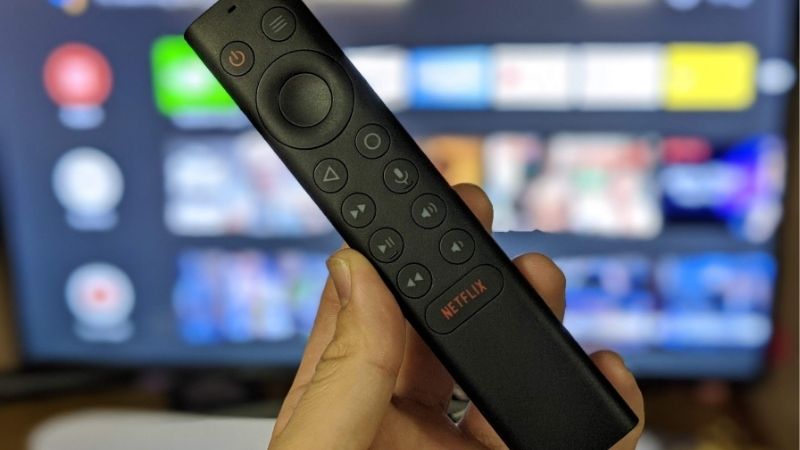
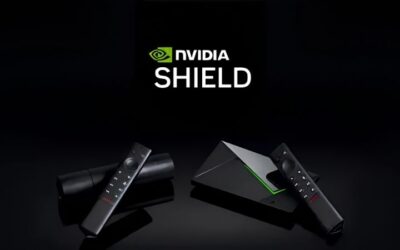
The Shield TV remote is the controller bundled with the 2019 Shield TV and Shield TV Pro, and it can also be purchased separately as a replacement. Its triangular, Toblerone-like shape and feature set set it apart from the flat plastic remotes that ship with most streaming boxes. Owners regularly describe it as feeling premium and thoughtfully designed, which is why it earns near-universal praise despite a few quirks.
As an Amazon Associate we earn from qualifying purchases at no extra cost to you.



The Distinctive Design and Feel
The remote’s most obvious trait is its shape. The angular, wedge-like body is designed to sit comfortably in the hand, and owners note it feels balanced, neither too light nor too heavy, with every button within easy thumb reach.
That shape serves a clever practical purpose: the wide front and angled back keep the remote sitting on top of cushions rather than slipping between them. Owners repeatedly point out that it is genuinely hard to lose, a small design win that pays off daily.
The build feels solid and premium overall, in keeping with the Shield’s positioning. It is a remote that signals quality the moment you pick it up, rather than the afterthought controllers common on cheaper devices. In a category where most bundled remotes feel disposable, the Shield remote stands out as something owners actually enjoy holding, which is a rare compliment for an accessory of this kind.
Motion-Activated Backlit Buttons
The standout feature is the backlighting. The buttons illuminate automatically when you pick the remote up, thanks to a motion sensor, and switch off when it sits still, making it effortless to use in a dark room without fumbling.
The layout is clean and intuitive, and it includes a user-customizable button that you can program to launch an app or trigger an action of your choice. This small touch adds real convenience for whatever you use most.
Together, the motion-activated backlight and sensible layout make the remote a pleasure to use during evening viewing. It is the kind of feature that seems minor on paper but proves genuinely useful every single night. Anyone who has hunted for the right button on an unlit remote in a dark living room will appreciate how much friction the motion-activated backlight quietly removes from everyday viewing.
IR Blaster, Voice and Lost-Remote Locator
The remote is more capable than its size suggests. A built-in IR blaster lets it control the power and volume of your TV, soundbar, or receiver, so you can often set aside your other remotes entirely and use the Shield remote as your main controller.
Voice control works through a built-in microphone, handling search and commands quickly and accurately, and it pairs with Google Assistant. Bluetooth connectivity keeps the link reliable without needing line of sight for the main functions.
The headline convenience is the lost-remote locator. If you misplace it, you can trigger it to sound from the NVIDIA Shield app so you can find it by ear, a feature that turns the usual couch-cushion hunt into a quick, painless task. It is a small feature with an outsized impact on daily frustration, and it is one of the first things owners mention when explaining why they rate this remote so highly.
Using the NVIDIA Shield TV Remote
Features only matter in daily use, so here is how the remote performs in practice, what owners consistently praise and criticize, and the practical details of compatibility and battery life that shape ownership.
What Owners Praise
Owners love the combination of backlighting and the lost-remote locator, calling them the features they did not know they needed until they had them. The two together solve the most common streaming-remote frustrations directly.
The IR blaster wins praise for consolidating control, letting owners handle TV power and volume without juggling extra remotes. Many describe the overall experience as feeling like a premium, well-thought-out accessory rather than a throwaway.
The ergonomic shape and hard-to-lose design round out the positives. For a lot of owners, the Shield remote is simply the nicest streaming remote they have used, and a big part of why they enjoy the Shield experience. In owner reviews the remote is frequently singled out as a highlight of the whole package, sometimes praised even more than the streaming box it controls.
What Owners Criticize
The remote is not universally loved. Its triangular shape is divisive: some find it comfortable and clever, while others dislike the unconventional feel or wish for a more traditional layout, so it comes down to personal preference.
Battery choice draws mild criticism too. The remote uses replaceable AAA batteries rather than a rechargeable cell, which some owners see as dated, though others prefer the convenience of never docking it and simply swapping batteries every several months.
A few owners mention minor gripes like button placement or a slight rattle, but these are small complaints against an otherwise well-liked design. None rise to the level of a serious flaw for most users. Taken together, the criticisms are the kind of minor preferences that come down to taste rather than defects, which is why the remote’s overall reputation remains so positive.
Compatibility and Battery Life
On compatibility, the remote is designed for the 2019 Shield TV and Shield TV Pro, and buying it as a standalone replacement is the main reason to purchase it separately. Owners replacing a lost or broken remote should confirm it matches their Shield model.
Battery life is a practical strength. On regular AAA batteries the remote runs for months on a charge, with owners reporting up to around six months of use before a swap, so it rarely interrupts your viewing.
Setup is straightforward: it pairs quickly over Bluetooth, and the IR control for your TV takes only a short extra step to configure. For a replacement, it slots back into your setup with minimal fuss. That easy setup matters for a replacement purchase, since the whole point is to get your Shield back to full functionality quickly rather than wrestling with a complicated re-pairing process.
Is the NVIDIA Shield TV Remote Worth It? Pros and Cons
With its features and real-world use covered, the verdict depends on why you are buying it. This section lays out the honest pros and cons, identifies who actually needs it, and gives a final recommendation.
Shield TV Remote Pros and Cons
The pros are strong for a streaming remote: motion-activated backlit buttons, a lost-remote locator, an IR blaster for TV and audio control, voice search, a customizable button, an ergonomic hard-to-lose shape, and long battery life.
The cons are modest: a divisive triangular shape, AAA batteries instead of a rechargeable cell, and a price premium over a basic replacement remote. These are preference and value points rather than functional failings.
Net assessment: as the controller for a Shield TV, it is one of the best in the business, and as a replacement it restores the full Shield experience. The only real question is whether you prefer its shape and battery approach.
Who Needs It and Alternatives
The clearest buyer is a Shield TV owner who has lost or damaged their remote and wants to restore full functionality, including the IR blaster and locator that generic remotes lack. For them, the official remote is the natural choice.
For those who simply want a spare or a different feel, third-party Shield-compatible remotes exist at lower prices, though they typically drop features like the backlight or locator. A basic Bluetooth remote works but loses the polish.
Owners who mainly control the Shield through a phone app or Google Assistant may not need a replacement at all. But for full, convenient control, the official remote remains the most complete option. Weigh how you actually control your Shield day to day: if you rely on the physical remote rather than a phone or voice, the official one is the only choice that restores every feature.
Final Recommendation
If you own a Shield TV and need a replacement, the official remote is worth it for the backlight, locator, and IR control alone, features that make daily use noticeably better. It restores the experience the Shield was designed to deliver.
If you are simply curious whether it is a nice remote, the answer is yes, provided its shape and AAA batteries suit you. It is a genuinely premium accessory rather than a basic clicker.
For a Shield owner weighing a replacement, this remote is an easy recommendation. Use the link to check the current price on the NVIDIA Shield TV remote and get your setup back to full convenience.
See more:
- amd driver auto-detect tool
- nvidia geforce rtx 5080 best buy
- TechPowerUp GPU-Z
- nvidia china
- nvidia etf price
Conclusion
The nvidia shield tv remote lives up to its strong reputation, combining motion-activated backlit buttons, a lost-remote locator, an IR blaster, and voice control in an ergonomic, hard-to-lose design that outclasses most streaming remotes. Its triangular shape and AAA batteries divide opinion, but the feature set and long battery life make it a standout, especially as a replacement that restores the full Shield experience. If you need one, use the link above to check the current price and get your Shield TV back to complete, convenient control today.
Frequently Asked Questions
What batteries does the NVIDIA Shield TV remote use?
The 2019 Shield TV remote uses two CR2032 coin cells, replaceable through a panel on the back. Earlier 2015 and 2017 remotes used a rechargeable internal battery charged over micro USB. Typical life on the current remote is several months to a year depending on how often the backlight and voice search are triggered.
Does the remote have a lost remote finder?
Yes. The 2019 remote includes a built-in locator that plays a tone when triggered from the Shield TV app on your phone or by pressing the button on the Shield device itself. It also has motion-activated backlit buttons, which is one of the more practical upgrades over the older flat remotes.
Can the Shield remote control my TV volume and power?
Yes, through HDMI-CEC and an infrared emitter. During setup you select your TV brand and the remote learns the correct IR codes, so it can power the TV on and off and control volume on a TV, soundbar or AV receiver. There are also two programmable buttons for custom actions.
Is the remote compatible with older Shield TV models?
The 2019 remote pairs with the 2015 and 2017 Shield TV units over Bluetooth and works for basic navigation and voice, though some functions such as the remote locator depend on newer hardware and firmware. NVIDIA sells it separately, which makes it a common replacement for owners of older boxes with failing remotes.
Is it worth buying the remote on its own?
If your original remote has a dead internal battery, which is a common failure on the 2017 model, the replaceable coin cells alone justify it. The backlighting, locator and IR TV control are genuine improvements. If your existing remote works fine and you mainly use a phone app or a universal remote, the upgrade is optional.


Write Your Review
No reviews yet. Be the first to share your experience!