
Fast Fourier Transform analysis turns a waveform display into a frequency picture, and that changes how you debug a circuit. Instead of guessing why a signal looks noisy, an FFT view shows which frequencies are present, whether a clock is leaking into an audio path, or whether a power supply is humming at a specific harmonic. The choice is not only about bandwidth: the software behind the scope decides how usable its FFT tools really are, and the hardware decides which signals you can capture in the first place.

This guide is for electronics hobbyists tracing noise in audio and radio circuits, students learning signal analysis on a laptop, and engineers who need a portable scope for field work. Each oscilloscope below was chosen from the specifications on its Amazon listing, with bandwidth, sample rate, channel count, and the FFT features of its bundled software weighed against real debugging work.
Quick Picks
As an Amazon Associate we earn from qualifying purchases
| Product | Best for | Key spec from title |
|---|---|---|
| Hantek 6022BE | A first USB scope for learning FFT on a budget | 2 channels with 20MHz bandwidth and 48MSa/s sample rate |
| OWON VDS1022I | Isolated measurements on USB-powered circuits | 2 channels with 25MHz bandwidth, 100MS/s, and USB isolation |
| Digilent Analog Discovery 3 | A full portable lab with spectrum analysis | 2 analog plus 16 digital channels, 14-bit, 125MS/s, USB-C |
| PicoScope 2204A | Clean FFT views with polished software | 2 channels with 10MHz bandwidth and 100MS/s sample rate |
How to Choose
Bandwidth and Sample Rate for the Signals You Measure
Bandwidth sets the fastest signal a scope can display accurately, and sample rate decides how finely it captures that signal. For audio work and low-speed microcontroller circuits, 10 to 20MHz is usually enough, while radio and fast digital work calls for more. Pick a scope whose bandwidth is several times higher than the fastest frequency you need to see, because a scope near its limit will round off edges and hide detail. Check the sample rate as well: the scopes in this guide range from 48MSa/s to 125MS/s, and a higher rate captures sharper edges and shorter glitches in the waveform before FFT analysis begins.
FFT Software: Windows, Resolution, and Ease of Use
An FFT is only as helpful as the software that draws it. Look for a bundled program that lets you choose the FFT window function, adjust the frequency span, and read peaks with markers or cursors. The PicoScope 7 software and Digilent WaveForms both include spectrum analyzer views with these controls, while the Hantek and OWON programs include FFT math functions for their captured waveforms. Try to learn whether the software runs on your operating system before buying, since some USB scopes are Windows-only while others support Mac and Linux too. A scope with strong hardware and awkward FFT software will slow down every debugging session.
Channels, Probes, and What Comes in the Box
Two analog channels cover most debugging work, letting you compare an input against an output or watch a clock alongside a data line. If you also work with digital buses, the Digilent Analog Discovery 3 adds 16 digital channels, which turns the same box into a logic analyzer. Check what probes ship with the scope, since the Hantek 6022BE and PicoScope 2204A include probes in the box while other models may need a BNC adapter for full bandwidth. Confirm the probe attenuation settings too, because a 10x probe and a 1x probe report very different voltages for the same signal.
Safe Probing: ESD Care, Isolation, and Input Limits
Test gear rewards careful handling, and the safety notes start with the listing. The OWON VDS1022I listing highlights USB isolation, which separates the scope from the computer and reduces the risk of ground loops when measuring USB-powered circuits. Before probing, check the input limits in the listing and the manual, and never connect a USB scope to mains voltage or signals above its rated range. Discharge static from your hands before handling boards, keep probes away from live power rails you do not intend to measure, and unplug the circuit under test before moving probes. These habits protect the scope, the computer, and the circuit in equal measure.
The 4 Best Options
Hantek 6022BE
The 6022BE is the classic entry point into USB oscilloscopes, and it fits hobbyists who want to learn FFT analysis without spending much. Its two channels, 20MHz bandwidth, and 48MSa/s sample rate cover audio circuits, microcontroller signals, and basic power supply checks, while the bundled PC software includes FFT math for examining the frequency content of a captured waveform. The aluminium case is small enough to carry in a laptop bag, and the scope draws its power from the USB connection itself.
Specs
- Channels: 2 analog channels
- Bandwidth: 20MHz
- Sample rate: 48MSa/s real-time
- Connection: USB-powered PC-based oscilloscope
- Included: 2 probes and USB cable
Best for: Hobbyists learning FFT analysis on a tight budget.
Watch out for: Check that the bundled software supports your operating system and that its FFT tools match the analysis you plan to do.
OWON VDS1022I
The VDS1022I stands out in this guide for its USB isolation, which matters when you measure circuits that share a ground with your laptop. Its two channels, 25MHz bandwidth, and 100MS/s sample rate handle a step up from the Hantek in both speed and capture detail, and the bundled software includes FFT analysis for tracking down noise and harmonics. The isolated USB connection helps avoid ground loops that can distort measurements on USB-powered devices, making this a practical choice for embedded and power electronics work.
Specs
- Channels: 2 analog channels
- Bandwidth: 25MHz
- Sample rate: 100MS/s
- Connection: USB with isolation
- Software: Includes FFT analysis
Best for: Measuring USB-powered circuits where ground isolation improves accuracy.
Watch out for: Confirm the input voltage limits in the listing before probing any circuit near the top of its range.
Digilent Analog Discovery 3
The Analog Discovery 3 is far more than a scope: it is a portable lab that combines a two-channel oscilloscope with a waveform generator, a logic analyzer, and programmable power supplies in one USB-C box. Its 14-bit resolution and 125MS/s sample rate capture fine signal detail, while the WaveForms software includes a spectrum analyzer view for FFT work alongside the scope, voltmeter, and data logger. The 16 digital channels let you watch a serial bus and an analog signal at the same time, which is invaluable when a digital fault shows up as analog noise.
Specs
- Analog channels: 2 differential channels, 14-bit resolution
- Digital channels: 16
- Sample rate: 125MS/s per channel
- Bandwidth: 30+ MHz with BNC adapter
- Connection: USB Type-C
- Instruments: Oscilloscope, waveform generator, logic analyzer, programmable power supplies
- Software: WaveForms with spectrum analyzer
Best for: Engineers and students who want a full portable lab with FFT and logic analysis.
Watch out for: Full bandwidth needs the BNC adapter, so check whether your configuration includes it or needs it added.
PicoScope 2204A
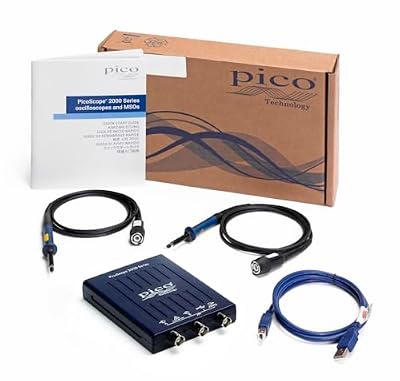
The PicoScope 2204A earns its place through software quality: PicoScope 7 gives clean FFT and spectrum views with markers, measurement tools, and a built-in waveform generator, all in a program that runs on Windows, Mac, and Linux. The hardware offers two channels, 10MHz bandwidth, and a 100MS/s sample rate in a pocket-sized case, with two probes included in the kit. For audio work, power supply ripple checks, and teaching, its combination of reliable software and straightforward hardware is hard to beat.
Specs
- Channels: 2 analog channels
- Bandwidth: 10MHz
- Sample rate: 100MS/s
- Capture memory: 8kS
- Connection: USB 2.0, compatible with USB 3.0 and 3.1
- Software: PicoScope 7 with spectrum analysis
- Included: 2 probes, USB cable, quick start guide
- Extra: Built-in waveform generator
Best for: Clean FFT and spectrum analysis with polished cross-platform software.
Watch out for: The 10MHz bandwidth suits audio and low-speed work, so confirm it covers the fastest signals you plan to measure.
Which One Fits Your Situation
You Are Learning Electronics and FFT for the First Time
Pick the Hantek 6022BE. It is the most affordable way to see real waveforms and FFT plots on your own laptop, and its two channels cover the audio and microcontroller circuits that beginners work with most. The small aluminium case travels easily in a laptop bag, and the USB-powered design means one cable handles both power and data.
You Debug USB-Powered Boards and Worry About Ground Loops
Pick the OWON VDS1022I. Its USB isolation separates the scope from the computer, and the 100MS/s sample rate captures more detail than the budget option when you chase noise in a power supply or a data line. The bundled software includes FFT analysis for tracking noise and harmonics, which helps when a power supply or data line misbehaves.
You Need One Tool for Analog, Digital, and Power Work
Pick the Digilent Analog Discovery 3. The combination of a 14-bit scope, 16 digital channels, a waveform generator, and power supplies replaces several separate instruments, and its spectrum analyzer handles FFT work alongside everything else. Its 14-bit resolution captures fine signal detail, and the spectrum analyzer handles FFT work alongside the scope, voltmeter, and data logger.
You Want the Smoothest FFT Software Experience
Pick the PicoScope 2204A. PicoScope 7 offers the clearest spectrum views and measurement tools in this guide, and its cross-platform support means the same workflow follows you between Windows, Mac, and Linux machines. Its pocket-sized case carries easily, two probes come in the box, and the built-in waveform generator adds a useful extra when you need to feed a test signal into a circuit.
Common Mistakes
- Buying a scope by bandwidth alone and ignoring whether its FFT software is easy to use.
- Probing signals above the rated input limits, which can damage the scope and the computer.
- Forgetting to check whether the bundled software runs on your operating system.
- Using a 1x probe setting while the software expects 10x, which makes every voltage reading wrong.
- Choosing the cheapest scope for fast digital work that actually needs higher bandwidth and sample rate.
Frequently Asked Questions
What does FFT analysis show that a normal waveform does not?
A normal waveform shows voltage against time, while an FFT shows which frequencies make up that signal. That view reveals harmonics, interference, and noise sources that look like a messy trace in the time domain. If a power supply hums or a clock leaks into an audio path, the FFT view shows the offending frequency as a clear peak.
How much bandwidth do I need for FFT work?
It depends on the signals you measure. Audio and microcontroller work is comfortable at 10 to 25MHz, while faster digital signals need more headroom. A practical rule is to choose a scope with several times the bandwidth of the fastest frequency you want to analyze, since the FFT can only show what the hardware captures cleanly.
Can a USB oscilloscope replace a benchtop scope?
For portable work, learning, and field debugging, a USB scope is often the better tool because it travels with a laptop and uses its screen. Benchtop scopes still lead for very high bandwidth, deep memory, and heavy daily lab use. Many engineers keep both: a USB scope for the field and a benchtop scope for the bench.
Do I need special probes for FFT measurements?
Standard passive probes work for most FFT measurements, as long as the probe attenuation matches the software setting. A 10x probe suits most general work and protects the input from larger signals, while a 1x probe helps with small signals. Check the probe rating before measuring anything near the top of the scope’s input range.



Write Your Review
No reviews yet. Be the first to share your experience!