
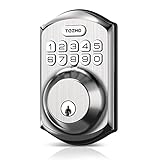
- Top Pick: TEEHO TE001 Keyless Entry Deadbolt with Keypad for Front Door, Satin Nickel | ANSI Grade 3 Security, 20 User Codes, Low Battery Alert, IP54 Waterproof, One Touch Lock, Anti-Peep Password & 2 Backup Keys
- Best Value: TEEHO TE004 Keyless Entry Door Lock Handle with Keypad, Satin Nickel | 20 User Codes, ANSI Grade 3 Security, One Time Code Access, Auto Lock, Durable Zinc Alloy Handle for Front Door, Bedroom
- Premium Choice: TEEHO TE001 Keyless Entry Deadbolt with Keypad for Front Door, Matte Black | ANSI Grade 3 Security, 20 User Codes, Low Battery Alert, IP54 Waterproof, One Touch Lock, Anti-Peep Password & 2 Backup Keys
For most households, the Schlage Arrive or the simpler Schlage BE365 is the safest pick for a code-based door lock, the Yale Assure Lock 2 suits Apple Home users, and the Wyze Lock Bolt v2 or TEEHO TE001 cover tight budgets. A “combination” lock in 2026 usually means a keypad deadbolt where you punch in a PIN instead of using a key, and the real choices are about build grade, smart features and how much you want to rely on batteries.
Gamers often ask about these because a streaming room, a shared house or a home office with expensive hardware benefits from controlled entry. Locks are a security product, so this guide leans on what makers state and what reviewers such as Bob Vila report, and avoids any claim that a particular lock is unbreakable.
As an Amazon Associate we earn from qualifying purchases at no extra cost to you.


At a Glance: Keypad and Combination Locks Reviewers Mention
| Model | Best for | Key stated features | Limits |
|---|---|---|---|
| Schlage Arrive | Most homes wanting smart features without a hub | Push-button keypad, built-in Wi-Fi, room for around 250 codes, backlit keypad | No fingerprint option; battery life reported as slightly shorter than some rivals |
| Schlage BE365 | Simple, non-Wi-Fi keypad deadbolt | Keypad deadbolt with a long track record in the Schlage range | Fewer remote features |
| Schlage Encode Plus | Premium Apple Home Key users | Grade 1 build, Apple Home Key, touch keypad, no subscription reported | Higher tier cost |
| Yale Assure Lock 2 | Apple Home and modular smart setups | Keyed and key-free versions, Matter support on some models | Check which variant has which radio |
| Kwikset Aura Reach | Matter over Thread homes | Keypad deadbolt, Matter over Thread, around 250 codes, SmartKey rekeying | Needs a Thread border router for full use |
| Wyze Lock Bolt v2 | Budget smart lock | Keypad, fingerprint reader and Wi-Fi | Lower tier build and fewer integrations |
| TEEHO TE001 | Basic stand-alone keypad | Around 20 user codes, auto-lock, two-year warranty stated | Not a smart lock |
| ULTRALOQ U-Bolt Pro WiFi | Fingerprint plus remote control | Fingerprint reader, Wi-Fi | Reviewers frame it as a smart upgrade, so more features to configure |
| Lockly Secure Pro | Fingerprint-first shoppers | Grade 1 deadbolt with fingerprint access | Higher tier cost |
Specifications above come from reviewer summaries including Bob Vila, SmartHomeMatrix and smart.homes. Model variants differ, so read the maker’s page for the exact version before buying.
What “Combination Lock” Really Means Here
Search results for the phrase mix two things. One is a smart or electronic keypad deadbolt. The other is a purely mechanical push-button lock, where a set of buttons are pressed in a programmed combination without any batteries. Mechanical versions are simple and reliable in cold, but they usually offer fewer user codes and no activity log. Electronic keypads add multiple codes, auto-lock and sometimes remote access.
How to Choose
Grade rating
Residential locks in North America carry ANSI/BHMA grades, where Grade 1 is the highest. Makers and reviewers note, for example, that the Schlage Encode Plus and Lockly Secure Pro are listed as Grade 1 units. A higher grade generally indicates tougher testing for strength and durability, though a good door, frame and strike plate matter just as much as the lock itself.
Wi-Fi, Thread or no radio
Built-in Wi-Fi, as on the Schlage Arrive, avoids buying a hub but can use more battery. Thread and Matter, as on the Kwikset Aura Reach, fit smart homes already using those standards. A lock with no radio, such as a basic keypad, has the smallest attack surface and the least setup.
Code capacity and guest access
If you have roommates, cleaners or LAN-party guests, count how many codes you need. Entry-level models list around 20; others list about 250. Temporary or scheduled codes are handy, so check whether the lock supports them without a paid plan.
Power and backup
Most electronic locks run on batteries and give low-battery warnings. Look for a physical key backup or an external terminal for emergency power, and keep spare batteries. Key-free designs are cleaner but leave you reliant on power or the app.
Door fit
Measure door thickness, the bore hole diameter and backset, and confirm the lock matches. Most North American deadbolts fit standard doors, but older or unusual doors may need adapters. If you rent, ask the landlord before swapping hardware.
Budget Tiers
- Budget: TEEHO TE001 for simple keypad use and Wyze Lock Bolt v2 for a keypad plus fingerprint and Wi-Fi.
- Mid-range: Schlage Arrive, Schlage BE365, Yale Assure Lock 2 and Kwikset Aura Reach.
- Premium: Schlage Encode Plus, Lockly Secure Pro and ULTRALOQ models aimed at fingerprint and ecosystem features.
Pick This If…
| Your need | Pick | Reason |
|---|---|---|
| Best all-rounder with app and keypad | Schlage Arrive | Bob Vila picked it as best with keypad; no hub required |
| Simplest dependable keypad | Schlage BE365 | Fewer features, fewer things to go wrong |
| Apple Home Key and premium build | Schlage Encode Plus | Grade 1 and Home Key support reported |
| Apple Home or Matter flexibility | Yale Assure Lock 2 | Matter on some variants |
| Thread network at home | Kwikset Aura Reach | Matter over Thread and SmartKey rekeying |
| Lowest cost with smart extras | Wyze Lock Bolt v2 | Keypad, fingerprint and Wi-Fi in one lock |
| Fingerprint first | ULTRALOQ U-Bolt Pro WiFi or Lockly Secure Pro | Fingerprint reader as the headline feature |
Alternatives
If you do not want a deadbolt replaced, retrofit smart locks fit over your existing deadbolt’s inside thumb-turn and leave the outside as is. A keypad lever lock suits interior doors such as a home office. A mechanical push-button lock suits sheds and garages where power is unreliable. For rentals, a lockbox with a combination dial holds a key for guests without changing the door hardware.
Common Mistakes
- Choosing an obvious code like a birth year or 1234. Use a random code and change it when someone moves out.
- Ignoring the door and frame. A lock cannot make up for a weak strike plate; reinforcing screws should reach into the stud.
- Skipping battery changes. Replace batteries when warned, not after the lock stops responding.
- Buying a lock without checking handing, backset and door prep.
- Leaving a spare key under the mat. Give a trusted neighbour a key or a code instead.
For installation involving drilling or door modification, follow the maker’s manual, and consult a licensed locksmith if the door is damaged or you are unsure. Locks should not be relied on as the only protection for high-value equipment.
Frequently Asked Questions
Is a keypad lock secure enough for my front door?
A good keypad deadbolt from a recognised maker, installed on a solid door with a reinforced strike plate, is a mainstream choice. Look for ANSI/BHMA grade ratings stated by the maker and avoid unrated bargain units on exterior doors. No lock is impossible to defeat, so layer your protection.
What happens when the batteries die?
Most electronic locks warn you in advance. Many also have a backup key cylinder or terminals for a temporary power source. Check the manual for how your model handles this and keep fresh batteries on hand.
Do I need Wi-Fi on a door lock?
No. Wi-Fi allows remote locking and notifications but adds battery use and an online dependency. A keypad-only lock is simpler. Matter-capable models can link to your smart home without proprietary hubs.
How many codes do I need?
Plan one per regular user plus a few for guests or services. Basic locks list roughly 20 codes, while others list about 250. Choose based on how many people truly need entry.
Can I install one myself?
Many people do with a screwdriver, following the maker’s guide, as most replace a standard deadbolt. If your door needs drilling or the frame is damaged, a locksmith or carpenter is a safer choice.
Will it work in cold or wet weather?
Makers list operating temperature and weather ratings in the manual. Cold reduces battery life, and exposed keypads should carry an outdoor rating stated by the maker. If you live in a harsh climate, check that rating before purchase.


Write Your Review
No reviews yet. Be the first to share your experience!