
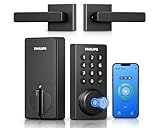
- Top Pick: Philips WiFi Keypad Deadbolt with Handle, Built-in WiFi, APP Remote Control | Smart Locks for Front Door, Voice & Fingerprint Unlock, Flexible Codes, Auto-Lock, Backlit Keypad, Come with Door Lever
- Best Value: eufy Security Smart Lock C220, Fingerprint Keyless Entry Door Lock | Built-in Wi-Fi, App Remote Control, Up to 8-Month Battery, Front Door Smart Lock Deadbolt, IP53 Waterproof, BHMA Grade 3
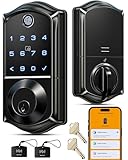
- Premium Choice: Veise VE017 Fingerprint Smart Door Lock with App Control, Matte Black | 8-in-1 Keyless Entry, Smart User Management, Auto Lock, Electronic Touchscreen Keypad, USB-C Port, Deadbolt for Front Door
For most front doors the Yale Assure Lock 2 is the model reviewers name most often as the safe all-round choice, the Schlage Encode Plus suits buyers who want built-in Wi-Fi and Apple Home Key support, the Aqara U100, U200 and U400 suit fingerprint and Apple Home buyers on a tighter budget, and the Level Lock+ or Level Lock Pro suit anyone who wants the door to look unchanged. Choosing well depends on your door, your phone ecosystem and how much you value a keypad or a hidden design.
As an Amazon Associate we earn from qualifying purchases at no extra cost to you.


Smart Locks at a Glance
These details come from 2026 roundups including Tom’s Guide and Forbes, plus smaller buying guides. Reviewers disagree on rankings and some specifications, so confirm security grade, connectivity and compatibility on the maker’s page for your exact version.
| Model | Best for | Key points reported | Limits |
|---|---|---|---|
| Yale Assure Lock 2 | Most households | Named best for most people by Tom’s Guide; Forbes picked it for homes with kids | Connectivity module choices vary by version |
| Schlage Encode / Encode Plus | Built-in Wi-Fi, Apple Home Key, Matter | Forbes named it best remote smart lock; security grade reported differently by outlets | Higher tier than basic locks |
| Aqara U100 | Fingerprint on a budget | Matter over Thread, per reviewers; Forbes picked it for guests and workers | Needs a Thread border router for Matter |
| Aqara U200 | Value pick | Rated best value by one guide | Fewer features than the U400 |
| Aqara U400 | Hands-free unlock | UWB hands-free unlock; one guide ranks it best overall | Works best with compatible phones |
| Level Lock+ / Level Lock Pro | Looks like a normal door | Motor, radio and battery hidden inside the bolt; Forbes named the Pro best overall | One review found installation took longer |
How to Choose a Smart Lock for a Front Door
Check the door first
Measure your door thickness, the backset (distance from the door edge to the center of the bore), and the bore hole size. Confirm whether your deadbolt is a single-cylinder (key outside, thumb turn inside) or double-cylinder type. Most retrofit smart locks replace the deadbolt and reuse the existing holes, but doors that are poorly aligned will make any motorized lock struggle. If the bolt does not slide freely by hand, fix the alignment first.
Decide how you want to unlock
- Keypad: good for family, guests, dog walkers; codes can be added and removed.
- Fingerprint: fast for daily use, as on Aqara models; consider how well it reads wet or dry fingers.
- Phone or hands-free: Bluetooth, Wi-Fi, NFC or UWB, depending on model.
- Physical key backup: reviewers prefer a locks that keep a key option in case batteries die.
Match your smart home
Apple Home users should look at Schlage Encode Plus (Home Key) and Aqara U-series. Matter over Thread is a standard that several recent locks support; it needs compatible hubs or border routers. Alexa and Google Home support varies by model, so read the compatibility list.
Connectivity and batteries
Bluetooth-only locks are simplest but need a bridge for remote control. Wi-Fi built in, as on Encode Plus, avoids extra hardware but uses more battery. Most locks run on AA batteries or a rechargeable pack and warn you when they get low. Replace batteries promptly and keep a 9V terminal or key backup in mind.
Security grade and certifications
ANSI/BHMA grades rate how well a lock resists force. Grade 1 is the highest residential-commercial tier, and Grade 2 is common on many residential locks. Outlets disagree on the Encode Plus grade, so confirm it directly from the maker. A smart lock is only as strong as the door and the strike plate, so use long screws into the door frame stud.
Budget Tiers
- Budget: Aqara U100 and similar fingerprint locks.
- Mid-range: Yale Assure Lock 2 and Aqara U200.
- Premium: Schlage Encode Plus, Aqara U400 and Level Lock Pro.
Pick X If You Want…
| If you want | Pick |
|---|---|
| A proven all-rounder | Yale Assure Lock 2 |
| Built-in Wi-Fi and Home Key | Schlage Encode Plus |
| Fingerprint plus Matter on a budget | Aqara U100 |
| Hands-free unlock | Aqara U400 |
| The door to look unchanged | Level Lock+ or Level Lock Pro |
| Easiest install | Keypad deadbolts that reuse the existing holes, as reviewers say most do |
Installation and Safety Notes
- Remove the old deadbolt and confirm the door bores match the new lock.
- Install the latch and strike plate with long screws into the frame.
- Mount the exterior and interior parts, and connect the ribbon cable carefully.
- Add batteries, then follow the app setup and calibration.
- Test the lock repeatedly with the door open and closed before relying on it.
Always keep a way in that does not depend on the phone, such as a physical key or a keypad code. Change default setup codes, and use strong passwords and two-step sign-in on the account that controls the lock. Level Lock installations are reported to take longer, with one review noting a much longer time than the other locks, so allow extra time. If you rent, ask the landlord before swapping hardware.
Common Mistakes
- Buying before measuring the backset and door thickness.
- Ignoring a misaligned door, which drains batteries.
- Choosing a lock that does not support your smart home platform.
- Leaving no key backup.
- Skipping a reinforced strike plate.
- Sharing one permanent code with everyone.
Alternatives
If you do not want to replace the whole lock, a retrofit device that turns the existing thumb turn motorized is another option. Smart deadbolts from other brands, including U-tec Ultraloq models, appear in competitor lists, though the results I reviewed gave no detailed coverage of them. A simple keypad deadbolt without a smart hub is a reasonable lower-tech alternative.
Frequently Asked Questions
What is the best smart lock for most front doors?
Tom’s Guide calls the Yale Assure Lock 2 the best for most people. Other outlets rank Schlage or Aqara first, so the best answer depends on your platform and features.
Do smart locks work if the Wi-Fi goes down?
Most still work with a keypad, fingerprint or key, because local operation does not need the internet. Remote control and notifications do.
Can smart locks be hacked?
Any connected device carries some risk. Keep firmware updated, use strong unique passwords, and enable two-step sign-in. Choose makers that publish update support.
What happens when the battery dies?
Locks warn you when batteries are low. Many have a key cylinder or terminals for emergency power. Replace batteries when the first warning appears.
Will a smart lock fit my deadbolt hole?
Most retrofit deadbolts fit a standard bore and backset. Measure your door thickness and backset, and read the maker’s fit notes.
Is a hidden lock like Level worth it?
If you want the exterior and interior to look like a normal lock, yes. Reviewers describe the trade-offs as higher cost and a longer install.



Write Your Review
No reviews yet. Be the first to share your experience!