
A gaming laptop packs desktop-class power into a thin chassis, so heat builds fast under load and the machine throttles. The result is lost frames mid-session, louder internal fans and a keyboard that grows warm to the touch. A cooling pad attacks the problem from outside, lifting the laptop off the desk, opening the intake path and pushing cool air toward the vents.
This guide covers five pads that take different routes to the same goal, from sealed turbofan chambers that pressurize airflow to slim three-fan mats built for travel. The ranking starts with airflow design, then checks size support, noise, USB ports and build, running from the llano V12 with its single large turbofan to the Havit HV-F2056, a slim three-fan pad that fits in a laptop bag.
As an Amazon Associate, we earn from qualifying purchases.
Quick Answer
For most gamers, the llano V12 is the pick: a sealed-chamber turbofan pad for 15.6 to 19-inch laptops with a three-port USB hub. The Razer pad is the smart premium pick with automatic fan control, the IETS GT500 is the sealed turbo pick for 13 to 17.3-inch machines, the KLIM Wind is the budget pick, and the Havit HV-F2056 is the slim pick for travel.
Table of Contents
- Quick Answer
- 1. llano V12 RGB
- 2. Razer Laptop Cooling Pad
- 3. IETS GT500
- 4. KLIM Wind
- 5. Havit HV-F2056
- How to Choose a Laptop Cooling Pad
- Who Should Skip a Laptop Cooling Pad
- Frequently Asked Questions
- Final Verdict
- Product and ASIN Reference
1. llano V12 RGB

Best overall pick for maximum cooling on large gaming laptops
The llano V12 is the strongest cooler here: it works like a sealed chamber rather than a fan tray. A single 5.5-inch turbofan spins up to 2,800 RPM, pushing air through foam seals against the laptop base so airflow enters the intakes instead of leaking out the sides. The deck fits laptops from 15.6 to 19 inches, the widest support here.
The trade-offs are size and sound. The deck measures about 16.9 by 12.9 inches and weighs close to 4.7 pounds, so it lives on a desk. The turbofan is audible at full speed, with listed noise up to 70 dB, so quiet rooms call for a lower setting.
Specs
- Brand: llano
- Fan: Single 5.5-inch turbofan, up to 2,800 RPM
- Design: Sealed chamber, foam seals, dust filter
- Laptop size: 15.6 to 19 inches
- USB ports: 3-port hub
- Lighting: RGB
- Noise: Up to 70 dB
- Tier: Premium
2. Razer Laptop Cooling Pad

Best premium pick for smart automatic cooling
The Razer pad is the only pick that manages its own fan speed. Its 140 mm brushless fan spins up to 3,000 RPM inside an airtight pressure chamber, with foam seals that stop cool air leaking out around the laptop base. Smart cooling adjusts the fan automatically with system temperature, with preset or custom curves set through Razer Synapse.
The premium design carries two conditions. Full fan-curve control and button remapping need Razer Synapse, and the HyperBoost mode that lifts power limits only works with supported Razer Blade laptops. On other laptops it still cools well through the sealed chamber, with a three-port USB hub, Chroma RGB and a two-year warranty. Glance at the live offer before ordering: the listing record is the oldest evidence here.
Specs
- Brand: Razer
- Fan: Single 140 mm brushless fan, up to 3,000 RPM
- Design: Airtight pressure chamber, foam seals
- Laptop size: 14 to 18 inches
- Fan control: Automatic smart cooling, custom curves
- USB ports: 3-port USB-A hub
- Lighting: Chroma RGB
- Warranty: 2 years
- Tier: Premium
3. IETS GT500

Best mid-range pick for sealed turbo cooling on smaller decks
The IETS GT500 uses the same sealed-chamber idea as the two premium picks, at a smaller size and a mid-range tier. Its turbofan spins up to 5,000 RPM, the fastest fan here, and seal foam forces that air into the laptop intakes. A dust filter blocks debris, and the speed control adjusts continuously rather than in fixed steps. The deck fits laptops from 13 to 17.3 inches, covering most gaming laptops except the largest 18 and 19-inch machines.
The 5,000 RPM fan is the honest trade-off: at full speed it is the loudest design here, so the variable speed dial matters and quiet rooms will run it well below maximum. For a 15 or 16-inch gaming laptop that runs hot, the GT500 delivers sealed-chamber cooling without the premium tier.
Specs
- Brand: IETS
- Fan: Single turbofan, up to 5,000 RPM
- Design: Sealed chamber, seal foam, dust filter
- Laptop size: 13 to 17.3 inches
- Fan control: Infinitely variable speed dial
- USB ports: 3-port hub
- Tier: Mid-range
4. KLIM Wind
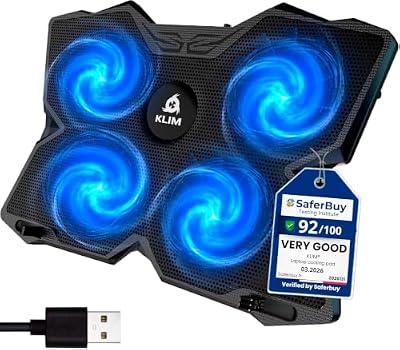
Best budget pick for everyday cooling
The KLIM Wind is the default budget recommendation for a reason: four 120 mm fans at 1,200 RPM move steady air across the laptop base, and the open mesh deck lets that air reach the intakes. Two back legs raise the laptop into a typing slope, and front pegs stop it sliding forward. The pad fits laptops up to 17 inches and runs from a single USB connection.
The open design is also its limit. Without foam seals, some airflow escapes around the laptop edges, so the Wind cools less aggressively than the sealed-chamber picks. The four fans are quiet at 1,200 RPM, which suits shared rooms and late sessions.
Specs
- Brand: KLIM
- Fans: Four 120 mm fans, 1,200 RPM
- Design: Open mesh deck, two height legs
- Laptop size: Up to 17 inches
- Power: USB powered
- Lighting: Blue LED
- Warranty: 5 years
- Tier: Budget
5. Havit HV-F2056

Best budget pick for slim and portable cooling
The Havit HV-F2056 is the slimmest pad here, built for laptops that travel. Three quiet fans sit in a thin deck for laptops from 15.6 to 17 inches, and the whole pad slips into a laptop bag beside the machine. Two USB ports give back one connection for a mouse or headset, and the ergonomic slope lifts the keyboard for long sessions.
The slim build means less airflow than the turbofan picks, so the HV-F2056 suits laptops that run warm rather than laptops that throttle hard. It is also the quietest approach here, with three low-speed fans instead of one fast turbine, which suits offices, libraries and shared rooms.
Specs
- Brand: Havit
- Fans: Three quiet fans
- Design: Slim portable deck, ergonomic slope
- Laptop size: 15.6 to 17 inches
- Power: USB powered
- USB ports: 2
- Tier: Budget
How to Choose a Laptop Cooling Pad
Start with the airflow design, not the fan count
Sealed-chamber pads trap air against the laptop base with foam seals, so the fan output reaches the intakes instead of escaping sideways. The llano V12, the Razer pad and the IETS GT500 all use this design, which is why they cool harder than open pads. Open mesh pads such as the KLIM Wind and the Havit HV-F2056 rely on broad, even airflow instead, which is quieter and simpler but less forceful. If the laptop throttles under load, start with a sealed design.
Match the deck to the laptop size
A pad that is too small leaves the laptop overhanging the edges, and one too large wastes desk space. The llano V12 covers 15.6 to 19 inches, the Razer pad 14 to 18 inches, and the IETS GT500 13 to 17.3 inches. Measure the laptop base before ordering, and check where the intakes sit: a pad helps most when its fans line up with the bottom vents.
Decide how much noise is acceptable
Fan speed and noise rise together. The IETS GT500 spins up to 5,000 RPM and the llano V12 lists noise up to 70 dB at full speed, so both belong where fan sound is acceptable. The KLIM Wind runs four fans at 1,200 RPM and the Havit uses three low-speed fans, so both stay quiet in shared rooms. Variable speed control matters: every pick except the Havit lets the fan speed drop when the laptop idles.
Check the USB ports and the power draw
A cooling pad takes one USB port to run, and a built-in hub gives ports back. The llano V12, the Razer pad and the IETS GT500 each carry a three-port hub, while the Havit carries two and the KLIM Wind none. Turbofan pads also draw more power than slim pads, so a laptop with few free ports should pair with a hub-equipped pick.
A note on laptop cooling pad recalls
No CPSC recall covers laptop cooling pads as a class, and none covers any pick here. The closest recalls cover different products: IBM and Dell recalled notebook AC adapters years ago for overheating, and a 2026 CPSC recall covers JKMAX heated blankets and heating pads, which heat rather than cool. None of those actions touches a cooling pad.
Who Should Skip a Laptop Cooling Pad
Skip a cooling pad if the laptop already holds its clock speeds under load, because extra airflow cannot add frames throttling never took. Skip the large turbofan pads if the desk is small or the laptop travels daily: the llano V12 weighs close to 4.7 pounds and the sealed picks are desk fixtures. Skip sealed-chamber designs if the laptop draws air from side vents rather than the base, since foam seals only help bottom intakes. Skip the whole class if the real problem is dust-clogged internal fans or dried thermal paste, because no pad fixes what is blocked inside.
Frequently Asked Questions
Do laptop cooling pads actually lower temperatures?
Yes, when the laptop draws air from the bottom. A pad lifts the machine off the desk, opens the intake path and pushes cool air toward the vents, helping the laptop hold higher clock speeds for longer. Sealed-chamber pads cool hardest because their foam seals force air into the intakes instead of letting it escape sideways.
Which cooling pad is best for a 17-inch gaming laptop?
The llano V12 fits laptops up to 19 inches and is the strongest pick for a 17-inch machine, with a sealed chamber and a three-port USB hub. The Razer pad also fits and adds automatic fan control. The KLIM Wind and the Havit HV-F2056 fit too, but their open designs cool less aggressively.
Are cooling pads noisy?
It depends on the fan. Turbofan pads such as the IETS GT500 spin up to 5,000 RPM and are audible at full speed, while the KLIM Wind runs four fans at 1,200 RPM and stays quiet. Variable speed control helps: run the fan low during light work and raise it only for gaming.
Can a cooling pad damage a laptop?
No, when it is used as designed. A pad only moves air across the outside of the machine and draws power from a USB port, so it cannot harm the internals. Keep the foam seals clean on sealed designs, and avoid blocking the laptop exhaust vents.
Final Verdict
For most gamers, buy the llano V12: a sealed-chamber turbofan pad for 15.6 to 19-inch laptops with a three-port USB hub. Step up to the Razer pad for automatic fan control and Chroma RGB, or to the IETS GT500 for sealed turbo cooling at a mid-range tier. Choose the KLIM Wind when the budget binds, and the Havit HV-F2056 when the pad has to travel.








Write Your Review
No reviews yet. Be the first to share your experience!