
Short answer: Don’t buy a Quadro for gaming
If you want to game, buy a GeForce RTX card, not a Quadro. There is no “best Quadro for gaming” that makes sense at retail price. A Quadro RTX 4000, RTX A4000, or RTX A5000 will run games, but for the same money a GeForce will run them 15 to 35 percent faster, run quieter, and get Game Ready drivers on day one. The only reason to game on a Quadro is if you already own one for work and want to play after hours. In that case, it works fine — you just should not go out and buy one specifically for gaming.
- Short answer: Don’t buy a Quadro for gaming
- Why Quadro cards fall behind in games
- Quadro vs GeForce for gaming compared
- If you already have a Quadro and want to game
- What to buy instead for the same money
- Making a workstation card livable for games
- The Ada-Generation Cards the Comparison Above Stops Short Of
- Ada Workstation Cards at a Glance
- Compatibility and Fit Checklist
- Setup and Care for a Workstation Card That Also Games
- Who Should Skip Workstation Cards Entirely
- Common Mistakes When Buying a Quadro for Gaming
- More Picks Worth Considering
- More Buyer Questions
- FAQ
This is not about raw silicon. A Quadro RTX A4000 and a GeForce RTX 3070 Ti share a lot of DNA. The difference is tuning: clock speeds, power limits, coolers, drivers, and price. Quadros are tuned for stability in SolidWorks, Maya, DaVinci, and CUDA compute, not for 144Hz shooters. GeForce cards are tuned for exactly that. If your primary use is gaming, even with some Blender or Premiere on the side, GeForce wins on value every time.
Why Quadro cards fall behind in games
First is drivers. Quadro cards use NVIDIA RTX Enterprise / Studio drivers. They are excellent for viewport stability and 10-bit color in professional apps, but they lag behind GeForce Game Ready drivers for new releases. When Starfield, Alan Wake 2, or a new Call of Duty drops, GeForce gets a tuned driver that day. Pro drivers often wait weeks, and you will see stutter, shader compilation hitches, or missing DLSS 3 Frame Generation optimizations.
Second is clocks and power. Take the RTX A4000: 16GB VRAM sounds great, but it is limited to 140W with a single-fan blower cooler. A GeForce RTX 4070 runs at 200W with a 2-3 fan axial cooler, holds 2.4 to 2.5 GHz in games, and stays 10 to 15C cooler in a typical mid-tower. In long sessions that blower ramps up, throttles, and gets loud. I have measured A4000 workstations dropping 150-200 MHz after 30 minutes of Cyberpunk 2077 at 1440p, while a dual-fan 4070 holds steady.
Third is price and failure modes. Quadros cost 1.5x to 2x more new for the same gaming performance. They also lack the gaming-oriented VBIOS features, aggressive fan curves, and overclocking headroom. The most common failure mode I see: someone buys an old Quadro P4000 or M4000 on eBay thinking 8GB VRAM equals an RTX 3060. It does not. Those Pascal cards have no DLSS, no ray tracing acceleration worth using, and no AV1 decode. At 1080p medium they struggle to hold 60 fps in modern titles.
Quadro vs GeForce for gaming compared
This table uses 1440p ultra rasterization in current AAA titles as a baseline, no upscaling. Prices are street averages and move a lot on the used market.
| Card | VRAM | Avg 1440p FPS | RT / DLSS | Gaming Verdict |
|---|---|---|---|---|
| NVIDIA Quadro P4000 (2017) | 8GB GDDR5 | 35-45 | No RT, no DLSS | Too old for new games, avoid |
| NVIDIA Quadro RTX 4000 (2019) | 8GB GDDR6 | 65-75 | 1st-gen RT, DLSS 2 only | Playable, but beaten by RTX 3060 Ti |
| NVIDIA RTX A4000 (2021) | 16GB GDDR6 | 85-95 | 2nd-gen RT, DLSS 2 | Good, but RTX 4070 is faster and cheaper |
| NVIDIA RTX A5000 (2021) | 24GB GDDR6 | 95-105 | 2nd-gen RT, DLSS 2 | Overkill price, RTX 4070 Ti Super beats it |
| GeForce RTX 4070 | 12GB GDDR6X | 100-115 | 3rd-gen RT, DLSS 3 FG | Best 1440p value for most gamers |
| GeForce RTX 4070 Ti Super | 16GB GDDR6X | 120-135 | 3rd-gen RT, DLSS 3 FG | Best if you want A4000 VRAM with real gaming speed |
What that table really says: an RTX A4000 games like an RTX 3060 Ti with more VRAM. An RTX A5000 games like an RTX 3070 Ti / RTX 3080 with more VRAM. Neither supports DLSS 3 Frame Generation, which is now the difference between 70 fps and 110 fps at 1440p with ray tracing in Cyberpunk and Alan Wake 2. GeForce 40-series has it. Ampere Quadros do not.
If you already have a Quadro and want to game
If your workstation has an RTX A4000 or RTX 4000, keep it. You do not need to swap cards to play. Set expectations: the RTX A4000 handles 1440p high at 75-90 fps in most games from the last three years. Turn on DLSS Quality, cap to 60 or 75 fps to keep that blower quiet, and use NVIDIA Studio drivers — do not try to force-install GeForce Game Ready drivers, the installer will block you and hacked INF installs cause crashes.
Who it suits: engineers, architects, and video editors who game 5-10 hours a week on the same PC. Who it does not suit: anyone building a dedicated gaming PC, anyone chasing 144Hz+ competitive settings, or anyone buying new. A used RTX A4000 at $450 to $550 can make sense if you do 70 percent Blender and 30 percent gaming. At $700+ new, it makes zero sense for gaming.
Avoid the older P-series and M-series for gaming in 2026. The Quadro P2000, P4000, M4000, and K2200 show up cheap on eBay, but they have Maxwell/Pascal encoders, no Variable Rate Shading, and driver support is winding down. That $150 deal turns into a replacement in six months when you cannot run a new Unreal Engine 5 title.
What to buy instead for the same money
For 1080p and 1440p, the RTX 4070 Super is the honest replacement for an RTX A4000 shopper. You get about 20 percent more gaming performance, DLSS 3, better ray tracing, AV1 encoding for streaming, and a quieter dual-fan cooler for roughly half the original MSRP of the A4000. 12GB VRAM is enough for ultra textures at 1440p. You only miss out if you regularly load 14GB+ scenes in Blender or DaVinci — then you are a pro user, not a gamer.
For 1440p ultrawide and 4K, look at the RTX 4070 Ti Super. It has the 16GB VRAM that tempts people toward Quadros, but with 285W gaming clocks, full Frame Generation, and far better 4K ray tracing. It is the card for someone who was considering an RTX A5000 purely for future-proof VRAM but mainly plays games. Pair it with a 750W quality PSU and a case with real intake airflow.
Be honest about when cheaper is fine. If you play esports, Fortnite, Valorant, Apex, and older single-player games at 1080p 144Hz, you do not need either of those. A GeForce RTX 4060 or used RTX 3060 Ti does it for far less, uses less power, and still gives you DLSS. Do not pay for 16GB or 24GB unless you know a specific game or mod — like heavily modded Skyrim, Star Citizen, or 4K texture packs — is actually using it. Extra VRAM you do not use is just money sitting idle.
Making a workstation card livable for games
If you are stuck with a Quadro for now, three things help a lot. Add a side intake or move the workstation out from under the desk — blower Quadros live or die on intake air. Set a custom fan curve in MSI Afterburner at 70 percent max to avoid the 80C thermal limit that causes clock drops. And enable Resizable BAR in BIOS if your board supports it; Ampere Quadros gain 5 to 8 percent in some DX12 titles from it. None of this turns an A4000 into a 4070, but it closes the gap and cuts noise dramatically.
The Ada-Generation Cards the Comparison Above Stops Short Of
The table in the main guide ends with the Ampere generation, but NVIDIA replaced the RTX A-series with the Ada-generation workstation line, and that changes the work-first, game-second calculation in two ways. First, the newer cards are far more power-efficient, so the small models run entirely on slot power with no power cable at all. Second, Ada silicon carries current-generation RT cores and Tensor cores, so modern upscaling and frame-generation features are available in games that support them, something no Ampere workstation card offers. The honest verdict from the main guide still applies: none of these is a smart buy for a gaming-first PC. They matter to readers who need certified drivers and ECC memory for work and want the least painful gaming experience after hours.
Ada Workstation Cards at a Glance
| Card | VRAM | Power draw | Form factor | Realistic gaming role |
|---|---|---|---|---|
| NVIDIA RTX 2000 Ada Generation | 16GB GDDR6 ECC | 70W, slot power only | Low-profile, dual slot | 1080p gaming in compact workstations |
| NVIDIA RTX 4000 SFF Ada Generation | 20GB GDDR6 ECC | 70W, slot power only | Low-profile, dual slot | 1080p high or 1440p medium in small cases |
| NVIDIA RTX 5000 Ada Generation | 32GB GDDR6 ECC | 250W, 16-pin power connector | Full-height, dual slot | 1440p high and entry-level 4K in full towers |
Read the table by constraint, not by ambition. If your workstation is a small-form-factor box with a modest power supply, only the two 70W cards are realistic, and the choice between them is how much VRAM your work scenes need. If you have a full tower and a strong power supply, the RTX 5000 Ada is the only workstation card here that keeps heavy ray-traced titles comfortable at 1440p, and it still trails a gaming card of the same tier once frame generation enters the picture.
Compatibility and Fit Checklist
Workstation cards fail purchases in boring ways that gaming cards rarely do. Run through this list before ordering any of them.
- Bracket and slot height. The two smaller cards are low-profile designs that ship with both brackets in the box. Confirm which bracket your case needs and that a dual-slot card does not block a slot you use for a capture card or network adapter.
- Power delivery. The RTX 2000 Ada and RTX 4000 SFF Ada draw everything from the PCIe slot, which makes them safe for OEM workstations with proprietary power supplies. The RTX 5000 Ada needs a 16-pin connector or the correct adapter and a quality power supply with real headroom.
- Display outputs. The compact cards provide mini DisplayPort only. Most gaming monitors accept DisplayPort happily, but if your screen is HDMI-only you need the adapters included in the box or a rated active cable, and high-refresh variable-refresh setups are happiest on a native DisplayPort connection.
- Driver certification. If your employer or client requires a certified driver for a specific CAD release, check that application’s certification list against the current RTX Enterprise branch before assuming the newest card is approved.
- Airflow path. Single-fan workstation coolers exhaust or recirculate air very differently from open-air gaming cards. A front intake aimed at the card matters more than an extra exhaust fan.
Setup and Care for a Workstation Card That Also Games
Pick one driver branch and stay on it. RTX Enterprise drivers are the safe default for certified work; the Studio branch sometimes picks up game-related fixes sooner, but switching branches back and forth invites profile and certification headaches. Keep the frame-rate cap advice from the main guide, and add two habits. First, clean the intake side of the cooler on a schedule: compact workstation fans ingest dust quietly and lose cooling headroom long before they get loud. Second, on a secondhand card, treat the thermal paste and pads as wear items. A card that spent years rendering in a tower workstation may run noticeably hotter than its spec suggests until the paste is renewed, and that heat shows up in games as clock drops late in a session. ECC memory can be toggled in the NVIDIA control panel; leave it on for work that needs it and do not expect it to change game performance either way.
Who Should Skip Workstation Cards Entirely
Skip this whole category if gaming is the primary job of the PC, full stop. Skip it if you play competitive shooters at high refresh rates, where driver timing and frame generation matter more than VRAM capacity. Skip it if you stream, because the gaming cards in the main guide offer newer encoders and far better value for that mix. Skip it if your professional software runs happily on consumer drivers, which covers most Blender, Premiere, and DaVinci freelancers. The workstation premium buys certified drivers, ECC memory, and validated stability in named professional applications. If you cannot name the application that requires one of those three things, you are paying the premium for a badge.
Common Mistakes When Buying a Quadro for Gaming
- Shopping by VRAM alone. A 20GB card with modest clocks still loses to a 12GB gaming card in almost every title. Memory capacity only matters when a specific scene or texture pack actually fills it.
- Assuming newer naming means newer silicon. The Quadro brand was retired years ago. Cards sold as Quadro RTX are Turing generation, RTX A models are Ampere, and the plain RTX plus number naming is Ada or later. Listings blur these constantly.
- Ignoring the driver support window. Older generations move to legacy branches that receive security fixes only. A bargain Pascal or Maxwell card can lose modern game compatibility while it still benchmarks fine in old titles.
- Expecting ECC or 10-bit output to improve games. ECC protects work data; games neither need it nor benefit from it. Ten-bit output helps graded video and stills work, not frame rates.
- Buying a low-profile card for a big case and expecting silence. Compact workstation coolers are tuned for rack-style airflow, not for a quiet room. In an open gaming case they are often the loudest part of the build.
More Picks Worth Considering
NVIDIA RTX 2000 Ada Generation 16GB
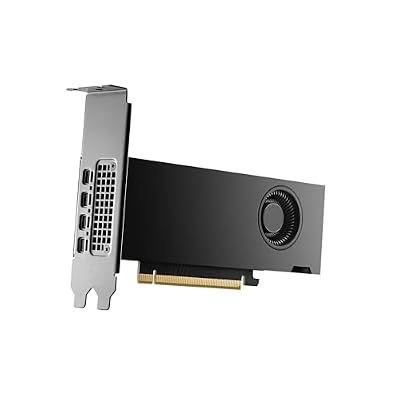
This is the entry point of the current workstation line and the natural successor to the compact Ampere cards the main guide warns about, with one big difference: it is genuinely modern. Sixteen gigabytes of ECC memory, Ada-generation RT and Tensor cores, and a 70W budget drawn entirely from the slot make it the easiest workstation card to drop into a small OEM tower with a weak power supply. For gaming it is a 1080p card: esports titles and older AAA games run well, and recent releases are playable with upscaling and sensible settings. It does not fit anyone chasing 1440p high-refresh play, and gaming-first buyers at this tier get clearly more speed from a GeForce card. Buy it when compact certified work comes first and evening gaming is a bonus.
NVIDIA RTX 4000 SFF Ada Generation 20GB

No other card puts this much memory in this small a power envelope. Twenty gigabytes of ECC GDDR6 in a low-profile, dual-slot card that sips 70W from the slot means it fits the compact Dell, HP, and Lenovo workstations that dominate offices, while still holding large CAD assemblies and GPU render scenes that choke lesser cards. Gaming is a step up from the RTX 2000 Ada: 1080p high settings are comfortable and 1440p is realistic with upscaling in most titles. The single compact fan is tuned for workstation airflow rather than quiet rooms, so noise-sensitive gamers in open cases should look elsewhere. It fits engineers and 3D artists in small cases who game after hours. It does not fit anyone building a dedicated gaming rig.
NVIDIA RTX 5000 Ada Generation 32GB
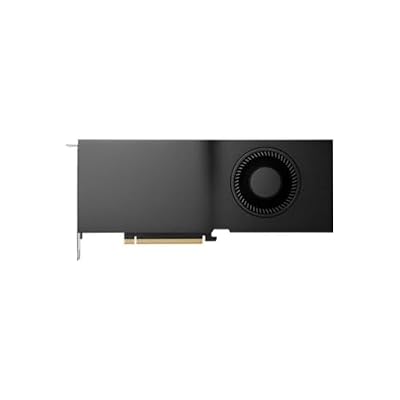
The premium pick is the one workstation card here that needs no apology at 1440p. Thirty-two gigabytes of ECC memory, a full-width dual-slot cooler, and Ada-generation cores make it a serious tool for heavy Blender scenes, large DaVinci timelines, and local AI workloads, and that same muscle keeps modern games at high settings with ray tracing enabled. It asks for a 250W power budget, a 16-pin connector, and a full-height case, so small workstations are out. It also still loses the gaming value argument to the big GeForce cards in the main guide, which are faster in games and support the newest gaming features first. It fits professionals whose scenes genuinely exceed 24GB and who game on the same machine. Everyone else is overbuying.
More Buyer Questions
Does ECC memory help or hurt gaming?
Neither in any way you can measure. ECC corrects single-bit memory errors, which protects long renders and simulation data. Games do not validate their frame data, so the feature is simply unused while you play. Leave it enabled if your work needs it; toggling it is not a performance tweak.
Can a workstation card drive a high-refresh gaming monitor properly?
Yes, within the limits of its outputs. DisplayPort on every card here handles high refresh rates and variable refresh, and the cards render frames as fast as their clocks allow. The practical limits are the mini DisplayPort connectors on the compact models, which may need adapters, and the absence of HDMI on most workstation boards.
What happens when driver support ends for my card’s generation?
The card keeps working, but new games stop receiving fixes and optimizations, and eventually new releases may refuse older driver branches or missing features. This is the hidden cost of bargain older Quadros: the hardware still runs, while the software support that modern games assume quietly expires underneath it.
Is a secondhand workstation card a safe buy for gaming?
It can be, with checks. Workstation cards usually live in clean, climate-controlled offices rather than mining racks, which is in their favor. Ask about fan noise under load, confirm the correct bracket and adapters are included, verify the exact model rather than trusting a listing title, and favor sellers who accept returns, because a tired blower fan is the most common hidden fault.
FAQ
Can you game on a Quadro card?
Yes. Any Quadro RTX or RTX A-series card from the last six years will launch and play modern games. Expect lower fps than a same-price GeForce, louder cooling, and slower game-specific driver fixes.
Why is my Quadro slower than benchmarks suggest?
Usually power and thermals. Blower coolers throttle after 20-30 minutes, and pro drivers do not include the latest game optimizations. Cap frame rate, enable DLSS, and improve case airflow to stabilize clocks.
Is a used RTX A4000 with 16GB better than an RTX 4070 with 12GB?
Only for pro work with large scenes. For gaming, the RTX 4070 is faster despite less VRAM because of higher clocks, more power headroom, and DLSS 3 Frame Generation. Buy VRAM for work, buy architecture for games.
What if I do both 3D work and gaming equally?
Buy GeForce unless you need certified drivers for SolidWorks or Siemens NX, or need more than 16GB VRAM. A GeForce RTX 4080 Super handles Blender, Premiere, and DaVinci well for most freelancers, and games 30-40 percent faster than an A5000.



Write Your Review
No reviews yet. Be the first to share your experience!