
Nvidia Jetson Nano Developer Kit is one of the most popular ways to get hands-on with edge AI and robotics, but if you are a maker, student, or developer deciding where to start, you want to know exactly what it can do, how easy it is to use, and whether it is still worth it. Rather than sit through a long video, you want the specs, real project possibilities, and honest owner feedback laid out clearly. This review breaks down what the Jetson Nano delivers and whether it belongs on your workbench.


What the Jetson Nano Developer Kit Delivers
The Jetson Nano is a small, affordable single-board computer built specifically for AI and machine learning at the edge, and understanding its hardware is the first step to judging its potential. This section covers the core specs, the AI performance, and the software ecosystem that define what this kit can do.
Core Specs and Hardware
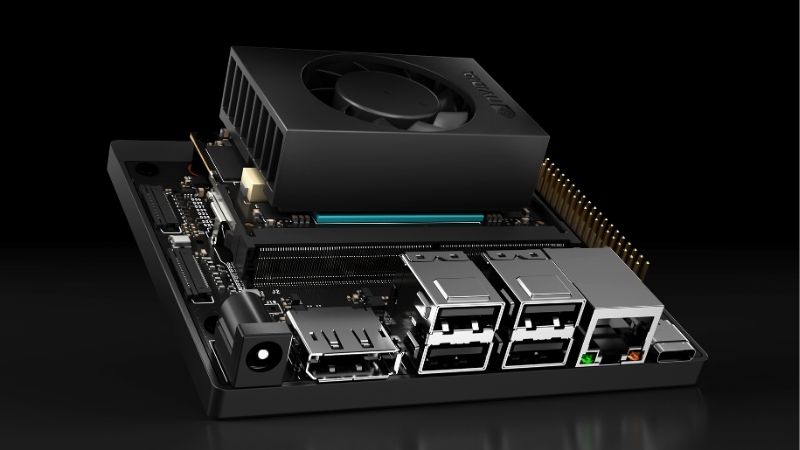
The Jetson Nano Developer Kit pairs an Nvidia GPU with a multi-core ARM CPU and onboard memory in a compact board roughly the size of a credit card plus its carrier. It includes the ports makers need, such as USB, HDMI, and GPIO pins for connecting sensors and hardware.
This combination gives it enough power to run real AI workloads while staying small and energy-efficient, making it ideal for embedded and portable projects. It is a genuine computer, not just a microcontroller.
The practical point is that the hardware is purpose-built for edge AI. It packs enough capability into a tiny, low-power board to run models locally, which is exactly what maker and robotics projects need.
Its low power draw is a real advantage for embedded and battery-powered projects. A robot or smart camera that must run untethered benefits enormously from a board that delivers AI capability without demanding heavy power, which is where the Jetson Nano fits perfectly.
AI and Machine Learning Performance
The Jetson Nano’s standout capability is running AI inference locally. Its GPU can execute neural networks for tasks like image classification, object detection, and segmentation directly on the device, without needing the cloud.
For learning and prototyping, this is powerful. You can build projects that recognize objects, track movement, or process camera feeds in real time, all running on the board itself.
The realistic takeaway is that the Jetson Nano handles entry-level to intermediate AI workloads well, though it is not meant for training large models or heavy production inference. It is a learning and prototyping platform, and an excellent one for that purpose.
Running inference locally also brings practical benefits beyond learning: lower latency, no cloud costs, and privacy, since data never leaves the device. For many edge-AI applications, that on-device processing is not just convenient but essential to how the project is meant to work.
The Software Ecosystem and JetPack
A major strength is Nvidia’s software support. The Jetson Nano runs Nvidia’s JetPack SDK, which includes the operating system, libraries, and AI frameworks needed to develop and deploy machine learning projects.
This ecosystem gives access to popular tools and Nvidia’s CUDA platform, meaning the skills and code you develop transfer to larger Nvidia systems. You are learning within a professional, widely used framework.
The experimental value here is significant: the Jetson Nano is a gateway into Nvidia’s broader AI ecosystem, letting makers and students build real skills on the same software stack used in serious AI development.
This ecosystem continuity is a genuine long-term benefit. Skills learned on the Jetson Nano — working with CUDA, deploying models, using Nvidia’s tools — carry directly to larger Jetson boards and professional AI systems, making it a smart first rung on a longer ladder.
Real Projects, Ease of Use, and Ownership
Specs matter, but what you can actually build and how approachable the kit is determine its real value. This section covers the projects the Jetson Nano enables, its ease of setup for beginners, and the honest pros and cons from owner feedback.
Popular Projects You Can Build
The Jetson Nano shines as a project platform. Makers use it to build AI-powered robots, smart cameras with object recognition, gesture-controlled systems, autonomous vehicles, and home automation projects that see and respond to their environment.
Because it runs full AI models locally, projects can do genuinely impressive things — identifying objects, following people, reading signs — that would be impossible on simpler boards. This capability is the heart of its appeal.
The practical read is that the Jetson Nano opens the door to real, functional AI projects. For anyone wanting to learn robotics and machine learning by building, it provides a capable and inspiring foundation.
The large community around the board is a huge asset here. Countless tutorials, open-source projects, and forum discussions mean that whatever you want to build, someone has likely documented a similar project you can learn from and adapt, dramatically shortening the path from idea to working prototype.
Ease of Setup for Beginners
Setup is approachable but does require some technical comfort. You flash the JetPack image to a microSD card, connect the board, and follow Nvidia’s documentation and the large community of tutorials to get started.
Owner feedback broadly describes the initial setup as manageable with the available guides, though complete beginners may face a learning curve with the Linux environment and command line. Patience helps early on.
The realistic takeaway is that the Jetson Nano is beginner-friendly for those willing to learn, backed by extensive documentation and community support. It is accessible, though not quite as plug-and-play as a simple hobby board.
Pros and Cons of the Jetson Nano
The strengths are consistent in positive reviews: genuine local AI capability, an affordable entry price for edge AI, access to Nvidia’s professional CUDA and JetPack ecosystem, a compact and efficient design, strong community support, and versatile GPIO for hardware projects.
The criticisms appear in owner feedback too: it is not powerful enough for training large models or heavy production use, complete beginners face a Linux learning curve, performance is entry-level compared to larger Jetson boards, and you often need to buy extras like a power supply, microSD card, and camera separately.
The pattern is clear. The complaints are about scope and setup, not fundamental capability. For its intended purpose — learning and prototyping edge AI — the Jetson Nano delivers strongly, provided you understand it is a starter platform.
Value, Accessories, and the Final Verdict
Understanding the kit’s capabilities leads to the real question: is it worth buying, and what do you need alongside it? This section covers the accessories to plan for, who the kit suits best, and the final verdict.
Accessories You Will Need
To get the most from the Jetson Nano, budget for a few essentials. You will typically need a compatible power supply, a fast microSD card for the operating system and projects, and often a compatible camera module for vision-based projects.
Depending on your project, you may also want sensors, a case for protection, and possibly a small display or peripherals. Factoring these into your budget avoids surprises after the board arrives.
The practical advice is to plan the full kit, not just the board. A quality microSD card and reliable power supply in particular make the experience far smoother, so it is worth getting good ones from the start.
A slow or unreliable microSD card is a common source of frustration, causing sluggish performance and occasional corruption. Investing in a fast, reputable card upfront prevents headaches and makes the whole platform feel far more responsive.
Who Should Buy the Jetson Nano
The Jetson Nano is ideal for specific buyers. Students learning AI and robotics, makers building intelligent projects, and developers prototyping edge AI applications all benefit from its capability and its connection to Nvidia’s ecosystem.
It is also a great choice for anyone wanting to build real, portfolio-worthy AI projects on a budget, gaining skills that transfer to professional development. The learning value is substantial.
It is less suited to those needing heavy production performance or wanting a pure plug-and-play experience, who might prefer larger Jetson boards or simpler platforms. Matching the kit to your goals is key.
Final Verdict on the Jetson Nano
Weighing everything, the Nvidia Jetson Nano Developer Kit remains an excellent entry point into edge AI and robotics for makers, students, and developers. Its blend of real local AI capability, an affordable price, and access to Nvidia’s professional ecosystem is hard to beat as a learning platform.
Its limitations — entry-level performance and a setup learning curve — are reasonable trade-offs for what it offers at its price. For its intended purpose, it delivers genuine, inspiring capability.
If you want to learn AI and robotics by building real projects, the Jetson Nano is a smart, capable starting point. Check current listings and accessory bundles to see whether it fits your goals and budget today.
See More:
- 3060 Ti vs 9060 XT
- Nvidia Shield TV Pro
- RTX 5070 vs RX 9060 XT
- RTX 3090 24GB
- Nvidia price prediction
Conclusion
The Nvidia Jetson Nano Developer Kit earns its reputation as one of the best entry points into edge AI and robotics. It runs genuine AI models locally, connects you to Nvidia’s professional CUDA and JetPack ecosystem, and enables impressive real-world projects, all at an affordable price and in a compact, efficient board. Its entry-level performance and slight learning curve are fair trade-offs for a starter platform, and planning for accessories like a good microSD card and power supply smooths the experience. If you want to build real AI and robotics skills, the Jetson Nano is worth buying — check current listings and bundles to start your first project today.
Frequently Asked Questions
Which Jetson Nano should I buy today?
The original Jetson Nano Developer Kit uses a 128-core Maxwell GPU with a quad-core Cortex-A57 and 4GB of LPDDR4, and it is now quite dated. The Jetson Orin Nano Super Developer Kit is the current entry point, offering vastly more AI throughput, 8GB of memory and current software support for a modest price increase.
What power supply and storage do I need?
The original kit accepts five volts over micro USB for light loads but wants a five volt four amp barrel jack supply, with the jumper fitted, for sustained work. Orin Nano ships with its own adapter. Use a fast A2-rated microSD card of at least 64GB, or add NVMe storage where the carrier board provides an M.2 slot.
Is the original Nano still supported by current JetPack releases?
No, and this is the biggest practical catch. The original Nano was left behind on an older JetPack and Ubuntu base, which limits CUDA, TensorRT and Python library versions and blocks many current AI frameworks. Orin generation boards receive current JetPack releases, so buy Orin if you want to follow modern tutorials.
Can it run local language models?
The original Nano with 4GB is effectively limited to very small quantised models and runs them slowly, so it suits classic vision tasks instead. An Orin Nano with 8GB of shared memory can run small quantised models at usable speeds and handles vision transformers and speech models comfortably for prototyping and edge deployment.
Is it better than a Raspberry Pi 5 for AI projects?
For GPU-accelerated inference, yes, because CUDA and TensorRT give it a genuine hardware advantage over a CPU-only board. The Raspberry Pi wins on price, community size, documentation freshness and general-purpose Linux use. Choose Jetson when neural network throughput at the edge is the point of the project, not general tinkering.




Write Your Review
No reviews yet. Be the first to share your experience!