
Best white motherboard shopping involves one problem the spec sheet never mentions: most so-called white boards are black PCBs with white heatsinks. If you want a build that genuinely reads as white behind a glass panel, coverage matters as much as the chipset underneath, and the difference is easy to miss in product photography.
As an Amazon Associate we earn from qualifying purchases at no extra cost to you. Product prices and availability are accurate as of the date shown and are subject to change.


As an Amazon Associate we earn from qualifying purchases at no extra cost to you. Product prices and availability are accurate as of the date shown and are subject to change.
By Ryan Cole
How to Choose the Best White Motherboard
A themed build fails on details, so it is worth knowing what to look at before ordering. These four checks cover the appearance of the best white motherboard for your build as well as the hardware you have to live with.
Check How Much of the Board Is Actually White
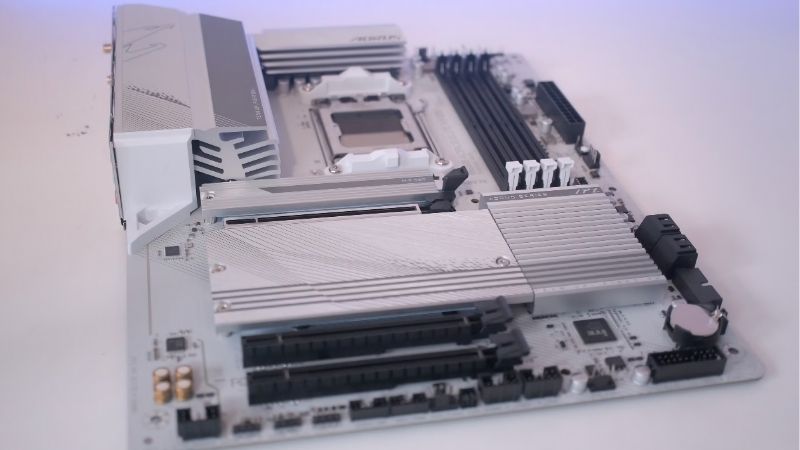
Three levels exist: white heatsinks over a black PCB, a light silver or grey PCB with white covers, and genuinely white PCBs which are rare and expensive. Product photos are usually lit generously.
Look for images taken inside a case rather than studio renders. The area between the DIMM slots and the rear I/O shroud is where a black PCB shows most clearly through a side panel.
Build videos and owner photographs are more reliable than any product page. Two boards described the same way can look noticeably different once a graphics card and cooler cast shadows across them.
Rear I/O shroud size also matters visually. A large white shroud covering the VRM area does more for the overall look than white M.2 heatsinks buried under a graphics card.
Do Not Compromise on Chipset and VRM
White versions usually sit in the mid or upper range, which means the power delivery is adequate. Occasionally a manufacturer applies white styling to a weaker board, so check the specifications properly.
On AMD, B650 and B850 cover gaming builds comfortably. On Intel, B760 and B860 suit locked chips while Z-series is required for tuning a K-series processor.
Count M.2 slots and rear USB ports the same way you would on any board. Colour is a preference; a board with one M.2 slot and thin rear I/O will annoy you long after the theme stops being novel.
Plan the Rest of the Build Around the Same Shade
White components vary between warm and cool tones, and a board that looks perfect alone can clash with a whiter case or GPU. Where possible, buy the case, board and cooler from photos taken together.
Cable extensions and white fans do more for the finished look than the board itself. Budget for those rather than paying a large premium for a slightly whiter PCB.
A white graphics card is the single biggest visual factor and the hardest part to source. Decide whether you can get one before committing the rest of the build to a strict colour scheme.
Expect a Price Premium and Limited Stock
White variants typically cost more than the identical black model and appear in smaller production runs. When one is in stock at a reasonable price, that is usually the moment to buy.
Check that the white version has not been given fewer features to hit a price point. Comparing the full specification against the standard model takes a minute and occasionally saves a bad purchase.
Top Picks: Best White Motherboard Options
The best white motherboard is a balance of coverage and specification, so these six span AM5 and Intel and are ranked by how convincingly white they look as well as what they offer as hardware. Availability on these models is more variable than standard versions.
| Board | Platform | White Coverage | M.2 Slots | Best For |
|---|---|---|---|---|
| ASUS ROG Strix B650-A Gaming WiFi | AM5 | Heatsinks and shroud | 2 | Best all-round AMD pick |
| Gigabyte B650 AORUS Elite AX ICE | AM5 | Extensive, light PCB | 3 | Most convincing white |
| MSI MPG B650 Edge WiFi | AM5 | Heatsinks and shroud | 3 | Balanced features |
| ASRock B650 Steel Legend WiFi | AM5 | Silver-white styling | 3 | Value themed builds |
| ASUS ROG Strix Z790-A Gaming WiFi II | LGA 1700 | Heatsinks and shroud | 4 | Intel K-series builds |
| Gigabyte Z890 AORUS ELITE WIFI7 ICE | LGA 1851 | Extensive, light PCB | 4 | Current Intel platform |
ASUS ROG Strix B650-A Gaming WiFi
White heatsinks, a large white shroud and a strong B650 feature set make this the default recommendation for an AMD themed build. Power delivery handles anything up to a Ryzen 9 comfortably.
The PCB underneath is black and visible around the DIMM area, which purists will notice immediately in a bright build. Only two M.2 slots is also modest for the price bracket this board occupies, so plan storage carefully.
Gigabyte B650 AORUS Elite AX ICE
The ICE line goes further than most, with white covers over a light PCB that reads as genuinely white through a glass panel. Three M.2 slots and Wi-Fi round out a practical specification.
Gigabyte’s BIOS is less friendly than its rivals, and ICE models often sell out for long stretches. If you find one in stock at retail pricing, that is the pick for a strict white theme.
MSI MPG B650 Edge WiFi
A clean white-and-silver design with three M.2 slots, 2.5G Ethernet and a solid power stage. MSI’s BIOS is among the easiest to work with, which matters when setting memory profiles.
Coverage is good rather than complete, with black showing between the slots. Pricing sits above the ASRock alternative without a clear hardware advantage in a gaming build.
ASRock B650 Steel Legend WiFi
Steel Legend has offered light styling for years and remains the value option for a themed build. Three M.2 slots and a competent VRM cover a gaming machine without any weak points.
The finish reads more silver-grey than pure white under bright lighting. In a build with white fans and cables that is barely noticeable, but it will not satisfy anyone chasing a strict colour match against a pure white case.
ASUS ROG Strix Z790-A Gaming WiFi II
For an Intel build on the previous socket, this is the established white option: four M.2 slots, strong power delivery and enough tuning capability for a K-series chip.
LGA 1700 no longer receives new processors, so treat this as a fixed-specification build. It is also expensive relative to what a gaming machine needs from a Z-series board.
Gigabyte Z890 AORUS ELITE WIFI7 ICE
The current Intel platform version of the ICE treatment, with extensive white coverage, four M.2 slots and Wi-Fi 7. It suits a build using a current-generation Intel processor.
Z890 pricing is high, and much of the tuning capability is wasted on a locked chip. Stock is intermittent, and the white version usually carries a premium over the standard model.
What 2026 Pricing Means for Themed Builds
White hardware sits at the sharp end of a market that has moved toward higher-margin products, which changes the calculation slightly this year.
Specialty Variants Are Harder to Find Cheaply
Motherboard sales fell by more than 25% and manufacturers concentrated production on mid and high-end SKUs, with promotional pricing policies tightened from February onward.
White boards were always a niche run, and that squeeze has made discounts rarer. If the best white motherboard for your platform appears at close to standard pricing, it is worth acting on.
AM5 Holds Value Better Than Intel Here
AMD committed at Computex 2026 to supporting AM5 with new processors through 2029, while Intel’s next platform changes socket. A themed build is expensive to rebuild, so longevity matters.
Choosing AM5 means the board, cooler and case theme survive a CPU upgrade. That is a stronger argument in a build where matching parts were sourced deliberately over several months.
Spend on the Visible Parts First
With graphics cards up sharply and memory contracts locked high, budgets are tighter than usual. White fans, cable extensions and a white cooler change the look more than a whiter PCB does.
Those parts are also still discounted normally in late-November sales, unlike memory and prebuilt systems built from expensive contract DRAM. That makes them the sensible place to spend on appearance.
There is also nothing to wait for on the hardware side. Zen 6, Nova Lake and the refreshed graphics cards have all moved to CES in January 2027, so no board launch before then will change a themed build.
Frequently Asked Questions
These questions come up in every thread about the best white motherboard for a themed build, and the answers save money more often than they cost it.
Are white motherboards more expensive than black ones?
Usually yes, by a modest amount, because they are produced in smaller runs. The hardware is normally identical to the standard model, so you are paying for the finish rather than performance.
Do any boards have a fully white PCB?
A few do, mostly in premium ranges, but they are rare and costly. Most options use white heatsinks and shrouds over a black or light grey PCB, which looks white enough once built.
Does a white board affect temperatures?
No. The coating is cosmetic and the heatsink material underneath is the same. Any temperature differences between models come from heatsink size and VRM design, not colour.
Will white components yellow over time?
Painted heatsinks and coated PCBs hold their colour well over time. Plastic fan frames and cable sleeving are more prone to discolouration, particularly in rooms with strong sunlight or smoke exposure, so those are the parts to plan on replacing eventually.
See More:
Final Thoughts
The best white motherboard for most builds is a mid-range AM5 board with extensive white coverage, paired with white fans and cable extensions that do the rest of the visual work. Check real photographs rather than renders, confirm the hardware has not been downgraded for the finish, and buy when stock appears at sensible pricing. A themed build lives or dies on those details.











Write Your Review
No reviews yet. Be the first to share your experience!