
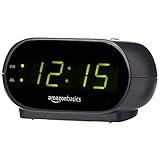
- Top Pick: Amazon Basics Small Digital Oval Alarm Clock with LED Display, Nightlight, Snooze Function & Battery Backup, Black, 4.5 x 3.5 x 2.4 Inches
- Best Value: Sharp Digital Alarm Clock with Keyboard Controls, Large Snooze, Red LED | Easy-access keyboard controls; Large snooze button; Front alarm switch; Battery backup; Simple operation; Black case
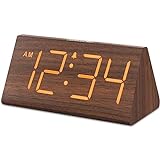
- Premium Choice: DreamSky Wooden Digital Alarm Clock for Bedrooms Desk with Large Numbers | Living Room Clock, USB Port, Loud Alarm for Heavy Sleepers, Adjustable Volume, Dimmer, DST, Mantel Clock Wood Décor (Plug in)
For most gamers, the best simple alarm clock is a plain digital bedside model with a physical snooze bar, a dimmable display and a battery backup, because it removes the phone from the nightstand without adding anything to learn. If you wake groggy in the dark, a sunrise-style wake-up light such as the Philips wake-up light range or the Hatch Restore line suits you better. If you only want a loud, mechanical, no-power option, a twin-bell analog clock does the job. This guide sorts the main types by who they suit, what to look for on the spec sheet, and what to skip.
- Why a dedicated alarm clock still makes sense for gamers
- The main types of simple alarm clock
- At a glance: which type fits which gamer
- What to check on the spec sheet
- Pick X if you…
- Budget tiers, without prices
- Common mistakes
- Placement and routine tips
- Alternatives to a standalone clock
- Frequently Asked Questions
As an Amazon Associate we earn from qualifying purchases at no extra cost to you.


Why a dedicated alarm clock still makes sense for gamers
Late-night sessions, ranked grinds and early-morning work or study shifts all collide on the same nightstand. A phone alarm means the same device that holds your chat apps, game launchers and notifications is the last thing you touch at night and the first thing you touch in the morning. A separate clock keeps the alarm job on its own device. Sleep-health organizations such as the National Sleep Foundation generally advise keeping bright screens out of the bedroom close to bedtime, and a basic clock is one easy way to follow that advice.
“Simple” here means a clock that sets in under a minute, has a clearly labeled alarm switch, and does not need an app, an account or a Wi-Fi connection to ring. Smart features are listed separately below so you can decide whether you want them.
The main types of simple alarm clock
Basic digital bedside clocks
These are the most common. They plug into the wall, usually with a battery slot that keeps time and the alarm through a power cut. Look for a large display, a brightness control that includes a very dim or off setting, a snooze bar big enough to hit in the dark, and an alarm-on indicator. Many brands make these, from budget house brands to well-known names such as Philips, Sony and Electrohome, and the differences are mostly display size, sound options and build feel.
Twin-bell and analog clocks
Windup or quartz twin-bell clocks have a mechanical hammer between two bells. They are loud, have no screen and have no menu at all. The trade-offs are a ticking sound some people find disturbing and a less precise alarm setting, since the alarm hand is moved by feel. Brands such as Westclox and Braun have long made this style, and reviewers who cover them tend to praise their simplicity and criticize the harshness of the bell.
Sunrise and wake-up light clocks
These raise a lamp gradually before the alarm time and then add a sound. The Philips wake-up light family, the Hatch Restore line and the Loftie Clock are the names that come up most in reviewer round-ups. They are less “simple” than a basic digital clock because they have light schedules, sound libraries and in some cases an app, but several of them can be set from buttons on the device. The makers describe the gradual light as a gentler wake-up; they do not promise any medical outcome, and neither should you expect one. If you have a diagnosed sleep problem, talk to a doctor rather than relying on a bedroom gadget.
Travel and compact clocks
Small battery-powered clocks with a fold-over case suit gamers who go to LAN events, tournaments or dorms. Their speakers are usually weaker, so they are a poor choice if you sleep deeply.
At a glance: which type fits which gamer
| Type | Best for | Typical stated features | Limits |
|---|---|---|---|
| Basic digital bedside clock | Anyone who wants a no-fuss alarm | Mains power, battery backup, dimmer, snooze bar | Alarm tone can be harsh; cheaper units have bright displays |
| Twin-bell analog | Heavy sleepers, screen-free rooms | Mechanical bell, no power needed on windup models | Ticking, imprecise alarm setting |
| Wake-up light (Philips, Hatch, Loftie style) | Dark mornings, light sleepers who dislike sudden noise | Gradual light ramp, multiple sounds, dimmable display | More settings, higher budget tier, some need an app |
| Compact travel clock | Events, dorms, travel | Battery power, small case | Quiet alarm, small buttons |
| Radio alarm clock | People who prefer radio to beeps | AM/FM tuner, dual alarms on some | Reception depends on the room; more buttons |
What to check on the spec sheet
- Battery backup. A clock that forgets its alarm in a power cut is useless on the one morning it matters. Check that the maker lists a backup battery and how it is used.
- Display dimming. Gamers who sleep in dark rooms want a dim or off setting. Fixed-brightness red or green digits glow across the room.
- Alarm sound options. A gradually rising beep or a choice of tones is easier to live with than one fixed buzzer. Also check for a separate volume control.
- Snooze length. Some clocks fix snooze at a set number of minutes. Pick one that matches your habit, or one that lets you cancel the alarm with a single clear switch.
- Dual alarms. Useful if your weekday and weekend schedules differ, or if you share a room.
- Weekday or weekend scheduling. Without it you will be switching the alarm off every Saturday.
- Power input. Many modern clocks use USB power or a barrel adapter. A clock with a USB port can also charge a controller or earbuds, though the maker will state the output.
Pick X if you…
| Pick this | If you… |
|---|---|
| A basic digital clock with dimmer and battery backup | want the simplest, cheapest reliable alarm |
| A wake-up light | wake before sunrise and dislike abrupt sound, and accept more settings |
| A twin-bell analog clock | sleep through quiet alarms and want nothing electronic in the bedroom |
| A radio alarm clock | like waking to music or news and have decent signal |
| A compact travel clock | attend events or move between rooms often |
Budget tiers, without prices
At the budget tier, expect basic digital clocks with a loud alarm, a simple dimmer and a battery slot. Fit and finish vary, and snooze bars can feel light. The mid-range tier adds better displays, dual alarms, USB charging and more pleasant sounds, and is where most buyers will be happy. The premium tier is dominated by wake-up lights and designer clocks, where you are paying for light quality, sound libraries and design rather than a more reliable alarm. If your only goal is to wake up on time, you gain little by going beyond mid-range.
Common mistakes
- Buying a smart clock and then never connecting it, so it falls back on a few settings you did not want.
- Choosing a clock with a very bright blue display for a dark room.
- Ignoring the battery backup and relying on power staying on.
- Choosing a quiet travel clock if you are a deep sleeper.
- Placing the clock on the far side of the room to force yourself to stand, then finding it is too quiet to hear.
Placement and routine tips
Place the clock at arm’s reach if you rely on the snooze bar, or across the room if you need a reason to stand up. Keep it away from the edge of a nightstand where a swinging arm can knock it off. If you use a wake-up light, point it toward your face rather than the wall, and read the maker’s manual for the recommended distance. Cables should run behind the table, not across a walkway, and a clock should never be covered by a blanket or cloth while powered, because the vents, if any, need air.
Alternatives to a standalone clock
- A smart speaker or display. Convenient if you already own one, but it brings voice assistants and microphones into the bedroom, which some people prefer to avoid.
- A smartwatch or band alarm. A vibrating wrist alarm is useful for shared rooms, though it needs charging and not every user wears a watch to bed.
- A phone alarm with Do Not Disturb. Still the cheapest option. If you go this route, charge the phone across the room and set notifications to stay silent.
Frequently Asked Questions
What is the simplest alarm clock to use?
A plain digital clock with a hardware alarm-on switch, separate hour and minute buttons and a snooze bar is the simplest. Clocks with a single row of labeled buttons tend to be quicker to set than those with menus or touch controls.
Are wake-up light clocks worth it for gamers?
They can be if you wake in dark conditions and find sudden noise unpleasant. Makers describe them as a gentler way to wake, but they are an extra budget item and add settings. If you simply need a reliable alarm, a basic clock does the same job.
Do I need battery backup?
Yes, if you rely on the clock for early shifts or study. Without it, a power cut can clear the alarm or the time. Check the maker’s product page to see how the backup is used and what type of battery it takes.
Is an analog alarm clock louder than a digital one?
Twin-bell models are often described by reviewers as very loud, but loudness depends on the model. Many digital clocks offer a volume control and several tones, so you can usually find one that is loud enough.
Can a bedside clock replace my phone alarm completely?
For most people, yes, provided you set both the time and the alarm on the clock and test it once during the day. Some people keep the phone alarm as a backup for important mornings, which is reasonable.
How do I stop a bright display from disturbing sleep?
Choose a clock with a dimmer that includes a very low or off setting, and turn the display away from your bed. If your clock lacks a dimmer, a small piece of tape or a cover that leaves the display partly visible can help, but never cover vents on a powered device.



Write Your Review
No reviews yet. Be the first to share your experience!