
A fan controller is not a fan. It is the box or dial that tells the case fans how fast to spin and, on RGB models, what colour to show. A gaming PC can hold six or more case fans and still run loud at idle, because a motherboard only has a few fan headers and every fan sharing one header spins at the same speed. A controller gives the fans their own instructions, so the PC stays quiet at idle and moves air under load.
The five controllers below cover the ways builders actually control fans: a software hub for six fans and lighting, two NZXT hubs that pair fan speed with RGB lighting, a manual dial for a small build that needs no software, and a ten-port distributor for a case full of fans. The difference that matters most is control: software hubs set curves per fan, manual dials set one speed by hand, and plain hubs pass one motherboard signal to every fan at once.
As an Amazon Associate, we earn from qualifying purchases.
Quick Answer
Buy the Corsair iCUE Commander CORE XT: six PWM fan ports, RGB lighting control, and temperature sensors, all run from iCUE software. Choose the NZXT RGB and Fan Controller for CAM software with separate fan and lighting channels, or the NZXT Control Hub for newer NZXT fans. Pick the Noctua NA-FC1 for manual control with no software, and the ARCTIC Case Fan Hub for ten fans on a budget.
Table of Contents
- Quick Answer
- 1. Corsair iCUE Commander CORE XT
- 2. NZXT RGB and Fan Controller
- 3. NZXT Control Hub
- 4. Noctua NA-FC1 Fan Controller
- 5. ARCTIC Case Fan Hub
- How to Choose a Fan Controller
- Who Should Skip a Fan Controller
- Frequently Asked Questions
- Final Verdict
- Product and ASIN Reference
1. Corsair iCUE Commander CORE XT

Best overall pick for software control
The Commander CORE XT is the controller to buy when one app should run the whole cooling setup. Six 4-pin PWM fan ports sit on one small board, so six case fans connect to one device instead of hunting for spare motherboard headers. Two temperature sensors are included, and iCUE turns their readings into fan curves, so fans speed up as the case warms and slow at idle.
RGB lighting runs through the same box, so Corsair RGB fans get speed and lighting from one controller. Power comes from a SATA connector, and the board talks to the PC through an internal USB 2.0 header. A listing crawl about 292 days old is the evidence here, so glance at the live offer before ordering.
Specs
- Brand: Corsair
- Fan ports: Six 4-pin PWM
- Temperature sensors: Two included
- RGB control: Corsair RGB fans
- Software: iCUE
- Power: SATA
- Connection: Internal USB 2.0 header
- Tier: Premium
2. NZXT RGB and Fan Controller

Best CAM pick for fan speed and lighting together
The NZXT RGB and Fan Controller splits the job in two: three fan channels for speed and six RGB lighting channels for colour. The lighting channels carry up to 120 LEDs combined, covering several RGB strips or a set of RGB fans from one box. NZXT CAM software sets the fan curves and the lighting effects, so both halves change from the same screen.
This is the pick for a build that already runs CAM, and for builders who want fan speed and lighting handled by one device rather than a hub plus a separate lighting controller. A two-year warranty backs the unit. A listing crawl about 250 days old is the evidence here, so glance at the live offer before ordering.
Specs
- Brand: NZXT
- Fan channels: Three
- RGB channels: Six, up to 120 LEDs combined
- Software: NZXT CAM
- Warranty: Two years
- Tier: Mid-range
3. NZXT Control Hub
Best newer pick for NZXT fan builds
The NZXT Control Hub is the newer NZXT controller, built for current NZXT fans. It controls up to five PWM fans, or four NZXT single-frame fans, and handles digital RGB lighting through the same hub. NZXT CAM software runs the fan curves and the lighting, so NZXT fans get speed and colour from one small device.
Power comes from an 8-pin PCIe connector, and the hub connects to the motherboard through an internal USB 2.0 header. A two-year warranty backs it. A listing crawl about 199 days old is the newest evidence here.
Specs
- Brand: NZXT
- Fan ports: Five PWM, or four NZXT single-frame
- RGB control: Yes, digital RGB lighting
- Software: NZXT CAM
- Power: 8-pin PCIe
- Connection: Internal USB 2.0 header
- Warranty: Two years
- Tier: Mid-range
4. Noctua NA-FC1 Fan Controller
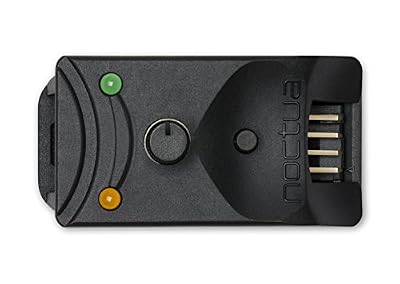
Best manual pick with no software
The Noctua NA-FC1 is the controller for a build that should never need an app. A small dial sets the fan speed by hand, and it works two ways: on its own for manual speed reduction, or in tandem with the motherboard automatic fan control, trimming the speed the board asks for. A no-stop mode keeps the fan from stalling at the lowest dial setting, which matters for quiet builds.
The included three-way splitter lets one NA-FC1 drive up to three PWM fans, and the unit is rated for up to 3 amps in total. A six-year warranty backs it, the longest cover here. A listing crawl about 241 days old is the evidence here, so glance at the live offer before ordering.
Specs
- Brand: Noctua
- Control: Manual dial, for 4-pin PWM fans
- Fans per unit: Up to three, with splitter
- Modes: Manual, or trim on motherboard control
- No-stop mode: Yes
- Current rating: Up to 3 amps total
- Warranty: Six years
- Tier: Mid-range
5. ARCTIC Case Fan Hub

Best budget pick for ten fans
The ARCTIC Case Fan Hub is the simplest answer to a case full of fans: ten 4-pin PWM outputs on one small board, powered by a SATA connector. Every fan on the hub follows the same signal from a single motherboard fan header, so one BIOS curve drives all ten at once.
Each port carries up to 1 amp, with 4.5 amps total, and the unit measures 55.6 by 86.3 by 14.3 millimetres and weighs 50 grams, so it tucks behind the motherboard tray. A listing crawl about 303 days old is the evidence here, so glance at the live offer before ordering.
Specs
- Brand: ARCTIC
- Fan ports: Ten 4-pin PWM
- Power: SATA
- Current: Up to 1 amp per port, 4.5 amps total
- Size: 55.6 by 86.3 by 14.3 millimetres
- Weight: 50 grams
- Tier: Budget
How to Choose a Fan Controller
Count the motherboard fan headers first
A motherboard usually carries only a few fan headers, and a gaming case can hold far more fans than that. Count both: if the fans outnumber the headers, a hub or controller is the fix. The ARCTIC hub turns one header into ten fan ports, the Commander CORE XT turns one USB header into six, and the NA-FC1 turns one header into three through its splitter.
Decide between software, manual, and pass-through control
Software hubs give the most control: the Commander CORE XT and the two NZXT hubs set a different curve for each fan group from an app, and change lighting at the same time. The NA-FC1 gives one speed by hand on a dial, which suits a build with a fixed cooling setup. The ARCTIC hub gives no control of its own at all: it passes the motherboard signal to every fan at once, so all ten fans share one curve.
Match the controller to the fan type
PWM hubs control the speed of 4-pin PWM fans. A 3-pin fan plugged into most PWM hubs will run at full speed, because it has no PWM signal wire, so check the fan connectors before buying. The NA-FC1 is also built for 4-pin PWM fans, and its no-stop mode keeps them turning at low speeds.
Check the power source and the current limit
Every controller here draws fan power from the power supply rather than the motherboard header: SATA on the Commander CORE XT and the ARCTIC hub, an 8-pin PCIe connector on the NZXT Control Hub. Check the current rating too: the ARCTIC hub allows 1 amp per port and 4.5 amps in total, and the NA-FC1 allows 3 amps in total, so high-draw fans need the limit checked before they share one device.
A note on fan controller recalls
No CPSC recall covers PC fan controllers or fan hubs as a class, and none covers any pick here. A Fractal Design replacement program for the hub bundled inside the Torrent case was a manufacturer program, not a CPSC recall. Recent CPSC fan recalls cover different classes entirely, such as bedroom fans and ventilation fans in heat pumps.
Who Should Skip a Fan Controller
Skip a fan controller if the motherboard already has a header for every fan and its BIOS fan curves do the job, since a controller would add a box and an app. Skip the software hubs if another background app is unwelcome: the NA-FC1 dial and the ARCTIC hub need no software. Skip the ARCTIC hub if the fans need different speeds, since all ten share one signal. Skip an RGB controller if the fans have no lighting.
Frequently Asked Questions
What is the difference between a fan controller and a fan hub?
A controller sets fan speeds, either from software curves or from a manual dial, while a plain hub only distributes one motherboard signal to many fans. The Commander CORE XT and the NZXT hubs are controllers, the NA-FC1 is a manual controller, and the ARCTIC hub passes one signal to ten fans with no control of its own.
Do fan controllers work with 3-pin fans?
Most PWM controllers and hubs only control the speed of 4-pin PWM fans. A 3-pin fan plugged into one will usually run at full speed, because it has no PWM signal wire. Keep 3-pin fans on motherboard headers that support voltage control.
How many fans can one controller run?
It depends on the device and its current limit. The Commander CORE XT runs six fans, the NZXT RGB and Fan Controller runs three fan channels, the NZXT Control Hub runs up to five PWM fans, the Noctua NA-FC1 runs up to three fans through its splitter, and the ARCTIC hub runs ten fans on one motherboard signal.
Do I need software for a fan controller?
It depends on the pick. The Commander CORE XT needs iCUE and the two NZXT hubs need CAM, while the Noctua NA-FC1 is a manual dial that needs no software, and the ARCTIC hub is driven by the motherboard BIOS through a single fan header.
Final Verdict
Buy the Corsair iCUE Commander CORE XT: six PWM fan ports, RGB lighting control, and temperature sensors, all run from iCUE software. Choose the NZXT RGB and Fan Controller for CAM software with separate fan and lighting channels, or the NZXT Control Hub for newer NZXT fans. Pick the Noctua NA-FC1 for manual control with no software, and the ARCTIC Case Fan Hub for ten fans on a budget.





Write Your Review
No reviews yet. Be the first to share your experience!