
A 49-inch super ultrawide monitor at 5120 x 1440 renders about 7.4 million pixels per frame, roughly double a 1440p screen and within a step of 4K, so a card that felt fast on a 27-inch panel can feel ordinary here. The five picks below are matched to that pixel load on core counts, memory capacity, boost clocks and cooler dimensions.
Every pick is an RTX 50-series card with DisplayPort 2.1b output, the connection a 5120 x 1440 panel needs for its full 240 Hz refresh rate with display stream compression. The lineup runs from an RTX 5080 flagship to an RTX 5070 that leans on DLSS upscaling, and each card is pinned to one exact listing.
As an Amazon Associate, we earn from qualifying purchases.
Quick Answer
For most super ultrawide owners, the MSI GeForce RTX 5070 Ti Shadow 3X OC is the pick: 16GB of GDDR7, a triple-fan cooler and SFF-ready dimensions. The GIGABYTE RTX 5080 Gaming OC is the high-refresh flagship, the GIGABYTE EAGLE OC SFF carries the fastest 5070 Ti clock here, the ZOTAC SOLID SFF OC is the true two-slot option, and the PNY Epic-X ARGB OC is the entry point.
How to Choose a Graphics Card for Super Ultrawide Gaming
Start with the pixel count, not the panel size
A 5120 x 1440 frame holds 7,372,800 pixels. A 2560 x 1440 frame holds about 3.7 million, a 3440 x 1440 ultrawide frame about 5.0 million, and a 4K frame about 8.3 million. Super ultrawide therefore asks for roughly 89 percent of a 4K workload and double the 1440p workload, and cards marketed as 1440p cards are built for half this load. Shop the way you would shop for 4K, then adjust for refresh rate: at 240 Hz the card must feed frames far faster than a 4K 60 Hz screen demands.
VRAM is the hard ceiling
Texture pools and frame buffers scale with resolution, and memory capacity cannot be upgraded later. The four top picks here carry 16GB of GDDR7, leaving headroom for high texture settings at 5120 x 1440. The 12GB entry pick works by leaning on DLSS upscaling and careful texture settings in heavy titles. If you keep a card for several years, capacity is the spec that ages first.
DLSS 4 does the heavy lifting at 240 Hz
All five picks are Blackwell cards with DLSS 4 and Multi Frame Generation. At super ultrawide resolutions, generated frames are how a 240 Hz panel gets fed in demanding games, and upscaling is what lets the RTX 5070 below stay in this guide at all. Players who want native rendering only should read one tier up: the RTX 5080 becomes the starting point, not the flagship.
Check the output, the length and the power cable
Driving 5120 x 1440 at 240 Hz takes DisplayPort 2.1b with display stream compression, and all five picks carry three DisplayPort 2.1b outputs plus one HDMI 2.1b. Lengths run from about 300 mm to 340 mm, so measure the case first; the ZOTAC is the only true two-slot card here. Every pick draws power through a single 16-pin connector: seat it fully, prefer the power supply maker’s native cable, and skip angled adapters. The one CPSC recall in this area covers CableMod angled 12VHPWR adapters, versions 1.0 and 1.1, recalled in February 2024 (recall 24-112); those adapters only, and no CPSC recall covers any graphics card in this guide.
The 5 Best Graphics Cards for Super Ultrawide Gaming
1. MSI GeForce RTX 5070 Ti Shadow 3X OC
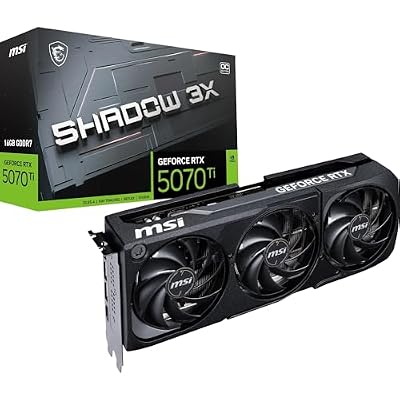
The Shadow 3X OC is the balanced pick: a triple-fan RTX 5070 Ti with 8,960 CUDA cores, 16GB of GDDR7 and a 2,482 MHz boost clock, in a card MSI rates as SFF-Ready at 303 mm long and 49 mm thick. TORX Fan 5.0 fans and a nickel-plated copper baseplate handle the 300 W budget, and MSI lists an Extreme Performance clock of 2,497 MHz through MSI Center software. There is no lighting and no dual BIOS; the offer is the full 5070 Ti specification in a smaller triple-fan body.
Specs
– GPU: NVIDIA GeForce RTX 5070 Ti per MSI
– CUDA cores: 8,960 per MSI
– Boost clock: 2,482 MHz per MSI
– Memory: 16GB GDDR7, 256-bit, 28 Gbps per MSI
– Outputs: 3 x DisplayPort 2.1b, 1 x HDMI 2.1b per MSI
– Dimensions: 303 x 121 x 49 mm per MSI
– Power: 300 W, 750 W power supply recommended per MSI
– Tier: Mid-range
Choose it for the full 16GB specification in a compact triple-fan card. Skip it if you want the highest factory clock or a flagship GPU.
2. GIGABYTE GeForce RTX 5080 Gaming OC 16G

The Gaming OC is the flagship: an RTX 5080 with 10,752 CUDA cores, a 2,730 MHz boost clock and 16GB of GDDR7 at 30 Gbps on a 256-bit bus, the widest memory bandwidth here. It is the card for high frame rates at native 5120 x 1440 and for feeding a 240 Hz panel with less frame generation help. The trade-offs are physical: at 340 mm long and 70 mm thick it is the largest card here, and GIGABYTE recommends an 850 W power supply.
Specs
– GPU: NVIDIA GeForce RTX 5080 per GIGABYTE
– CUDA cores: 10,752 per NVIDIA
– Boost clock: 2,730 MHz per GIGABYTE
– Memory: 16GB GDDR7, 256-bit, 30 Gbps per GIGABYTE
– Outputs: 3 x DisplayPort 2.1b, 1 x HDMI 2.1b per GIGABYTE
– Dimensions: 340 x 156 x 70 mm per GIGABYTE
– Power: 850 W power supply recommended per GIGABYTE
– Tier: Premium
Choose it for native rendering and the highest refresh rates. Skip it if your case cannot fit a 340 mm card or your power supply is under 850 W.
3. GIGABYTE GeForce RTX 5070 Ti EAGLE OC SFF 16G

The EAGLE OC SFF carries the fastest factory clock of the three 5070 Ti picks, 2,542 MHz against a 2,452 MHz reference, in a 2.5-slot SFF-Ready body 304 mm long. It adds a dual BIOS with performance and silent modes, which the MSI and ZOTAC picks do not offer, plus WINDFORCE cooling with Hawk fans per GIGABYTE. For a small case with 2.5 slots of room, it is the strongest clock-per-litre option here.
Specs
– GPU: NVIDIA GeForce RTX 5070 Ti per GIGABYTE
– CUDA cores: 8,960 per GIGABYTE
– Boost clock: 2,542 MHz per GIGABYTE
– Memory: 16GB GDDR7, 256-bit, 28 Gbps per GIGABYTE
– Dimensions: 304 x 126 x 50 mm, 2.5-slot per GIGABYTE
– Power: 300 W, 750 W power supply recommended per GIGABYTE
– Extras: Dual BIOS with performance and silent modes per GIGABYTE
– Tier: Mid-range
Choose it for the fastest 5070 Ti clock and a BIOS switch. Skip it if your case allows only a true two-slot card.
4. ZOTAC GAMING GeForce RTX 5070 Ti SOLID SFF OC
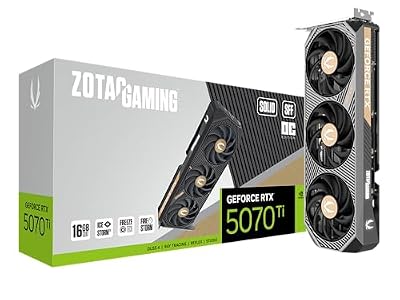
The SOLID SFF OC is the fit specialist: the same 8,960 cores and 16GB of GDDR7 as the other 5070 Ti picks, with a 2,482 MHz boost clock, in a 41.6 mm thickness that ZOTAC rates as a true two-slot design. IceStorm 2.0 cooling handles the 300 W budget in that slim body, with three DisplayPort 2.1b outputs and support for up to four displays. It gives up nothing in memory or cores to fit small builds; the compromise is cooler mass, not specification.
Specs
– GPU: NVIDIA GeForce RTX 5070 Ti per ZOTAC
– CUDA cores: 8,960 per ZOTAC
– Boost clock: 2,482 MHz per ZOTAC
– Memory: 16GB GDDR7, 256-bit, 28 Gbps per ZOTAC
– Dimensions: 304.4 x 115.8 x 41.6 mm, 2-slot per ZOTAC
– Power: 300 W, 750 W power supply recommended per ZOTAC
– Tier: Mid-range
Choose it when slot width, not length, is your case limit. Skip it if you have room for a thicker cooler and want the quietest possible fans.
5. PNY GeForce RTX 5070 ARGB Epic-X OC Triple Fan

The Epic-X is the entry point: an RTX 5070 with 6,144 CUDA cores and 12GB of GDDR7, but with the highest factory boost clock in this guide at 2,685 MHz and a triple-fan ARGB cooler in a 2.4-slot SFF-Ready body. At 5120 x 1440 it is a DLSS card: upscaling and Multi Frame Generation are part of the plan, and texture settings need more care than on the 16GB picks. In return it asks for the least power here, 250 W with a 650 W power supply recommended per PNY.
Specs
– GPU: NVIDIA GeForce RTX 5070 per PNY
– CUDA cores: 6,144 per PNY
– Boost clock: 2,685 MHz per PNY
– Memory: 12GB GDDR7, 192-bit, 28 Gbps per PNY
– Outputs: 3 x DisplayPort 2.1b, 1 x HDMI 2.1b per PNY
– Power: 250 W, 650 W power supply recommended per PNY
– Tier: Budget
Choose it to get into super ultrawide gaming at the lowest commitment here. Skip it if you refuse upscaling or plan to keep the card through several game generations.
Who Should Skip These Graphics Cards
Skip this whole guide if your panel is the 57-inch dual-UHD class at 7680 x 2160: that much heavier resolution belongs to RTX 5090 territory. Skip it if you game at 3440 x 1440, where a standard RTX 5070 roundup is the right list and every card here is overspend. Skip the 32:9 format entirely for competitive esports, where a fast 1440p screen is the better tool. And skip every pick except the ZOTAC if your case allows only two slots, and every pick if your power supply is under 650 W.
Frequently Asked Questions
Is the RTX 5070 enough for 5120 x 1440 gaming?
Yes, with DLSS doing real work. The PNY pick holds playable frame rates at super ultrawide resolution by combining upscaling with Multi Frame Generation, and its 2,685 MHz factory clock is the highest here. What it cannot promise is native rendering at high settings in the heaviest titles, and its 12GB of memory is the first limit you will meet. Buy it as an upscaling card, not a native one.
How much VRAM do I need for super ultrawide gaming?
Sixteen gigabytes is the comfortable figure at 5120 x 1440, because texture pools and frame buffers scale with the 7.4 million pixel frame; four of the five picks carry 16GB. Twelve gigabytes remains workable with DLSS upscaling and sensible texture settings, but it is the ceiling that ends the card’s useful life at this resolution, not its core count.
Can one cable drive a 49-inch super ultrawide monitor at 240 Hz?
Yes. DisplayPort 2.1b with display stream compression carries 5120 x 1440 at 240 Hz over a single cable, and every pick here has three such outputs. HDMI 2.1b can also drive these panels, but DisplayPort is the connection the 240 Hz modes are built around, so use it first and keep HDMI for a second screen.
Is super ultrawide harder to run than 4K?
Slightly easier on paper, similar in practice. A 5120 x 1440 frame holds about 89 percent as many pixels as a 3840 x 2160 frame, so the raw fill load is a little lower, though the wider field of view puts more of a scene on screen and claws some back. Treat the two as the same shopping class: a card right for one is roughly right for the other.
Final Verdict
Buy for the pixel count first and the badge second. Most super ultrawide owners should take the MSI Shadow 3X OC for its full 16GB specification in a compact body. Choose the GIGABYTE RTX 5080 Gaming OC for native rendering and 240 Hz ambitions, the GIGABYTE EAGLE OC SFF for the fastest 5070 Ti clock, the ZOTAC SOLID SFF OC when only two slots are free, and the PNY Epic-X ARGB OC to enter the format on a DLSS plan. Confirm the exact model and case clearance on the listing before ordering.










Write Your Review
No reviews yet. Be the first to share your experience!