
- Top Pick: Lenovo 15.6" FHD Business Laptop, Intel Processor, 8GB DDR5, 128GB Storage | 1TB Cloud Storage, 2026 Edition, Copilot AI+Office 365, Slim PC for Student & Home Office, Win 11, Arctic Grey
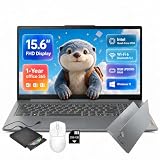
- Best Value: Lenovo IdeaPad Slim-3i 15.6-in Laptop – 1-Y Office 365, FHD, Wi-Fi 6, USB-C | Intel Quad-Core N150, 8GB LPDDR5, 128GB UFS, 256GB SD Card, Windows 11, Privacy Shutter, for Home Office & Student
- Premium Choice: Lenovo IdeaPad Slim 3 • 15.6" FHD Business Laptop • AMD Ryzen 5 • 8GB RAM DDR5 • 256GB SSD • 2026 Edition • Windows 11
Working from home turns a laptop into an office, a conference room, and a filing cabinet all at once. When you narrow the search to Lenovo, the real question becomes which configuration of the same 15.6-inch design family suits a remote worker: how much memory the daily stack of chat, browser tabs, and video calls needs, whether the storage is large enough to keep working files without a cloud dependency, and whether the processor is Intel or AMD. The labels on these listings blur together, so the differences that matter are in the spec lines.
This guide is for remote employees, freelancers, and people who run a side business from a spare-bedroom desk. It covers seven Lenovo laptops, most of them in the budget and mid-range tiers, and judges them only from what the listings state. Plenty of 2026 listings lean heavily on words like “Copilot AI” and “long battery life,” so the sections below focus on thresholds you can check: RAM type, storage size, display finish, and ports. One accessory in the same search results, a wired USB headset, is not a laptop and is left out of the rankings.
Quick Picks
As an Amazon Associate we earn from qualifying purchases at no extra cost to you.



| Product | Best for | Key spec from the title |
|---|---|---|
| Lenovo 15.6″ FHD Business Laptop | Cloud-first remote work | 8GB DDR5, 128GB storage, Office 365 |
| Lenovo IdeaPad Slim-3i 15.6″ | Extra storage via SD card | Intel N150, 8GB LPDDR5, 128GB UFS, 256GB SD card |
| Lenovo IdeaPad Slim 3 Ryzen 5 | More local file space | AMD Ryzen 5, 8GB DDR5, 256GB SSD |
| Lenovo IdeaPad Slim 3i (Arctic Grey) | Simple Microsoft 365 setup | Intel N150, 8GB, 128GB SSD |
| Lenovo Essential 15.6″ with external HDD | Large archive of old files | 8GB DDR5, 128GB, 500GB external HDD |
| Lenovo V15 15.6″ | Roomier internal drive | 8GB DDR5, 256GB SSD, Wi-Fi 6 |
| Lenovo Essential 15.6″ (cloud bundle) | Light office and email | 8GB DDR5, 128GB, anti-glare screen |
How to Choose
Match storage to how you handle files
Every laptop here carries 8GB of memory, so storage becomes the main separator. A 256GB SSD is the practical minimum if you save client files locally, install conferencing software, and let Windows update twice a year. The 128GB models are viable only if your documents live in a company drive or a cloud service. Extras such as an SD card or external hard drive help, but they are slower and easy to leave behind on a desk.
If your employer requires encrypted local storage or restricts cloud services, the internal drive size matters even more. In that case, treat 256GB as the starting point and budget for an external SSD that you keep in a drawer for monthly backups.
Processor family and what it means for calls
The Intel N150 is an entry-level quad-core chip aimed at documents, browsing, and video calls. An AMD Ryzen 5 sits a tier higher and handles spreadsheets and several apps at once more comfortably. If your day includes screen sharing while a large spreadsheet is open, lean toward the Ryzen option; for email and a chat app, the N150 is adequate.
Remember that video calls lean on the processor, memory, and camera together. A laptop with 8GB of RAM can run a call comfortably, but closing unused tabs before joining a meeting keeps fan noise and lag down. A quiet, cool laptop is a small but real quality-of-life gain for people who spend hours in meetings.
Display finish and desk setup
A 15.6-inch FHD (1920 by 1080) panel is the standard here. An anti-glare finish helps in a room with window light behind you. For long days, plan to connect an external monitor and keyboard: check that the laptop has USB-C or HDMI output, and note that titles usually mention only some ports, so open the full listing.
Also think about posture. A 15.6-inch laptop on a desk puts the screen too low for most people, so a stand and a separate keyboard are inexpensive ways to avoid neck strain. Those add-ons matter more than a faster processor for comfort over a full workday.
Ignore marketing labels, check the fundamentals
“Copilot AI,” “long battery life,” and “slim design” appear on nearly every listing and tell you little about daily comfort. Ignore bundled cloud storage as a hardware feature. Instead check memory type (DDR5 or LPDDR5), the Windows edition, and whether the machine ships in S mode, which restricts which programs you can install for work.
Budget Lenovo models cut corners in familiar places: modest speakers, an average webcam, and plastic bodies that flex slightly. None of this blocks productive work, but it explains why a headset and webcam are common companions.
The 7 Best Options
Lenovo 15.6″ FHD Business Laptop
This model is aimed at remote workers who already store files in the cloud. The title lists an Intel processor, 8GB DDR5 memory, 128GB of storage, a 1TB cloud storage bundle, Copilot AI features, and Office 365, in a slim 15.6-inch FHD body.
- Strength: DDR5 memory and an FHD display at a budget tier.
- Strength: Office 365 is part of the package for email and documents.
- Trade-off: only 128GB of local storage, so large project folders will not fit.
Skip it if your job requires keeping big files stored locally while offline.
Lenovo IdeaPad Slim-3i 15.6″
A pick for people who want expandable-feeling storage. The title lists an Intel quad-core N150, 8GB of LPDDR5 memory, 128GB of UFS storage, a bundled 256GB SD card, a one-year Office 365 subscription, Wi-Fi 6, and USB-C.
- Strength: the included SD card adds file space without extra purchases.
- Strength: Wi-Fi 6 and USB-C support modern home networks and chargers.
- Trade-off: UFS and SD storage are slower than a typical SSD for large transfers.
Skip it if you move large files daily and need fast internal storage.
Lenovo IdeaPad Slim 3 Ryzen 5
For many remote workers this is the more balanced configuration. The listing cites an AMD Ryzen 5, 8GB DDR5 RAM, a 256GB SSD, and Windows 11 in a 15.6-inch FHD business-oriented laptop.
- Strength: a Ryzen 5 processor tier above entry-level chips.
- Strength: a 256GB SSD doubles the internal storage of several rivals.
- Trade-off: 8GB of RAM can feel tight if you keep dozens of tabs open.
Skip it if your workload includes video editing or large data models.
Lenovo IdeaPad Slim 3i (Arctic Grey)
A straightforward option for someone who wants a ready-to-use setup. The title lists Microsoft 365, 8GB of RAM, a 128GB SSD, an Intel N150 processor, Windows 11, and an Arctic Grey finish.
- Strength: Microsoft 365 is included, so word processing and email are covered immediately.
- Strength: an SSD rather than eMMC-class storage helps startup and app loading.
- Trade-off: 128GB is limited for long-term local storage.
Skip it if you plan to keep years of project files on the machine.
Lenovo Essential 15.6″ with external HDD
This listing stands out for the bundled 500GB external hard drive. The title lists an Intel processor, 8GB DDR5, 128GB internal storage, an FHD anti-glare display, long battery life, and Office 365.
- Strength: the external drive gives you a place for archives and backups.
- Strength: an anti-glare screen is kind to eyes in a bright home office.
- Trade-off: external drives add a cable and one more thing to manage.
Skip it if you prefer a single clean desk setup with everything internal, or if you rarely look at files older than a few months.
Lenovo V15 15.6″
The V15 is a business-oriented line, and this listing pairs it with an Intel processor, 8GB DDR5 RAM, a 256GB SSD, Copilot AI, Wi-Fi 6, and Office 365. The title is cut off after “Idea,” so check the full listing for details.
- Strength: 256GB SSD with DDR5 memory at a modest tier.
- Strength: Wi-Fi 6 helps with stable calls on a busy home network.
- Trade-off: the exact processor model is not named in the title.
Skip it if you need to know the exact CPU before buying, since the cut-off title leaves that detail unconfirmed and a wrong guess could affect call performance.
Lenovo Essential 15.6″ (cloud bundle)
The simplest configuration in the group, suited to email, calendars, and web apps. The title lists an Intel processor, 8GB DDR5, 128GB storage, 1TB of cloud storage, an anti-glare screen, Copilot AI, and Office 365.
- Strength: anti-glare FHD screen and DDR5 memory at an entry tier.
- Strength: the cloud storage bundle helps if you work mostly online.
- Trade-off: it is nearly identical to other Essential listings, so compare carefully.
Skip it if your job needs offline access to large files.
Which One Fits Your Situation
You save client files on the laptop
Choose the Lenovo IdeaPad Slim 3 Ryzen 5. Its 256GB SSD and Ryzen 5 chip give more breathing room than the 128GB entries.
Your files all live in the cloud
The Lenovo 15.6″ FHD Business Laptop works well because its cloud bundle and Office 365 match a browser-first workflow.
You have a pile of old project archives
The Lenovo Essential with the 500GB external HDD covers backups and historical files without additional purchases, which is handy if past projects occasionally come back for revisions.
You want a simple grab-and-go setup
The IdeaPad Slim 3i in Arctic Grey comes with Microsoft 365 and an SSD, so it is ready for email and documents right away.
This also suits a home office that doubles as a guest room or dining table: the laptop and its charger pack away at the end of the day, and nothing else needs to be plugged in or stored.
Common Mistakes
- Buying 128GB of storage and expecting it to hold a year of client work.
- Treating every “Essential” listing as identical when RAM and storage differ.
- Relying on an SD card or external drive as the only backup.
- Skipping a headset and external webcam, then relying on built-in laptop audio for daily calls.
- Not confirming the processor model when the title is truncated.
Related guides
- Low Profile Nvidia Graphics Cards For Small Form Factor Pcs
- Why Is My Gpu Benchmark Score Lower Than Others
- Travel Backpack With Laptop Compartment
Frequently Asked Questions
Is 8GB of RAM enough for working from home?
For email, chat, documents, and video calls it is workable. If you keep many browser tabs and heavy spreadsheets open together, 16GB would be more comfortable, and these listings do not offer it.
Intel N150 or Ryzen 5?
The N150 is entry-level and suits light tasks such as email, chat, and web apps. A Ryzen 5 is a step up for multitasking and larger files, and it is the better pick if you often share your screen while other programs are open.
Do I need an external monitor?
A second screen makes long workdays more comfortable and is worth considering, since a 15.6-inch panel gets crowded when you juggle chat, email, and a document. Confirm HDMI or USB-C display output in the full listing before you plan the setup.
Are bundled Office subscriptions permanent?
Many are time-limited, such as one year. Read the listing details and plan for renewal if you rely on Office daily.


Write Your Review
No reviews yet. Be the first to share your experience!