
The Lian Li 4 Slots Vertical GPU Kit (VG4v4) is the strongest all-round pick here for anyone who wants a finished vertical mount: a steel bracket, an anti-sag arm and a PCIe 5.0 riser in one package that handles thick graphics cards. A vertical GPU mount turns the card 90 degrees so it faces the glass side panel, and the riser cable carries the PCIe signal from the motherboard slot to the relocated card. If your case already has a vertical bracket, the cable-only options below can be the simpler fix, and the NZXT and Cooler Master kits suit smaller or branded builds.
Quick List
- XMSJSIY PCIe 3.0 riser – best for a plain shielded cable swap in a case with a bracket
- Cooler Master Gen5 Vertical Holder – best for a tool-light PCIe 5.0 kit in ATX and E-ATX cases
- GLOTRENDS 200mm PCIe 3.0 riser – best for older GTX 10, GTX 16 and RTX 20 era builds
- Lian Li VG4v4 4-Slot Kit – best for thick, heavy cards that need a full bracket
- NZXT Vertical GPU Mounting Kit – best for matching NZXT mid-tower cases
- JEYI PCIe 5.0 flexible riser – best for a Gen 5 cable with adjustable bend angles
Which One Is Right for You?
| If you… | Choose |
|---|---|
| own a heavy three- or four-slot card and want a complete support bracket | Lian Li VG4v4 |
| run an NZXT H-series case and want a matching bracket | NZXT Vertical GPU Mounting Kit |
| want a PCIe 5.0 holder for an ATX or E-ATX case | Cooler Master Gen5 Vertical Holder |
| need only a Gen 5 cable for a case with a built-in vertical bracket | JEYI PCIe 5.0 riser |
| use an older GTX 10 or RTX 20 card in a case with a bracket | GLOTRENDS 200mm riser |
| want a simple shielded 90-degree cable and nothing else | XMSJSIY PCIe 3.0 riser |
If you are still undecided after the table, start from your case rather than your card: a case with an existing bracket points to a cable, a case without one points to a kit, and a very thick card points to the Lian Li. Slot count is the second filter, and your PCIe generation is the third. The first question is whether you need a bracket or only a cable. A cable alone carries the signal but does not hold the card, so it belongs in cases that already provide a vertical mounting position. The second question is slot count and card thickness, because every vertical kit consumes expansion slot openings on the rear of the case.
All 6 Picks in Detail
1. XMSJSIY PCIe 3.0 x16 Riser Cable – Best for a Plain Shielded Cable Swap
As an Amazon Associate we earn from qualifying purchases at no extra cost to you.

This is a cable-only product, so it suits builders whose case already includes a vertical bracket and who just need a shielded riser to bridge the gap between the motherboard slot and the card. The listing describes a PCI-E 3.0 x16 male-to-female extension with a 90-degree right-angle connector and shielding for high-speed signals. It is not a bracket, so it will not support the weight of the card on its own.
Who it suits: owners of a case with a factory vertical bracket whose original riser is missing, damaged or too short, and anyone who wants to try vertical mounting before spending on a full kit. It also suits builders running a PCIe 3.0 platform, where a Gen 3 cable gives up nothing. Before buying, confirm the cable length on the listing against the distance from your slot to the bracket, because a cable that is a few centimeters short cannot be fixed with routing.
- Interface: PCIe 3.0 x16, male to female
- Connector: 90-degree right-angle end for a tight turn behind the card
- Shielding: listed as shielded for high-speed use
- Length: confirm on listing
- Bracket: not included, so check your case has a mount
Installation is straightforward: seat the male end in the motherboard slot, fit the card to the female end, and secure the card to the case bracket with the slot screws. Route the cable so that it follows a gentle curve and never presses on the fan blades. Leave the PC powered down and the power supply switched off while connecting, and double-check that the latch on the motherboard slot is engaged.
Pros
- Simple, single-part replacement for a failed or missing riser
- Right-angle end helps in cramped bracket layouts
Cons
- Limited to PCIe 3.0 speeds, which can trim a very fast modern card
- No support hardware, so heavy cards still need case-side support
Compared with the GLOTRENDS cable, this one is the more generic option, while the GLOTRENDS listing is more specific about which GPU generations it targets.
2. Cooler Master Gen5 Vertical Graphics Card Holder – Best for a Tool-Light PCIe 5.0 Kit

Cooler Master pairs a modular holder with a PCIe 5.0 riser, and the listing names E-ATX, ATX and Micro-ATX cases. The white finish suits light-colored builds. Manufacturer information points to a holder that adjusts without tools, a 165 mm class riser and support for cards up to three slots thick, but confirm those figures on the product page for the exact variant you receive.
Who it suits: builders with a standard ATX or E-ATX tower who want to show off the card and prefer an adjustable holder to a case-specific part. The white finish fits white-and-silver themes, and the modular design lets you shift the card position to clear fans or a radiator. It is a sensible middle path between a bare cable and the tall, slot-hungry kits.
- Interface: PCIe 5.0 x16 riser, backward compatible with older generations
- Case support: E-ATX, ATX and Micro-ATX per the listing
- Adjustment: holder position shifts toward the front and side panel
- Card thickness: triple-slot class, confirm on listing
- Finish: white
Fit notes: the manufacturer cautions that the kit may interfere with components near the rear panel and limits the maximum CPU cooler height, so measure your cooler and the gap behind the I/O area before ordering. Because the riser runs at PCIe 5.0, current boards that support the standard can keep full link speed, while older boards simply negotiate lower. Check your BIOS version if the system does not detect the card at its expected speed.
Pros
- Gen 5 headroom for current and next-generation cards
- Adjustable holder helps with different case depths
Cons
- Limit on CPU cooler height and rear-panel clearance, so measure first
- Not intended for cards thicker than the triple-slot class
It is a lighter-duty alternative to the Lian Li kit, which accommodates thicker cards but requires more open slots.
3. GLOTRENDS 200mm PCIe 3.0 x16 GPU Riser Cable – Best for Older GTX and RTX 20 Builds

The listing says this 200 mm right-angle cable is ready for GTX 10 and GTX 16 cards, RTX 20 cards, and Radeon RX 5000 and Vega generations, and it also names Gen 3 and Gen 2 GPUs. It highlights EMI protection. Like the XMSJSIY, it is a cable, not a bracket.
Who it suits: owners of mid-generation graphics cards who are repurposing a case with a vertical bracket, or who bought a bracket without a cable. The listing is explicit about the older generations it targets, which makes this a low-risk choice for a build around a GTX 1660, RTX 2060 or Radeon RX 5700 class card. The 200 mm length also helps in cases where the bracket sits farther from the motherboard slot.
- Length: 200 mm per the listing
- Interface: PCIe 3.0 x16
- Connector: 90-degree right angle
- Targeted cards: GTX 10/16, RTX 20, RX 5000, Vega
- Shielding: EMI protection listed
Fit notes: because the cable is limited to PCIe 3.0, pairing it with a recent Gen 4 or Gen 5 card means the link will run at Gen 3 speed. For many games this is a small trade-off, but it is worth knowing before you commit. Keep the cable clear of the CPU cooler fan and the rear exhaust, and make sure the 90-degree end faces the right way for your bracket orientation before tightening any screws.
Pros
- Longer reach than many short riser cables
- Clear statement of the GPU generations it targets
Cons
- PCIe 3.0 ceiling, so PCIe 4.0 or 5.0 cards will drop to Gen 3 speeds
- No mounting hardware included
Choose it over the XMSJSIY when the longer 200 mm reach and the older-card compatibility list matter to you.
4. Lian Li 4 Slots Vertical GPU Kit (VG4v4) – Best for Thick, Heavy Cards

This is the most complete kit in the group: a steel bracket with a reinforced anti-sag arm, a PCIe 5.0 riser, and room for cards up to four slots thick. The listing carries a clear warning to verify six open case slots for vertical mounting, or seven for angled mounting. Lian Li documents forward, neutral and backward tilt and several height positions.
Who it suits: owners of large, heavy cards, builders who want a showpiece layout with the full cooler visible, and people who would rather buy one well-supported kit than assemble separate parts. Lian Li documents the kit as supporting cards up to four slots thick and shifting the card forward, so it appeals to those with spacious cases.
- Interface: PCIe 5.0 x16 riser
- Card thickness: up to four slots
- Slot requirement: six open slots vertical, seven angled
- Adjustment: tilt and height positions on the bracket
- Finish: white
Fit notes: the anti-sag arm and the choice of tilt and height positions are what justify the slot requirement. Check the listing note about open slots carefully, since a case with only seven slots leaves little margin. Lian Li also advises a motherboard BIOS update to maintain full PCIe 5.0 operation, and E-ATX boards may need the dedicated extension arm and a check for side-mounted board components that could touch the support.
Pros
- Handles the biggest air-cooled cards with proper support
- Gen 5 riser keeps full link speed on recent platforms
Cons
- Needs many open slots, which rules out some compact cases
- Shifts the card forward, so check CPU cooler and bottom fan clearance
Compared with the NZXT kit, it is far more universal but more demanding about case geometry.
5. NZXT Vertical GPU Mounting Kit (AB-RH175-B1) – Best for NZXT Mid-Towers

NZXT sells this kit with a 175 mm PCIe 4.0 x16 riser and a sturdy steel bracket, finished in black. Retailer listings generally describe it as designed for NZXT H5, H7 and H9 series cases, so treat it as a case-specific accessory and confirm fit with NZXT before ordering for any other chassis.
Who it suits: owners of an NZXT H-series chassis who want the mounting position the case was designed around. The bracket and riser are matched to those cases, so installation is usually neat and the finish blends with the chassis. It is a good fit when you value a tidy, supported result more than raw flexibility.
- Interface: PCIe 4.0 x16 riser
- Length: 175 mm
- Bracket: steel GPU holder
- Design target: NZXT H-series cases, confirm exact models
- Finish: black
Fit notes: retailer descriptions disagree slightly about the exact case models, so confirm the model list on the NZXT product page before purchase. The riser is 175 mm and PCIe 4.0, which covers current Gen 4 cards at full speed and Gen 5 cards at Gen 4 speed. The steel bracket carries the weight through the chassis, which is the main reason to choose a kit rather than a bare cable.
Pros
- Clean fit and matching look in the right NZXT chassis
- Gen 4 covers the large majority of current graphics cards
Cons
- Narrow compatibility outside NZXT cases
- Gen 4 rather than Gen 5 limits future-proofing
If you want one bracket for many cases, the Lian Li kit is the more flexible alternative.
6. JEYI PCIe 5.0 Riser Cable – Best for a Flexible Gen 5 Cable
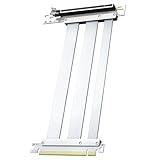
JEYI targets owners of the newest cards: the listing names RTX 5090 and 5080 class hardware, a 180 mm flexible cable with 90 and 180 degree bends, gold-plated pins and a 29 AWG shielded build. Quoted bandwidth is 128 GB/s, a figure that matches the combined two-direction PCIe 5.0 x16 total. As with the other cable products, no bracket is included.
Who it suits: owners of the newest high-end cards in a case that already includes a vertical bracket, and builders who want maximum link speed on a Gen 5 platform. The flexible construction and the adjustable bend angles also suit cases where the riser has to take an unusual route to the bracket.
- Interface: PCIe 5.0 x16
- Length: 180 mm flexible
- Bend: 90-degree and 180-degree routing per the listing
- Build: gold-plated pins, 29 AWG, EMI shield
- Bracket: not included
Fit notes: a 180 mm flexible cable is easier to route than a rigid ribbon, but it still has a minimum bend radius. Do not fold it sharply, and keep it away from heat. Because the product does not include a bracket, check that the case or an existing holder carries the card weight, particularly with the very large cards named in the listing.
Pros
- Gen 5 support for the latest cards
- Flexible bends make unusual layouts workable
Cons
- Needs a case or bracket that already holds the card
- Flexible cables can be harder to route neatly
It is the cable counterpart to the Cooler Master and Lian Li kits, which add the support hardware this product lacks.
Specs Compared
| Product | Type | PCIe generation | Length | Bracket included | Finish |
|---|---|---|---|---|---|
| XMSJSIY riser | Cable | 3.0 x16 | confirm on listing | No | confirm on listing |
| Cooler Master Gen5 Holder | Kit | 5.0 x16 | confirm on listing | Yes | White |
| GLOTRENDS riser | Cable | 3.0 x16 | 200 mm | No | confirm on listing |
| Lian Li VG4v4 | Kit | 5.0 x16 | confirm on listing | Yes, 4-slot | White |
| NZXT Vertical Kit | Kit | 4.0 x16 | 175 mm | Yes | Black |
| JEYI riser | Cable | 5.0 x16 | 180 mm | No | confirm on listing |
How We Chose These
We built this list from product listing information and manufacturer specification pages rather than from our own bench work. The main filters were PCIe generation, whether a bracket is included, stated cable length, and the case or card limits each listing mentions. We favored items that spell out compatibility, such as slot requirements and card thickness, because mismatched dimensions are the usual reason vertical mounts get returned. Kits and cable-only parts are both included on purpose, and each entry says plainly which type it is so you can match it to what your case already provides. Specifications that a listing does not state are marked for confirmation instead of guessed.
What to Look For
Kit or cable
A complete kit contains a bracket that bolts to the rear expansion slots plus a riser. A bare riser cable only extends the connection. Many modern cases ship with their own vertical bracket and a riser, and in those cases a replacement cable is all you need. If your case has no mounting position, a bare cable leaves the card dangling, which stresses the motherboard slot and is unsafe for heavy cards.
PCIe generation and real-world speed
PCI-SIG specifies roughly 16 GB/s per direction for a PCIe 3.0 x16 link, about 32 GB/s for 4.0 and about 63 GB/s for 5.0. A Gen 3 cable in front of a Gen 4 or Gen 5 card forces the link down to Gen 3 speeds, which matters most for cards with small memory pools or for workloads that move a lot of data. Many gaming loads show little difference, but a Gen 4 or Gen 5 cable removes the question. A poor-quality cable can also cause the link to retrain at a slower speed, so shielding and clean contacts matter more as generations climb.
Slot count and card thickness
Expansion slots sit about 20 mm apart. A three-slot card is therefore roughly 61 mm thick and a four-slot card about 81 mm. A vertical mount moves that thickness away from the rear and into the space between the card and the side panel. Rule of thumb: leave at least 15 to 20 mm between the fans and the glass for fresh air. Worked example: in a case with seven slots, a vertical bracket that needs six open slots leaves one slot of margin, so a four-slot card is the practical ceiling.
Clearance, cooling and cable routing
Vertical mounting shifts the card toward the front of the case, which can collide with a bottom radiator, intake fans or a tall CPU cooler. Measure these distances before ordering. Keep the riser away from sharp edges, do not bend it tighter than its design allows, and avoid crimping it behind the card. Check that the card is seated on the bracket without stretching the cable, and recheck after moving the case.
Weight and support
Modern flagship cards weigh several pounds. The motherboard slot is not designed to bear that load with a lever arm. A bracket that carries the weight through the case chassis is the real value of a full kit, so do not skip support just because a bare cable looks cheaper on paper.
Questions
Does a vertical GPU mount reduce performance?
A good riser at the correct PCIe generation has a small or unmeasurable effect in most games. A low-generation or poor-quality cable can reduce link speed, so match the cable to your card.
Will a vertical mount make my GPU run hotter?
It can if the fans sit too close to the glass. Leave a gap of roughly 15 to 20 mm and consider moving case fans to improve airflow around the card.
Can I use a PCIe 5.0 riser on an older motherboard?
Yes. The link will negotiate down to the speed your platform supports, and BIOS updates can help with full Gen 5 operation on newer boards.
Do I need a bracket if I buy a riser cable?
You need some way to hold the card. If your case has a vertical bracket, a cable is enough; otherwise buy a complete kit.
How many open slots does a vertical mount need?
It varies by kit. Lian Li lists six open slots for vertical mounting and seven for angled mounting, and other kits state their own requirement on the product page.
Are these kits safe for heavy cards?
Kits with a steel bracket and anti-sag support are designed for that job. A bare cable is not, so match the support to the card weight.
Update History
- October 20, 2026 – Initial publication; product set drawn from current catalog listings.
- Check the product page for current specifications and availability before buying.
Sources
- Manufacturer product and specification pages for Lian Li, NZXT and Cooler Master
- Retailer listing titles and specification fields for all six products
- PCI-SIG published PCI Express bandwidth figures








Write Your Review
No reviews yet. Be the first to share your experience!