
The best GPU water block for an RTX card is the one engineered for your exact board, and among the six listed here the Alphacool Core block for the Gigabyte Aorus Master and Windforce RTX 5080 is the most broadly useful because it covers more than one card model. A GPU water block is a full-cover plate, usually copper, that replaces the air cooler and carries heat from the GPU, memory and power stages into a liquid loop. Because layouts differ from card to card, each block below is a model-specific part, and a match to your board matters more than any other feature.
Five of the six picks target RTX 5080 boards and two target the ROG Astral RTX 5090, so check the card name on your PCB before reading further.
Quick List
- Alphacool Core RTX 5080 Aorus Master and Windforce – best for Gigabyte RTX 5080 owners covered by the model list
- Alphacool Core RTX 5080 Epic-X – best for RTX 5080 Epic-X boards with an ARGB-lit chrome look
- Thermal Grizzly DeltaMate for ROG Astral RTX 5090 – best for ROG Astral RTX 5090 builders who want a premium, display-style block
- Alphacool Core RTX 5090 ROG Astral – best for ROG Astral RTX 5090 owners who prefer a copper-and-brass Alphacool design
- Alphacool Core RTX 5080 Prime – best for ASUS Prime RTX 5080 cards
- Alphacool Core RTX 5080 Gaming Trio – best for MSI RTX 5080 Gaming Trio cards
Which One Is Right for You?
| If you… | Choose |
|---|---|
| own an ROG Astral RTX 5090 and want a showpiece block | Thermal Grizzly DeltaMate for ROG Astral RTX 5090 |
| own an ROG Astral RTX 5090 and want a conventional full-cover block with backplate | Alphacool Core RTX 5090 ROG Astral |
| run a Gigabyte Aorus Master or Windforce RTX 5080 | Alphacool Core RTX 5080 Aorus Master and Windforce |
| run an MSI RTX 5080 Gaming Trio | Alphacool Core RTX 5080 Gaming Trio |
| run an ASUS Prime RTX 5080 | Alphacool Core RTX 5080 Prime |
| run a card sold as an Epic-X RTX 5080 | Alphacool Core RTX 5080 Epic-X |
None of these blocks is a universal fit, so the decision table is really a card lookup. Find the exact model name printed on your card’s box, backplate or sticker, confirm it appears on the block maker’s compatibility list, and only then compare finishes and looks.
All 6 Picks in Detail
1. Alphacool Core RTX 5080 Aorus Master and Windforce – Best for Gigabyte RTX 5080 Cards
As an Amazon Associate we earn from qualifying purchases at no extra cost to you.

This block is named for the Gigabyte Aorus Master and Windforce RTX 5080 boards, so it serves two card lines with one design. Alphacool’s own product information describes a chrome-plated copper cooler with an acrylic top and brass connection threads, plus an aluminum backplate and addressable RGB lighting. It is sold with a backplate, which matters because the plate protects the rear of the circuit board and helps pull heat from the memory area.
- Base material: chrome-plated copper, per manufacturer information
- Top: acrylic with aRGB lighting
- Ports: four G1/4 threads
- Backplate: aluminum, included
- Stated fit: Gigabyte Aorus RTX 5080 Master and Windforce models; check the list for exact variants
- Maximum coolant temperature: Alphacool lists 60 degrees Celsius for this block
Pros:
- One block covers more than one Gigabyte card line
- Detailed manufacturer specification is easy to find
Cons:
- Variant-by-variant fit still needs confirming
- Acrylic top can show wear if cleaned with the wrong solvent
Compared with the Prime and Gaming Trio blocks, it is the only one in the list whose title names two card lines at once, so double check the sub-model. Because it ships with a thermal pad set, paste, plugs and an adapter according to the manufacturer, it is also the most complete kit in the list on paper, though you should confirm the contents on the listing.
2. Alphacool Core RTX 5080 Epic-X – Best for Epic-X RTX 5080 Boards

The Epic-X block is the choice for RTX 5080 cards sold in the Epic-X lineup. The listing title points to a chrome-plated copper base, brass connectors and an aluminum backplate, with addressable RGB lighting also named. Retail fit tables elsewhere pair the Epic-X name with specific PNY ARGB boards, which is a reminder that the name on the box and the name of the card line do not always line up, so look up the real board before ordering.
- Base: chrome-plated copper, per the listing title
- Connectors: brass, per the listing title
- Backplate: aluminum, included
- Lighting: addressable RGB; confirm the connector on the listing
- Stated fit: Epic-X RTX 5080 boards; confirm exact model
Pros:
- Matches a card line few other blocks cover
- Copper base, brass fittings and a metal backplate suit a conventional loop
Cons:
- Narrow compatibility means it is useless on other boards
- Details beyond the title are limited on the listing, so confirm anything specific
It sits alongside the other Alphacool 5080 blocks as the same family of design with a different mounting pattern. If you have already bought fittings, tubing and a radiator for another Alphacool block, they carry over without change, which keeps the incremental cost of switching cards low.
3. Thermal Grizzly DeltaMate for ROG Astral RTX 5090 – Best Premium Showpiece

The DeltaMate is the odd one out: it comes from Thermal Grizzly, a company best known for thermal compounds, and it is built for the ASUS ROG Astral RTX 5090. The manufacturer describes a nickel-plated copper cold plate, a separate section for the memory and power stages, ARGB lighting and a Germany-made design. Acrylic and glass window versions exist, so check which one the listing delivers. One retailer note recommends it for experienced builders, which is fair given the 5090 card’s power draw.
- Fit: ASUS ROG Astral RTX 5090
- Cold plate: nickel-plated copper, per manufacturer information
- Terminal: direct terminal with G1/4 inlet and outlet; a through terminal is a separate option
- Lighting: ARGB, per manufacturer information
- Window material: acrylic or glass edition; confirm on the listing
- Backplate: confirm on the listing
Pros:
- Distinctive design with a fit-planning aid from the manufacturer
- Targets one flagship board precisely
Cons:
- Assembly is more involved than for a basic block
- Only suits one card line
Against the Alphacool Astral block it competes for the same card, and the choice is largely about looks, fittings and which accessories are in the box.
4. Alphacool Core RTX 5090 ROG Astral – Best Conventional Block for the Astral 5090

This is the Alphacool answer to the same card. The listing title names a copper block with a chrome finish, a brass terminal and an aluminum backplate. For many builders that is the sweet spot: a proven design language, standard G1/4 fittings and a full backplate, without needing a through-terminal or display glass. Given the large power budget of an RTX 5090, the combination of a full-cover plate and a metal backplate is what you want from a block.
- Fit: ASUS ROG Astral RTX 5090
- Block: copper with chrome finish, per the listing title
- Terminal: brass, per the listing title
- Backplate: aluminum, included
- Lighting and other fittings: confirm on the listing
Pros:
- Familiar Alphacool Core design with a backplate included
- Same card coverage as the DeltaMate with a more traditional look
Cons:
- Fit is limited to the Astral line
- Large, heavy board means support brackets or a vertical mount may be wise
It is the straightforward alternative to the DeltaMate for the same board, and either choice will need a loop planned for a very high heat load. Plan for at least a 360mm radiator dedicated to this card and treat any CPU in the same loop as additional load.
5. Alphacool Core RTX 5080 Prime – Best for ASUS Prime RTX 5080 Cards

The Prime block pairs with ASUS Prime RTX 5080 cards. ASUS Prime boards are the plainer, more compact members of the ASUS lineup, and a block built for them fits builders who want to cool a quieter card without moving to a halo model. The listing title is short, so rely on Alphacool’s compatibility list to confirm that your specific Prime variant is covered.
- Fit: ASUS Prime RTX 5080
- Design: Alphacool Core full-cover block with backplate
- Materials, lighting and port details: confirm on the listing
Pros:
- Pairs with a more modest board
- Same Core family as the other Alphacool blocks, so the loop parts are interchangeable
Cons:
- Listing title gives few specifications
- Does not fit other RTX 5080 boards
It is the easiest one in the group to mix up with the other 5080 blocks, so match by model name and not by chip. A quieter, more modest board also means lower heat output than the flagship cards in this list, so a smaller radiator may be enough for it.
6. Alphacool Core RTX 5080 Gaming Trio – Best for MSI Gaming Trio Owners
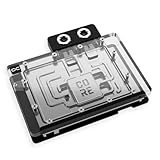
The Gaming Trio block targets the MSI RTX 5080 Gaming Trio and its OC variants. Alphacool launched a dedicated block for this card, and a forum thread notes that an older combined Gaming and Suprim block was withdrawn from the Gaming Trio fit list after a user found it did not fit. That history is a good example of why you should confirm the exact part for your card instead of trusting a retailer’s text.
- Fit: MSI RTX 5080 Gaming Trio (and OC versions, per the manufacturer)
- Design: Alphacool Core full-cover block with backplate
- Materials, lighting and port details: confirm on the listing
Pros:
- Dedicated block for a popular MSI board
- Backplate included
Cons:
- Older, similarly named blocks have caused fit confusion
- Few details are visible in the listing title
It is the counterpart to the Prime block for a different board maker, and the buying rule is the same: model name first, finish second. If you are unsure which of two similarly named blocks applies, contact the block maker with your card’s exact model number rather than relying on a retailer’s compatibility text.
Specs Compared
| Block | Card fit | Base / finish | Backplate | Lighting | Ports |
|---|---|---|---|---|---|
| Alphacool Core Aorus Master and Windforce | Gigabyte RTX 5080 Aorus Master / Windforce | Chrome-plated copper, acrylic top | Aluminum | aRGB | 4 x G1/4 |
| Alphacool Core Epic-X | RTX 5080 Epic-X | Chrome-plated copper base, brass connectors | Aluminum | aRGB (confirm) | Confirm on listing |
| Thermal Grizzly DeltaMate | ROG Astral RTX 5090 | Nickel-plated copper cold plates | Confirm on listing | ARGB | G1/4 direct terminal |
| Alphacool Core ROG Astral | ROG Astral RTX 5090 | Copper, chrome finish, brass terminal | Aluminum | Confirm on listing | Confirm on listing |
| Alphacool Core Prime | ASUS Prime RTX 5080 | Confirm on listing | Included per title | Confirm on listing | Confirm on listing |
| Alphacool Core Gaming Trio | MSI RTX 5080 Gaming Trio | Confirm on listing | Included per title | Confirm on listing | Confirm on listing |
How We Chose These
This list comes from desk research. We read each listing title and compared its stated card fit, materials and backplate against the block makers’ own product information where it was available. We favored full-cover designs with a backplate and a clearly named compatible board, because a water block is useless if the card layout does not match. We also looked at published compatibility notes and community reports of fit problems to understand where buyers get caught. This is a specification-based comparison, so we make no temperature, noise or flow-rate claims. Where a listing does not state a value, the specs table says to confirm on the listing.
What to Look For
Exact board compatibility
GPU water blocks are manufactured to a specific printed circuit board. Two RTX 5080 cards from different brands can use different PCB layouts, different memory placement and different power connector positions, and the block will only fit one of them. Always read the block maker’s compatibility list or configurator against the exact SKU on your card, including OC and White variants. If your card is not listed, assume it will not fit.
Materials and loop compatibility
Copper and nickel-plated copper are the standard wetted materials for the cold plate. Brass fittings are common. An aluminum backplate is fine because it stays dry, but you should avoid mixing bare aluminum parts inside the loop with copper parts, which invites corrosion. Use a coolant recommended by the block maker, and note the stated maximum coolant temperature: one of the listed Alphacool blocks quotes 60 degrees Celsius, which is comfortable for a typical loop but worth keeping in mind if you share a loop with a hot CPU.
Ports, fittings and thread size
Most blocks use G1/4 threads, the common standard for compression fittings and tube connectors. Count the ports: four ports let you use two for flow and two for plugs or a through-connection, which gives routing flexibility. Port spacing also matters if you plan to use a rigid bridge between two blocks. Plan tube length and fitting height, and leave room for the glass side panel.
Power, weight and mounting
An RTX 5090 can draw hundreds of watts and uses the high-current 12V-2×6 connector, which must be fully seated; a bend close to the plug is a known risk, so leave several centimeters of straight cable. A block and backplate add noticeable weight, so consider a support bracket or a vertical mount to keep the card from sagging. A water-cooled card also needs rear bracket and port clearance in the case, so measure the width before buying.
Worked example: sizing the loop
As a rule of thumb, plan about 100 to 120 watts of heat per 120mm of radiator for quiet operation. A 300 watt GPU plus a 150 watt CPU is about 450 watts, which suggests at least 360mm of radiator and preferably 480mm in total. Add a larger radiator or more fans if you plan to run both parts at full load for long sessions.
Flow restriction and pump choice
Full-cover GPU blocks use fine fin arrays to move heat from the cold plate into the coolant, and finer fins mean more restriction. One of the listed designs quotes fins 0.4 mm thick with 0.4 mm gaps, and the DeltaMate describes 0.2 mm slots and fins, which are both fine structures that reward clean coolant and a filter. A single D5-class pump or equivalent handles one GPU block and one CPU block with two radiators comfortably, but adding a second GPU block or a very restrictive radiator may call for a stronger pump or two pumps in series. Keep tubing runs short and avoid sharp bends, since each elbow adds restriction.
Coolant, tubing and maintenance
Premixed coolants are the simplest choice because the corrosion inhibitors are already balanced. Distilled water alone invites biological growth and has no protection for mixed metals. Clear soft tubing needs replacing every year or two as plasticizer can leach, whereas rigid tubing lasts longer but demands careful bending. Plan a drain port at the lowest point of the loop, and flush the system every 12 months or when the coolant clouds, because deposits in the fine fin stack are what gradually raise the GPU temperature.
Safety and leak testing
Never power the PC while testing for leaks. Run the loop with the pump only, using an external supply or a jumper on the power supply, for a day or more with paper towels under every joint. Drain and refill with the proper coolant, do not mix coolants, and keep liquid away from the card until the test is done. Taking off the air cooler may void the card warranty, so read the terms first.
Questions
Can I use a water block meant for another RTX 5080?
Almost never. Block layouts follow each board’s PCB, so a block for another brand’s 5080 will not line up with the memory, power stages or mounting holes. Use only the block listed for your exact card, and keep the original air cooler in a safe place so the card can be restored to stock if you ever sell it or need warranty service.
Does a water block make a GPU faster?
It lowers temperature, which can let the card hold higher boost clocks for longer, but the gain depends on the card and its power limit. The main benefits are quieter operation and thermal headroom, not a guaranteed speed jump. Keep expectations modest: modern RTX cards already boost close to their power limit, so the biggest day-to-day change is usually how quiet the fans and pump can run under load.
Do I need a backplate?
A backplate protects the back of the board and helps with rigidity and memory cooling, so it is worth having, and it adds stiffness to a heavy card. All of the Alphacool listings here name one, and you should confirm the backplate on the DeltaMate listing.
Will the thermal pads in the box be enough?
Block makers normally supply pads cut for their own design. Use those, since the pad thickness is chosen for the block. Replace them only if they are damaged or if the block maker’s instructions call for a different thickness, and always peel the protective film from both sides before installation.
Is custom liquid cooling worth it for an RTX 5080?
It is worth it if you want lower noise, a custom look or already run a loop for your CPU. For a quiet, simple setup, a good air-cooled card is easier to live with.
How do I know the card will fit in my case after the block is installed?
Check the card length, thickness and port position of the finished assembly against your case clearances, and leave room for tubing bends. Cases with a vertical GPU mount may need a longer riser. Also check that the power cable can reach the connector without a tight bend, because a block adds thickness around the connector area on some designs.
Update History
- October 20, 2026 – Initial publication; product set drawn from current catalog listings.
- Check the product page for current specifications and availability before buying.
Sources
- Alphacool product and compatibility information for the Core RTX 5080 and RTX 5090 blocks
- Thermal Grizzly product page and datasheet for the DeltaMate GPU block
- Retailer listing titles and specification fields
- Community forum reports on block fit for the MSI Gaming Trio







Write Your Review
No reviews yet. Be the first to share your experience!