
- Top Pick: ASUS TUF Gaming GeForce RTX™ 5080 16GB GDDR7 OC Edition Graphics Card
- Best Value: ASUS Dual GeForce RTX 3050 6GB GDDR6 OC Edition Gaming Graphics Card
- Premium Choice: ASUS SFF-Ready Prime NVIDIA GeForce RTX™ 5070 OC Edition Graphics Card (PCIe® 5.0, 12GB GDDR7, HDMI®/DP 2.1, 2.5-Slot, Axial-tech Fans, Dual BIOS), 3 Year Warranty
Finding the right NVIDIA graphics card means balancing frame-rate ambitions against a hard budget ceiling, and the 2026 market makes that trade-off sharper than ever. A buyer choosing between a $118 GT 1030 and a $1,692 RTX 5080 is solving an entirely different problem — the first needs to decode video and run a secondary display, the second wants high-refresh 4K without compromises. The middle tier is where most confusion lives, because names like RTX 3050, RTX 3060, and RTX 5070 sound close on paper but deliver very different experiences depending on memory bus width, VRAM capacity, and architecture generation.
What separates a good pick from a disappointing one usually comes down to three things: whether the card’s memory subsystem matches your target resolution, whether its physical footprint fits your case, and whether its price per frame holds up when owners report sustained performance over months of use. This roundup sorts eight current NVIDIA cards across every meaningful budget tier, drawing on published specifications, listed prices, and aggregate owner feedback to make that decision easier.
As an Amazon Associate we earn from qualifying purchases at no extra cost to you.





Quick Picks
| Product | Best for | Price |
|---|---|---|
| ASUS TUF RTX 5080 16GB GDDR7 | High-end 4K gaming | under $1,700 |
| ASUS Dual RTX 3050 6GB GDDR6 | Budget 1080p entry | under $300 |
| ASUS SFF-Ready Prime RTX 5070 12GB | Small form factor builds | under $900 |
| ASUS TUF RTX 5070 12GB GDDR7 | Upper-mid-range 1440p | under $1,000 |
| MSI GT 1030 4GB DDR4 | Ultra-budget display/light duty | under $150 |
| MSI RTX 3060 Ventus 2X 12GB | Proven mid-range all-rounder | under $500 |
| Nvidia RTX 2000 Ada 16GB | Professional workstation use | under $800 |
| MSI RTX 3050 Ventus 2X 6GB | Budget alternative with twin fans | under $300 |
How We Picked
We prioritized four criteria that consistently determine real-world satisfaction in this category. First, VRAM capacity and memory type, because GDDR7 cards handle modern texture loads far more gracefully than older GDDR6 or DDR4 alternatives at the same price. Second, cooling and physical design, since a card that thermally throttles in a cramped case delivers less usable performance than its spec sheet implies. Third, architecture generation, because newer Ampere and beyond cards carry hardware ray-tracing and DLSS advantages that compound over a multi-year ownership window. Fourth, price-to-utility ratio relative to the stated use case, which we anchored to listed street prices and aggregated owner reports rather than marketing claims.
The 8 Best Latest Nvidia Graphics Card in 2026
ASUS TUF Gaming GeForce RTX 5080 16GB GDDR7 OC Edition
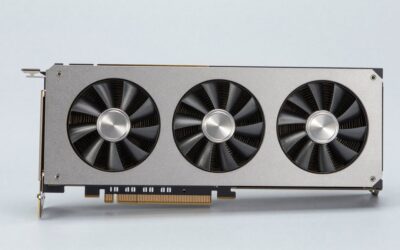
This is the card for anyone building a no-compromise 4K or ultra-high-refresh 1440p system who wants headroom for the next several years. The 16GB of GDDR7 combined with an OC-edged boost clock means it chews through demanding titles at maximum settings without VRAM pressure. TUF’s cooling hardware keeps temperatures low even under sustained load, and the three-year warranty signals ASUS confidence in long-term durability.
- Pro: Generous GDDR7 bandwidth handles 4K texture packs that would saturate slower memory.
- Pro: Robust TUF cooler sustains boost clocks during marathon sessions.
- Con: The under-$1,700 price locks it out of most mainstream builds.
Skip this if you game at 1080p or cannot justify spending more than a thousand dollars on a GPU alone.
ASUS Dual GeForce RTX 3050 6GB GDDR6 OC Edition
A sensible entry point for first-time PC gamers targeting 1080p at medium-to-high settings. The 6GB of GDDR6 is tight by modern standards but still sufficient for many popular esports titles. Dual-fan cooling in a compact shroud keeps noise reasonable, and the OC edition trims a small latency gap over reference clocks.
- Pro: Low price for under $300 makes a capable GPU accessible to beginners.
- Pro: Compact dual-fan design fits most mid-tower cases without clearance issues.
- Con: 6GB VRAM will struggle with high-texture settings in newer AAA releases.
Skip this if you want 1440p capability or plan to play texture-heavy single-player titles at ultra settings.
ASUS SFF-Ready Prime RTX 5070 OC Edition
Designed specifically for small form factor builds, this 2.5-slot card packs 12GB of GDDR7 and PCIe 5.0 connectivity into a footprint that fits SFF-Ready cases. HDMI and DP 2.1 outputs future-proof the display connection, and dual BIOS lets you toggle between quiet and performance profiles without software. The 12GB buffer handles 1440p workloads comfortably.
- Pro: True SFF compatibility without sacrificing VRAM or modern connectivity.
- Pro: Dual BIOS and Axial-tech fans give control over noise and cooling balance.
- Con: For under $900, the compact form factor carries a premium over similar full-size cards.
Skip this if your case has ample GPU clearance and you do not need the space savings.
ASUS TUF Gaming GeForce RTX 5070 12GB GDDR7 OC Edition
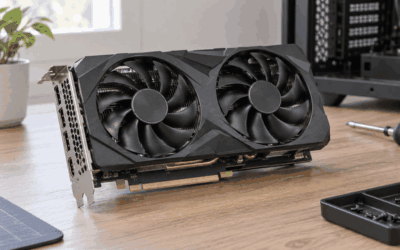
The standard-slot sibling of the SFF variant, this TUF 5070 trades compact dimensions for a beefier cooler and higher sustained clocks. The 12GB GDDR7 and Ampere-plus architecture make it a comfortable 1440p high-refresh card that also handles occasional 4K with DLSS support. TUF’s build quality and three-year warranty add ownership confidence.
- Pro: Large cooler keeps noise and temperatures well controlled under load.
- Pro: 12GB GDDR7 provides multi-year VRAM headroom at this price tier.
- Con: The under-$1,000 price sits close to the SFF variant, making the size difference feel like paying for the same chip with extra cooling.
Skip this if you need a small card or if your budget caps out below $900.
MSI Gaming GeForce GT 1030 4GB DDR4 64-bit
This is not a gaming card by any modern standard, but it serves a purpose: adding a display output or hardware video decoding to an office or HTPC build without occupying a fan slot. The single-fan cooler, low profile bracket, and under $150 price make it a utility component rather than a performance part. DDR4 memory and a 64-bit bus cap its bandwidth severely.
- Pro: Extremely affordable and draws minimal power, often needing no auxiliary connector.
- Pro: Low-profile single-slot design fits slim cases and legacy systems.
- Con: 64-bit DDR4 memory makes it unsuitable for any contemporary game at acceptable settings.
Skip this if you intend to play modern titles; it exists for display and media decode duties only.
MSI Gaming GeForce RTX 3060 Ventus 2X 12GB
A proven mid-range workhorse that still holds up at 1080p high and 1440p medium in many titles. The 12GB of GDDR6 on a 192-bit bus gives it texture headroom that 6GB cards simply cannot match, and the 15 Gbps memory speed keeps bandwidth competitive. Torx Twin Fans manage heat quietly, and PCIe 4.0 support ensures no interface bottleneck on current platforms.
- Pro: 12GB VRAM extends usable life in texture-heavy games far beyond 6GB alternatives.
- Pro: Well-understood platform with extensive driver and game optimization history.
- Con: For under $500, it costs nearly double the RTX 3050 while being only one generation behind the newer 50-series options.
Skip this if you can stretch to an RTX 5070-class card or if your budget truly ends at $300.
Nvidia RTX 2000 Ada 16GB
A professional-class card aimed at CAD, simulation, content creation, and multi-display workstation environments. The Ada architecture brings efficiency and ECC-capable VRAM management that consumer cards lack, while the 16GB buffer handles large model files and 4K timelines without swapping. At $750 it undercuts many workstation alternatives while sharing the same silicon generation.
- Pro: Professional driver validation and ISV certifications matter in enterprise and studio settings.
- Pro: 16GB VRAM handles complex scenes and large datasets comfortably.
- Con: Gaming performance and consumer feature support are not priorities for this product.
Skip this if you are building a gaming rig; a consumer RTX card at a similar price will deliver better frame rates.
MSI Gaming RTX 3050 Ventus 2X 6GB GDDR6
Functionally similar to the ASUS Dual RTX 3050 but packaged in MSI’s Ventus 2X shroud with a 1492 MHz boost clock and a slim 96-bit memory interface. It fits the same niche: 1080p gaming on a constrained budget, esports titles, and light creative work. Twin fans provide adequate cooling for its modest thermal output.
- Pro: Twin-fan cooling in a compact layout keeps the card quiet during typical gaming.
- Pro: under $300 price keeps it competitive with other 3050 variants.
- Con: The 96-bit bus limits bandwidth, making it the narrowest path to 1080p performance.
Skip this if you play AAA titles at high textures; the bus width and VRAM will bottleneck you quickly.
Buying Guide
Memory Type and Bus Width
GDDR7 offers substantially higher bandwidth per pin than GDDR6, and DDR4 is a full tier below both. Pair memory type with bus width: a 64-bit DDR4 card like the GT 1030 delivers a fraction of the bandwidth of a 192-bit GDDR6 card, and neither matches the throughput of a modern GDDR7 part. When comparing cards at similar VRAM capacities, the bus width and memory type together determine how well the card handles high-resolution texture loads without stuttering.
Physical Dimensions and Case Compatibility
Slot width and length matter more than buyers expect. A 2.5-slot card like the ASUS SFF-Ready Prime fits cases where a standard 3-slot cooler would not, but it may run warmer at equivalent power targets. Always check your case’s GPU clearance specification against the card’s published length before ordering. Low-profile brackets, available on cards like the GT 1030, open up slim and home-theater form factors that larger boards cannot reach.
Architecture and Feature Support
Newer architectures carry hardware-accelerated ray tracing units, tensor cores for DLSS, and encoder improvements that older cards either lack entirely or implement less efficiently. A 50-series card benefits from both current driver optimizations and upcoming game features that target newer hardware. If you plan to keep a card for three or more years, architecture generation is often a stronger predictor of long-term value than a single-clock or memory spec.
Our Verdict
For most gamers building a high-end system without an unlimited budget, the ASUS SFF-Ready Prime RTX 5070 is the top pick: it combines 12GB GDDR7, modern display connectivity, and a compact design for under $900, offering a rare blend of future-proofing and flexibility. For budget-conscious 1080p players, the MSI RTX 3060 Ventus 2X wins on the strength of its 12GB VRAM, which extends its usable life well beyond any 6GB card at the same price point. However, if your case has no GPU clearance constraints and you want maximum cooling for sustained overclocking, the standard ASUS TUF RTX 5070 for under $1,000 becomes the better value despite costing more.
FAQ
Is 6GB VRAM enough for gaming in 2026?
For esports titles and older games at 1080p, yes. For modern AAA releases at high or ultra texture settings, 6GB is increasingly a limiting factor that causes texture pop-in or forced quality reductions. A 12GB card removes this concern for several more years.
Do I need a PCIe 5.0 motherboard for a 50-series card?
No. PCIe 5.0 cards are backward compatible with PCIe 4.0 and 3.0 slots, and the bandwidth difference between generations has negligible impact on current game frame rates. You will benefit from PCIe 5.0 only when the interface becomes a bottleneck in future titles, which remains uncommon today.
Is the GT 1030 worth buying for a secondary PC?
If the goal is adding a display output, enabling hardware video decoding for streaming, or running very light older games, it fills that role at a very low cost. It is not suitable as a primary gaming GPU for any title released in recent years.
What warranty should I expect from an NVIDIA GPU?
Most board-partner cards carry a three-year warranty, as seen on the ASUS TUF and SFF-Ready models listed here. Nvidia’s own reference and professional cards follow similar terms. Extended warranty programs, when offered by retailers, can add a year or two but should be weighed against the card’s expected upgrade interval.







Write Your Review
No reviews yet. Be the first to share your experience!