
- Top Pick: GIGABYTE GeForce RTX 5070 Ti AERO OC 16G Graphics Card, 16GB 256-bit GDDR7, PCIe 5.0, WINDFORCE Cooling System, GV-N507TAERO OC-16GD Video Card
- Best Value: GIGABYTE GeForce RTX 5070 Ti Gaming OC 16G Graphics Card, 16GB 256-bit GDDR7, PCIe 5.0, WINDFORCE Cooling System, GV-N507TGAMING OC-16GD Video Card
- Premium Choice: Gigabyte GeForce RTX 5070 Ti AERO OC 16G Graphics Card – 16GB GDDR7, 256bit, PCI-E 5.0, 2588 MHz Core Clock, 3 x DP 2.1a, 1 x HDMI 2.1b, NVIDIA DLSS 4, GV-N507TAERO OC-16GD


Gigabyte GeForce RTX 5070 Ti Aero OC is the card white-themed builders keep coming back to, and it is far more than a pretty face. Underneath the clean Aero styling sits a genuine RTX 5070 Ti with 16 GB of memory, a factory overclock, and a serious triple-fan cooler aimed at high-refresh 1440p and entry-level 4K. This review breaks down the design, real gaming performance, DLSS 4, current pricing in a volatile market, and the honest pros and cons so you can decide whether this is the right premium-mainstream card for you.

Gigabyte RTX 5070 Ti Aero OC: Design and Cooling
The Aero line is Gigabyte’s white-and-silver aesthetic, built for clean, bright builds rather than blacked-out stealth rigs, and this 5070 Ti wears it well. But the design story is not only cosmetic, because the larger cooler here does real thermal work for a 300 W card, which is exactly what a factory-overclocked 5070 Ti needs to hold its clocks under sustained load.
As an Amazon Associate we earn from qualifying purchases at no extra cost to you.


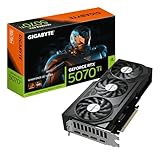

The White Aero Aesthetic
The card’s white shroud and light backplate make it a natural centerpiece for a matching white build, and that visual fit is a genuine reason buyers seek it out rather than a random black card. Aesthetics are part of the value here.
Practically, remember that white shrouds can show dust more over time, so a case with decent filtration keeps it looking sharp. It is a small maintenance note, but one worth knowing before you commit to the look.
For a curated, all-white build, matching the GPU to the case, cooler, and fans is often the hardest part, and a card designed around that theme removes a real headache, which is precisely why the Aero line has a loyal following.
Triple-Fan Cooling and Thermals
This is a substantial triple-fan cooler sized for the RTX 5070 Ti’s 300 W board, and that generous heatsink keeps temperatures and noise well controlled during long sessions. The extra cooling headroom is what lets the factory overclock run consistently.
Owner reports generally describe comfortable temperatures and quiet operation in a ventilated case, with fan-stop keeping things silent at idle. As always, a minority of units anywhere can exhibit coil whine, which is not specific to Gigabyte.
The payoff of that big cooler is stability: because the card is not thermally stressed, it sustains its boost clocks reliably rather than throttling as a session drags on, which is a meaningful advantage for long gaming or creative workloads.
Size, PSU, and Case Fit
Because this is a triple-fan card, it is on the larger side, so confirm your case supports its length and thickness before buying. Compact builders in particular should measure carefully to avoid a return.
The RTX 5070 Ti draws 300 W, and a 750 W power supply is the sensible recommendation, giving comfortable headroom for a mid-range or high-end CPU. The card uses a 16-pin connector, which you should seat fully until it clicks to avoid the connector issues that troubled early high-wattage cards.
Plan airflow around the card as well, since a large cooler rewards a case with good intake. Give it room to breathe and it stays quiet and cool even during extended high-load sessions.
Gaming Performance of the RTX 5070 Ti Aero OC
Looks and cooling only matter if the silicon delivers, and the RTX 5070 Ti is a serious performer with 16 GB of GDDR7 on a 256-bit bus and 8,960 CUDA cores, positioned as the premium-mainstream card for high-refresh 1440p and capable 4K. The Aero OC’s factory overclock nudges it slightly above reference, so it sits at the faster end of the 5070 Ti pool.
High-Refresh 1440p and Capable 4K
At 1440p the RTX 5070 Ti is in its element, pushing high and ultra settings well into triple-digit frame rates in most modern titles. This is comfortably a high-refresh 1440p card built for fast monitors.
Unlike its smaller sibling, the 16 GB buffer and wider bus also make 4K genuinely viable, especially with upscaling, so this card straddles both resolutions well. That flexibility is a big part of its appeal for buyers who want one card to handle everything.
That dual-resolution strength is what separates the 5070 Ti from the standard 5070: the extra memory and bandwidth remove the compromises that force cheaper cards to lean hard on upscaling at 4K, giving you more genuine headroom.
For a buyer choosing between the 5070 and this 5070 Ti, that headroom is the whole pitch. If you game at 1440p only, the cheaper card is plenty; if you want serious 4K flexibility and long-term texture headroom, the Ti’s 16 GB and extra bandwidth are what you are paying the premium for.
DLSS 4 and Multi Frame Generation
The Blackwell headline feature is DLSS 4 with Multi Frame Generation, which synthesizes multiple frames per rendered frame and can dramatically lift smoothness in supported games. On a card already this fast, that turns high frame rates into extremely high ones.
As more titles adopt DLSS 4, the card’s effective longevity improves through updates rather than raw silicon, which is the forward-looking reason to value the Nvidia feature set. The usual caveat applies: frame generation is best layered on top of an already solid base frame rate.
On a 5070 Ti, DLSS 4 is less about rescuing frame rates and more about unlocking very high-refresh play and headroom for demanding ray-traced settings, which is a genuinely enjoyable use of the technology at this performance tier.
Ray Tracing Strength
With its stronger RT cores and 16 GB of memory, the RTX 5070 Ti handles ray tracing far more gracefully than mid-tier cards, keeping frame rates high even with demanding lighting enabled at 1440p. This is one of the card’s clearest advantages.
Pairing heavy ray tracing with DLSS 4 lets you enjoy showcase lighting while staying smooth, and even pushing toward path-traced titles is realistic here with upscaling. For buyers who love maxed-out visuals, this is exactly the tier where ray tracing becomes fun rather than a compromise.
The 16 GB buffer matters for ray tracing specifically, since RT effects and high-resolution textures together can be memory hungry, and this card has the headroom to enable them without running short.
That combination, strong RT cores plus a large memory buffer, is what lets you actually turn on the visual features you bought the card for. Cheaper GPUs often force a choice between ray tracing and high textures, whereas this tier lets you enable both and lean on DLSS 4 to keep everything smooth.
Pricing, Pros and Cons, and Who Should Buy
Specs and styling set expectations, but value is decided at checkout, and the GPU market right now is anything but calm. Before committing, it helps to weigh this card’s concrete strengths and weaknesses against what you will actually pay for it this month.
Pros and Cons of the Aero OC
Pros: striking white design, large quiet triple-fan cooler, factory overclock, 16 GB of VRAM for 1440p and 4K, DLSS 4 Multi Frame Generation, and strong ray tracing for the class.
Cons: a large physical footprint that demands case space, a premium price over the base 5070 Ti list, white shrouds that show dust, and the occasional coil-whine report common to all brands.
On balance, this is a card you choose when the look matters as much as the frames: you pay a little extra and give up some case clearance in exchange for a fast, cool, quiet GPU that anchors a beautiful white build, which is a fair trade for its intended buyer.
Should You Buy Now? A Volatile Market
Timing is a real question in 2026. Component prices have been trending upward, driven largely by rising memory costs, and a 16 GB GDDR7 card like this is directly exposed to that pressure, so pricing can move week to week.
The encouraging news is that the steep climb of late 2025 has flattened, and some makers, including Framework, have reported a stretch of relative stability while still warning of possible swings. The sharpest increases appear to have paused for now.
Real new supply is not imminent, since Chinese DDR5 makers like CXMT and Micron’s two Idaho plants are not expected to be running at scale until roughly 2027-2028. Those fabs will not move this year’s prices.
The practical takeaway is that prices have paused rather than dropped, and meaningful relief is a year or more out. If this Aero OC lands at a fair price and you want a premium 1440p and 4K card now, buying beats waiting for a discount that may not come soon.
Because this is a pricier card than an entry model, the timing question carries a little more weight, but the logic is the same. With real relief a year or more out, holding a fair-priced Aero OC in your build now is more sensible than betting on a 2027 supply wave that may or may not push prices down meaningfully.
See More:
Who This GPU Is Perfect For
This card is ideal for the builder who wants a fast 16 GB card for high-refresh 1440p and capable 4K, and who specifically wants a white centerpiece for a matching build. It nails that combination better than a generic black card ever could.
It also suits anyone upgrading from an older high-end card who wants ray tracing, DLSS 4, and 4K flexibility in one purchase. The 16 GB buffer gives it the headroom to stay relevant for years of demanding releases.
Creators and streamers are a natural fit as well, since the 16 GB of memory and strong compute help with GPU-accelerated editing, rendering, and multitasking alongside gaming. For a do-it-all machine with a clean white aesthetic, this card covers an unusually wide range of use cases.
That versatility is easy to undervalue at purchase but pays off over time, since one capable card handles gaming, creation, and everyday multitasking without forcing you to compromise on any of them.
If that sounds like your build, checking the current price takes only a moment, and the button on this page will take you straight to the latest listing so you can compare today’s deal before stock shifts again.
The Gigabyte GeForce RTX 5070 Ti Aero OC succeeds by pairing genuine premium-mainstream performance with a standout white design and a cooler that keeps it fast and quiet. It is a card you buy for both the frames and the look.
With component prices paused but far from crashing, locking in a fair price on the Gigabyte GeForce RTX 5070 Ti Aero OC today is a reasonable move rather than a bet on distant 2027 supply. Check the latest price to see exactly where it lands for your build.
Frequently Asked Questions
What power supply does the Gigabyte RTX 5070 Ti Aero OC need?
NVIDIA lists 750W as the recommended system PSU for the RTX 5070 Ti, and the factory-overclocked Aero pushes slightly past the 300W reference board power under load. A quality 750W to 850W ATX 3.1 unit with a native 12V-2×6 cable is ideal, since it avoids the bundled adapter and handles transient spikes from Blackwell cards cleanly.
Will this triple-fan card fit in a mid-tower case?
The Aero OC is a long triple-slot design measuring roughly 340mm and occupying just over three expansion slots, so it is not a small card. Check that your case lists at least 350mm of GPU clearance and that no front radiator or hard drive cage intrudes. Also confirm the side panel clears the power connector and cable bend radius.
Is 16GB of GDDR7 enough for 4K gaming?
Yes for the vast majority of current titles. The 5070 Ti pairs 16GB across a 256-bit bus with very high GDDR7 bandwidth, which is comfortable for 4K with ray tracing and high texture packs. Heavily modded games or 4K path tracing can approach the limit, but DLSS 4 upscaling reduces the internal render resolution and trims VRAM use.
What frame rates should I expect from this GPU?
Treat it as a high-refresh 1440p card that also handles 4K well. Most modern raster titles run comfortably above 100fps at 1440p maximum settings, while 4K typically lands in the 60 to 90fps range natively. Enabling DLSS 4 with Multi Frame Generation pushes demanding ray traced games far higher on a 144Hz or 240Hz display.
Does the Aero OC include a power adapter, and can I use my old cables?
Gigabyte ships a 12V-2×6 adapter that splits into standard 8-pin PCIe connectors, so an older PSU works. Use separate cables rather than daisy-chained pigtails, and seat the connector until it clicks fully home. Melted connectors almost always trace back to partial insertion or tight bends right at the plug, not to the card itself.











Write Your Review
No reviews yet. Be the first to share your experience!