
- Top Pick: Movo VXR10 Universal Shotgun Mic for Camera | Camera Microphone for DSLR, iPhone, Android – Directional Shotgun Mic for Canon, Nikon, Sony – Vlogging & Video
- Best Value: Losfom 5K Body Camera with Audio, 270° Rotating Lens, External Mic, and EIS Stabilization – 4K/60FPS Z14 Vlogging Camera for Daily Recording and Personal Record (Black)
- Premium Choice: Rawiemy Video Camera Camcorder 4K 48MP 30FPS Vlogging Camera for YouTube with Wireless Lavalier Mic & External Mic Video Cameras for Filming with 32GB SD Card and 2 Batteries
For most vloggers who want a camera with a proper external microphone input, the Sony ZV-E10 II is the strongest interchangeable-lens pick, the DJI Osmo Pocket 3 is the most portable all-in-one, and the Canon PowerShot G7 X Mark III or Sony ZV-1 II suit people who want a pocketable fixed-lens camera with a mic jack. The deciding factors are how you will connect the microphone, how big a camera you will actually carry, and whether you want to change lenses.
Anyone who streams or records gameplay commentary will recognise the problem: built-in mics pick up room echo and keyboard noise, and a dedicated mic fixes most of that. This guide covers which cameras give you a way to plug one in, and what to watch for.
As an Amazon Associate we earn from qualifying purchases at no extra cost to you.

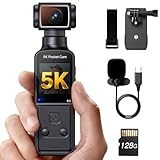


Camera comparison at a glance
| Camera | Best for | Key stated specs | Mic connection and limits |
|---|---|---|---|
| Sony ZV-E10 II | Creators who want interchangeable lenses | APS-C sensor, E-mount, vlog-focused features such as a flip-out screen | 3.5 mm mic input and a multi-interface shoe; larger than a compact |
| Sony ZV-1 II | Pocketable vlogging with a wide lens | 1-inch type sensor, fixed wide-angle zoom lens | Mic input and a hot shoe; fixed lens limits flexibility |
| DJI Osmo Pocket 3 | Walk-and-talk vlogs and travel | 1-inch CMOS sensor, 4K up to 60 fps, 3 built-in microphones, 179 g (maker figures) | Works with DJI wireless mics via its port; no interchangeable lenses |
| Canon PowerShot G7 X Mark III | Compact camera with live-streaming support | 1-inch type sensor, 24-100 mm equivalent lens, USB-C | 3.5 mm mic input; battery life is modest |
| Fujifilm X-M5 | Style-focused creators wanting a small body | APS-C sensor, X-mount, compact body | Mic input; fewer vlog-specific tools than Sony |
| Panasonic Lumix G100 and G100D | Budget-minded interchangeable-lens vloggers | Micro Four Thirds sensor, built-in directional audio | Mic input and tracking audio; older platform |
How the microphone connects
3.5 mm jack
The simplest option is a 3.5 mm mic jack, which accepts a wired shotgun mic or the receiver of a wireless kit. Cameras such as the Sony ZV-E10 II and Canon G7 X Mark III are described by their makers as having this input. Always confirm the exact jack type, because some cameras use a different standard or require a power setting for plug-in power mics.
Hot shoe and digital audio
Sony’s multi-interface shoe on certain models can carry digital audio directly to compatible accessories, which means no cable. If you use it, you will need a mic designed for that shoe. A standard hot shoe, on the other hand, only holds the mic and still needs a cable to a jack.
USB-C and proprietary ports
DJI’s Osmo Pocket 3 can pair with the maker’s wireless microphone system through its USB-C port. Cameras like the G7 X Mark III also use USB-C for streaming. Make sure the port is available for the mic while you charge, because some designs share one port.
What to look for beyond the jack
Sensor size and low light
A 1-inch or APS-C sensor generally gives cleaner video in dim rooms than a phone-sized sensor. The Osmo Pocket 3 uses a 1-inch sensor according to the maker. APS-C models like the ZV-E10 II offer more depth-of-field control, which many vloggers like for background blur.
Autofocus and face tracking
Autofocus that sticks to your face is crucial when you move around. Sony’s autofocus system on its vlog cameras is widely praised by reviewers, and DJI’s tracking is also well regarded. Check that the focus mode you want works at your recording resolution.
Screen and framing
A flip-out or rotating screen lets you see yourself while filming. The Osmo Pocket 3 has a 2-inch touchscreen that rotates, according to the maker. Cameras with a side-hinged screen work well on a tripod without the screen being blocked by a mic.
Stabilisation
A gimbal such as the one in the Osmo Pocket 3 gives very smooth walking footage. Electronic stabilisation in cameras like the ZV-1 II is good for casual use, but it can crop the frame.
Battery and heat
Compact bodies can run hot and have short battery life. The maker lists about 166 minutes of operating time for the Osmo Pocket 3 under standard testing conditions, and actual use will vary. Carry a spare battery and a power bank for long shoots.
Budget tiers without prices
Budget tier
The Panasonic G100 family and older compact models fill the entry tier. They provide a mic input and decent video but have an older sensor and fewer modern features. They are a sensible start for new creators.
Mid-range tier
The Canon G7 X Mark III, Sony ZV-1 II and DJI Osmo Pocket 3 sit in the middle. These are compact and ready to shoot, and they appeal to people who want excellent vlog results without carrying lenses.
Premium tier
The Sony ZV-E10 II and Fujifilm X-M5 move into higher territory when you add lenses. The body alone is mid-range, but a good lens and mic push total cost up. You get better image quality and room to grow.
Pick X if… decision table
| If you… | Pick | Why |
|---|---|---|
| Want to swap lenses as you grow | Sony ZV-E10 II | APS-C sensor and E-mount lens range |
| Walk and talk or travel light | DJI Osmo Pocket 3 | Gimbal stabilisation and a very small body |
| Want a pocket camera with a fast lens | Canon G7 X Mark III | 1-inch sensor and 24-100 mm equivalent zoom |
| Prefer a very wide fixed lens | Sony ZV-1 II | Wide-angle fixed lens suited to arm’s-length vlogging |
| Care about colour and style | Fujifilm X-M5 | Fujifilm colour looks in a small body |
| Are on a tighter budget | Panasonic G100 or G100D | Lower tier with built-in directional audio |
Microphone pairing tips
- Wireless kits: Choose a kit with a receiver that fits your camera’s jack or shoe. The DJI wireless microphones are designed for the Osmo line, and other brands work through a 3.5 mm receiver.
- Shotgun mics: A small on-camera shotgun mic improves speech clarity compared with a built-in mic. Add a furry windscreen outdoors.
- Gain settings: Set the audio level so loud speech does not clip. Many cameras offer manual audio levels and a wind filter in the menu.
- Headphone monitoring: Not every vlog camera has a headphone jack, so test your audio before a long recording.
Common mistakes
- Assuming every camera has a mic jack. Some do not, or require an adapter. Read the spec sheet.
- Forgetting the cold shoe. A hot shoe mount is essential if you plan to use an on-camera mic.
- Ignoring heat limits. Some compact cameras may stop recording after prolonged use in warm conditions.
- Buying on resolution only. 4K is common now, but autofocus and low-light quality matter more to a viewer.
- Skipping a tripod or grip. A small tripod grip makes handheld shots steadier.
Alternatives
- Canon EOS R50 V: A vlog-focused APS-C body with a mic input.
- Action cameras: Models from Insta360 and GoPro are rugged and portable, with accessory mics for better audio.
- A recent smartphone: With a wireless mic and a tripod, a phone is a capable starting point.
Frequently Asked Questions
Which vlogging camera has the best microphone input?
The Sony ZV-E10 II and Canon G7 X Mark III both offer 3.5 mm mic inputs, and Sony’s shoe adds a digital option. The Osmo Pocket 3 works with DJI’s own wireless mics. The best fit depends on the mic you plan to use.
Do I need an external mic for vlogging?
Not always, but built-in mics pick up room echo and wind noise. An external mic improves speech clarity and is considered one of the most useful vlogging upgrades.
Is a wireless mic better than a wired one?
Wireless mics let you move farther from the camera and clip the mic closer to your mouth, which usually improves audio. Wired mics are simpler and need no batteries in the transmitter.
Which is better, the Osmo Pocket 3 or a compact like the ZV-1 II?
The Osmo Pocket 3 offers a gimbal and a smaller body, while the ZV-1 II gives a more conventional camera layout and hot shoe. Walk-and-talk creators lean towards the DJI.
Can I use these cameras as a webcam?
Many makers offer USB webcam modes or software. Check the maker’s support page for your model and your operating system.
Do I need a cage or hot shoe adapter?
If your camera has a standard hot shoe, you can attach a mic directly. For the Osmo Pocket 3 or other small bodies, a cold shoe adapter or accessory mount is often needed.



Write Your Review
No reviews yet. Be the first to share your experience!