
- Top Pick: ASUS Dual GeForce RTX 3050 6GB GDDR6 OC Edition Gaming Graphics Card | PCIe 4.0, DLSS 3, HDMI 2.1, DisplayPort 1.4a, DVI-D, IP5X Dust Resistance, Stainless Steel Bracket
- Best Value: Kelinx AISURIX RX 580 Graphics Card, 2048SP, Real 8GB, GDDR5, 256 Bit, Pc Gaming Video Card, 2XDP, HDMI, PCI Express 3.0 with Freeze Fan Stop for Desktop Computer Gaming Gpu
- Premium Choice: RX 580 Graphics Card 8GB 2048SP GDDR5 256 Bit PC Gaming Video Card Computer Graphics Boards 3*DP 1*HDMI PCI Express 3.0 with Freeze Fan Stop for Desktop Computer GPU for Gaming PC
Most budget GPU buyers make the same mistake: they anchor on VRAM capacity or a model number without checking whether the card actually fits their case, their PSU, or their monitor’s refresh rate. A 6GB card paired with a 1080p 60Hz panel and a 450W supply is a perfectly sensible build. The same card in a slim desktop with no PCIe power connector becomes a brick. These cards are not interchangeable.
What separates a good value in this segment from a wasted purchase is how well the card’s architecture matches its price point. The RTX 3050 and Arc A750 deliver modern feature sets like DLSS and hardware ray tracing support at entry-level cost. The RX 580 and RX 550 still push respectable frame rates in older titles at 1080p. The R7 350 and GT 740 exist for a different job entirely—adding multi-display output or replacing failed integrated graphics. Mixing up these tiers is how people end up frustrated with a card that was technically “fine” for someone else’s build.
As an Amazon Associate we earn from qualifying purchases at no extra cost to you.




Quick Picks
| Product | Best for | Price |
|---|---|---|
| ASUS RTX 3050 6GB | Modern 1080p gaming with DLSS | under $300 |
| Kelinx RX 580 8GB | Budget esports and older AAA titles | under $150 |
| Generic RX 580 8GB | Maximum port count on a tight budget | under $150 |
| ASRock Arc A750 8GB | AV1 encode and modern driver stack | under $250 |
| MOUGOL R7 350 4GB | Slim desktop multi-monitor office use | under $60 |
| SOYO GT 740 4GB | Low-profile display output replacement | under $70 |
| Maxsun RX 550 4GB | ITX builds and light gaming | under $150 |
| ZER-LON RX 550 4GB | Slightly overclocked ITX light gaming | under $150 |
How We Picked
We scored every card on four axes: raw raster performance relative to price, power and space requirements (does it need supplemental power, does it fit a half-height slot), driver and feature support (DLSS, AV1, DirectX versions), and build quality signals like cooling design and bracket materials. Cards that looked fast on paper but failed on physical compatibility dropped out of recommendation tiers regardless of specs.
The 8 Best Graphics Cards Gpus Benchmark Free in 2026
ASUS Dual RTX 3050 6GB
The RTX 3050 6GB is the only card here with DLSS 3 frame generation, making it the clear pick for anyone who wants modern gaming without modern pricing. The 6GB GDDR6 buffer is limiting at higher resolutions, but at 1080p with settings tuned correctly it holds up. The IP5X dust rating and stainless steel bracket signal ASUS took build quality seriously at this price.
- Pro: DLSS 3 support extends effective GPU lifespan well beyond raw raster numbers.
- Pro: PCIe 4.0 interface with no supplemental power connector on many SKUs.
- Con: 6GB VRAM is already tight in newer titles at 1080p high settings.
Skip it if you need more than 1080p or want to run VRAM-heavy texture packs without compromise.
Kelinx AISURIX RX 580 8GB
This RX 580 variant uses 256-bit GDDR5 with 8GB VRAM—the same memory bandwidth architecture that made the original Polaro standout. For esports titles and games from the previous console generation, the 2048 stream processors deliver smooth 1080p frame rates. The freeze fan stop feature keeps the card silent at idle.
- Pro: 8GB VRAM on a 256-bit bus outperforms newer 6GB cards in texture-heavy scenarios.
- Pro: Dual DisplayPort plus HDMI covers triple-monitor setups.
- Con: Polaris architecture lacks ray tracing and hardware encoder features.
Skip it if you want AV1, DLSS, or ray tracing at any level.
Generic RX 580 8GB (2048SP)
Essentially the same silicon as the Kelinx variant at a lower price, this card ships with triple DisplayPort and one HDMI output—the best port count on this list. The 256-bit bus and 8GB buffer make it capable in the same older AAA and esports titles. Fan stop at idle keeps noise low in a quiet desktop.
- Pro: Four display outputs for multi-monitor productivity or budget triple-screen gaming.
- Pro: Lowest price for 8GB GDDR5 on a 256-bit bus in this group.
- Con: Lesser-known brand means limited warranty and firmware support.
Skip it if long-term driver updates or manufacturer support matter to you.
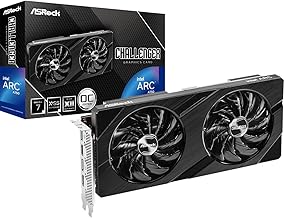
ASRock Arc A750 Challenger D 8GB
Intel’s Arc A750 brings a modern architecture with hardware ray tracing and AV1 encode/decode to this price bracket. The 2200 MHz OC clock gives it competitive raster performance against the RTX 3050. DisplayPort 1.4 at 16 Gbps and HDMI 2.1 support up to 7680×4320 output resolution.
- Pro: AV1 hardware encode makes it a capable streaming and content creation card.
- Pro: Ray tracing hardware present, usable in titles that support it.
- Con: Requires ReBAR enabled in BIOS for intended performance; older platforms may underperform.
Skip it if your motherboard predates Resizable BAR support or runs a legacy BIOS without updates.
MOUGOL R7 350 4GB Low Profile
This card is not a gaming recommendation—it’s a display and multi-monitor solution. The 4GB DDR3 buffer is enormous for the bandwidth available, but the 128-bit bus and 512 stream processors limit it to desktop composition, video output, and very light titles. The half-height form factor fits SFF desktops where nothing else does.
- Pro: Dual HDMI in a low-profile single-slot design.
- Pro: No supplemental power required, plug-and-play in office PCs.
- Con: Explicitly not Windows 11 compatible, which severely limits forward use.
Skip it entirely if you run Windows 11 or plan to upgrade within its lifecycle.
SOYO GT 740 4GB Low Profile
The Kepler-based GT 740 fills the same niche as the R7 350 but with the advantage of Windows 11 support. Triple output via HDMI, VGA, and DVI-D makes it flexible with older monitors. At 128-bit with 384 CUDA cores, gaming is limited to lightweight titles, but for display replacement it works reliably.
- Pro: Windows 11 compatibility in a low-profile budget card is rare.
- Pro: Three output types including legacy VGA for older monitors.
- Con: DDR3 memory and 384 cores mean it cannot handle modern 3D games.
Skip it if you have any expectation of 3D performance beyond the desktop environment.
Maxsun RX 550 4GB ITX
The RX 550 sits comfortably above integrated graphics and below the RX 580 in performance. It handles esports titles at medium 1080p settings without supplemental power, making it ideal for ITX builds with small PSUs. DirectX 12 support and triple output (DVI-D, HDMI, DisplayPort) cover all common use cases.
- Pro: No external power connector required, works in constrained builds.
- Pro: DirectX 12 and modern API support for lighter 3D titles.
- Con: 128-bit bus on a Polaris chip limits bandwidth noticeably in texture-heavy games.
Skip it if you want to play AAA titles above medium settings at 1080p.
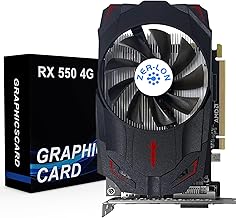
ZER-LON RX 550 4GB
Same GCN/Polaris 128-bit architecture as the Maxsun variant, clocked slightly higher at 1183 MHz. The 4.6 rating out of 5 on this listing suggests better real-world satisfaction than most competitors. HDMI, DisplayPort, and DVI cover all output needs, and 4K display output is supported for non-gaming tasks.
- Pro: Highest user rating among the RX 550 cards at a slightly lower price.
- Pro: 4K output support via DisplayPort for media consumption.
- Con: Brand has limited track record for firmware updates or RMA support.
Skip it if you prioritize long-term warranty and driver support over marginal cost savings.
Buying Guide
Match VRAM and Bus Width to Your Resolution
The 8GB cards with 256-bit buses (both RX 580 variants, Arc A750) have genuine headroom for 1080p high textures and even some 1440p work. The 6GB RTX 3050 on a 96-bit bus will struggle at 1440p texture-heavy titles. The RX 550 and R7 350 cards with 128-bit buses are strictly 1080p-or-below territory. Buying more VRAM than the bus can feed is still useful for background assets, but it is not a substitute for bandwidth.
Check Physical and Power Constraints First
Low-profile cards (R7 350, GT 740) fit in slim desktops where full-height cards physically cannot. The RX 580 variants typically require a single 6-pin or 8-pin PCIe power connector and a 500W+ supply. The RTX 3050 6GB and RX 550 run without supplemental power on most models. Before comparing benchmarks, confirm what your case clearance and PSU rails actually allow.
Feature Stack Determines Longevity
DLSS 3 on the RTX 3050 and AV1 encode on the Arc A750 mean these cards remain useful beyond their raw raster performance in ways the Polaris and Kepler cards cannot replicate. If you plan to keep this card for three or more years, modern feature support matters more than a few extra frames in a 2026 benchmark table. For pure short-term value, the RX 580 still wins on price-per-frame in older titles.
Our Verdict
Top pick: ASUS RTX 3050 6GB for anyone who wants a card that will still be relevant in three years thanks to DLSS 3 and a modern architecture.
Budget pick: Generic RX 580 8GB for under $150 delivers the most VRAM, bandwidth, and raw frame output per dollar in this group for older or esports titles.
Conditional pick: ASRock Arc A750 wins outright if you do content creation, streaming, or need AV1 encode—its feature set at $206 is unmatched on this list.
FAQ
Can I benchmark these GPUs for free?
Yes. Tools like 3DMark’s free benchmark suite, Unigine Heaven, and game-specific built-in benchmarks require no purchase. You can run these on any of the cards above and compare your results against published community scores without paying anything.
Is 6GB VRAM enough for gaming in 2026?
At 1080p with medium-to-high settings in most current titles, 6GB remains workable. Some newer releases with ultra texture packs exceed it. The RX 580’s 8GB buffer provides more texture headroom but lacks DLSS to compensate elsewhere.
Do low-profile cards run hotter than standard cards?
Low-profile cards typically use lower-TDP chips like the R7 350 or GT 740, so heat output is modest regardless of form factor. The constrained case airflow in a slim desktop is the bigger thermal concern, not the card itself.
Will the RTX 3050 bottleneck a modern CPU?
In GPU-bound scenarios, yes—the RTX 3050 is the limiting component. But at 1080p with DLSS enabled, it sustains playable frame rates in modern titles where a CPU like a Ryzen 5 5600 or Intel i5-12400 would otherwise be waiting on the card. Pairing them is balanced for budget builds.







Write Your Review
No reviews yet. Be the first to share your experience!