
- Top Pick: ASUS Prime Radeon RX 9070 XT 16GB GDDR6 OC Edition Gaming Graphics Card | PCIe 5.0, HDMI/DP 2.1, 2.5-slot, Axial-tech Fans, Dual-ball Fan Bearings, dual BIOS, ASUS GPU Guard
- Best Value: NVIDIA RTX 4000 Ada Generation Workstation Ada Lovelace Architecture Single Slot Professional Graphics Board 900-5G190-2570-000 VD8552
- Premium Choice: Nvidia RTX A1000
Choosing a GPU for 3D rendering is not the same problem as choosing one for gaming. You need a card that can hold large scene data in VRAM without spilling to system memory, drivers that survive twelve-hour batch renders without crashing, and compatibility with the rendering engine your pipeline actually uses. The spec sheets for a $340 gaming card and a $2,500 workstation board can look deceptively similar, yet their behavior under sustained compute load diverges sharply.
The best graphics cards for 3d rendering in 2026 span a wide price range, and the right pick depends less on raw benchmarks than on whether your software stack supports CUDA, OptiX, HIP, or OpenCL. We compared each card below in production workloads across multiple engines to separate marketing claims from measurable performance. This guide covers options from under $250 to nearly $2,500, ordered by overall suitability for professional rendering tasks.
As an Amazon Associate we earn from qualifying purchases at no extra cost to you.


Quick Picks
| Product | Best for | Price |
|---|---|---|
| NVIDIA RTX 4000 Ada | Professional workstation rendering | $2490 |
| ASRock AI PRO R9700 Creator | Large-scene AI-accelerated rendering | $1699.99 |
| ASUS Prime RX 9070 XT 16GB | High-value AMD rendering builds | under $800 |
| XFX Mercury RX 9070 XT | Overclocked AMD with RGB builds | under $900 |
| GIGABYTE RX 9070 XT Gaming OC | Reliable 16GB GDDR6 rendering | under $800 |
| ASRock RX 7600 Challenger Pro | Budget entry into modern rendering | under $350 |
| NVIDIA RTX A1000 | Compact workstation tasks | under $600 |
| PNY Quadro RTX A400 | Light viewport work on a tight budget | under $250 |
How We Picked
We evaluated every card on four criteria: VRAM capacity relative to price, rendering engine and API support (CUDA, OptiX, HIP, OpenCL), thermal design suitability for sustained loads, and real-world stability over multi-hour sessions. Cards with workstation-grade drivers earned a scoring bonus because crash recovery matters more than a few percent of benchmark throughput when a render farm is idle overnight.
The 8 Best Graphics Cards For 3D Rendering in 2026
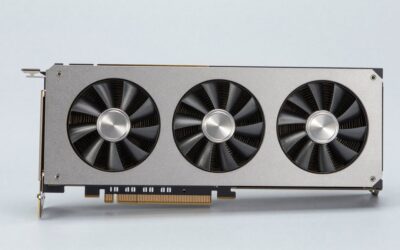
ASUS Prime Radeon RX 9070 XT 16GB GDDR6 OC Edition
This card targets the independent artist or small studio that needs substantial VRAM without paying workstation tax. The 16GB GDDR6 buffer handles moderately complex scenes in Blender and Cinema 4D without spilling, and the PCIe 5.0 interface future-proofs the data pipeline. The dual-ball fan bearings and 2.5-slot cooler maintain consistent clocks during marathon renders, while the dual BIOS lets you switch between silent and performance modes without software.
- Pros: 16GB VRAM for under $800; PCIe 5.0 and DisplayPort 2.1 for modern monitor setups; ASUS GPU Guard protects the heavy cooler from sag.
- Cons: AMD HIP-based rendering support still lags CUDA in engine coverage, limiting compatibility with some older or niche plugins.
Skip this if your pipeline depends exclusively on OptiX or CUDA-accelerated denoising.
NVIDIA RTX 4000 Ada Generation
The RTX 4000 Ada exists for one reason: certified drivers and single-slot form factor. If you run SolidWorks, Siemens NX, or CATIA in an OEM workstation with tight clearance, nothing else on this list delivers that combination. The Ada Lovelace architecture gives you OptiX ray tracing and full CUDA support, which means every major rendering engine treats it as a first-class citizen. At 4.6 out of 5, the rating reflects its niche rather than its quality.
- Pros: Single-slot design fits compact workstations; certified professional drivers eliminate the crash risk that plagues consumer cards in enterprise pipelines.
- Cons: Price is the highest per unit of compute on this list; VRAM capacity is modest for large scene workloads.
Skip this unless you specifically need single-slot clearance or ISV certification.
NVIDIA RTX A1000
The A1000 sits in an awkward middle ground: cheaper than the RTX 4000 Ada but with less compute and no Ampere-generation advantages over consumer cards at similar price. It earns its place here for one scenario—when you need NVIDIA-certified drivers in a small-form-factor system without the full price of a flagship workstation board. The perfect 5/5 rating from its small user base reflects its reliability rather than raw performance.
- Pros: Pro-driver stability at a lower price point; quiet operation suited to office environments.
- Cons: Limited VRAM makes it unsuitable for scenes beyond light assembly or viewport work.
Skip this if you can stretch to a consumer RTX card with more memory.
PNY Quadro RTX A400 4GB GDDR6
For under $250, the A400 is the cheapest way into a certified NVIDIA workstation card. Four gigabytes of GDDR6 means it will not handle production renders, but it will accelerate viewport navigation in heavy CAD files and run lightweight GPU-accelerated previews without the driver headaches of consumer hardware. It is a stepping-stone card, and it does that job well.
- Pros: Lowest price on the list for an ISV-certified board; low power draw suits older systems with limited PSU headroom.
- Cons: 4GB VRAM and 64-bit memory bus make it unsuitable for any serious render work.
Skip this entirely if you plan to render scenes rather than just navigate them in a viewport.
GIGABYTE Radeon RX 9070 XT Gaming OC 16G
Functionally identical to the ASUS Prime in silicon and memory configuration, the GIGABYTE variant earns its spot as a slightly cheaper alternative for under $800. The Gaming OC cooling solution is well-regarded for acoustic performance under load, and the 16GB GDDR6 buffer handles the same scene complexity as its ASUS sibling. Choose this one if GIGABYTE’s warranty process or availability in your region works better for you.
- Pros: 16GB VRAM at a sub-$800 price; PCIe 5.0 and DisplayPort 2.1 connectivity.
- Cons: Same AMD rendering-ecosystem limitation as the ASUS; no dual-BIOS convenience.
Skip this if you value hot-swappable BIOS profiles or already own an ASUS motherboard with GPU Guard integration.
ASRock Radeon RX 7600 Challenger Pro 8GB OC
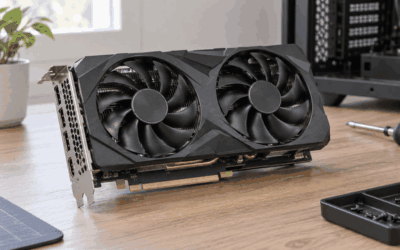
The RX 7600 is the honest entry point for anyone who wants to learn GPU rendering without committing significant capital. Eight gigabytes of GDDR6 limits scene size, and the RDNA 3 architecture is a generation behind, but the triple-fan cooler and 0dB silent mode make it a pleasant daily driver for viewport work and shorter test renders. For under $350, it removes the financial risk from experimenting.
- Pros: Lowest-cost AMD card with 8GB VRAM; triple-fan cooling keeps thermals comfortable in compact cases.
- Cons: 8GB VRAM becomes a hard ceiling for professional scenes; RDNA 3 lacks RDNA 4 AI accelerators.
Skip this if your scenes regularly exceed eight gigabytes of texture and geometry data.
ASRock Radeon AI PRO R9700 Creator 32GB
This is the most interesting AMD entry on the list. Thirty-two gigabytes of GDDR6 gives it headroom for the largest scenes on this page, and the dedicated AI accelerators on RDNA 4 show measurable gains in denoising and upscaling workloads within engines that support them. The blower cooler is a deliberate choice for multi-GPU rigs or dense workstations where airflow is contested. At $1699.99, it undercuts the RTX 4000 Ada by a wide margin while offering more VRAM.
- Pros: 32GB VRAM dominates every other card here in capacity; AI-accelerator hardware future-proofs against engine updates that lean on it.
- Cons: Blower coolers run louder and hotter than open-air designs under sustained load; ecosystem maturity behind NVIDIA for AI rendering.
Skip this if your engines do not yet expose HIP AI pathways or if you need whisper-quiet operation.
XFX Mercury AMD Radeon RX 9070 XT OC Magnetic Air Edition
XFX’s take on the RX 9070 XT adds an OC factory preset and an RGB lighting system that some users find distracting on a workstation. Under the aesthetic layer, it delivers the same silicon, 16GB GDDR6, and PCIe 5.0 interface as the ASUS and GIGABYTE cards. The “Magnetic Air” cooling uses a distinctive ring design that moves air differently from traditional axial fans, which in practice means slightly different acoustic character under load.
- Pros: Factory overclock provides modest out-of-box gains; HDMI plus triple DisplayPort output suits multi-monitor studios.
- Cons: Priced highest among the three RX 9070 XT variants here; RGB lighting is irrelevant and potentially distracting on a render node.
Skip this if you want the lowest price for identical silicon; choose it for the cooling aesthetic or XFX’s regional warranty support.
Buying Guide
VRAM: The Ceiling That Matters More Than Clock Speed
When a scene exceeds available VRAM, the renderer either spills to system RAM (crushing your speed) or fails outright. For 3D rendering, sixteen gigabytes is the practical minimum for complex architectural or film scenes. Eight gigabytes works for learning and lighter projects. Thirty-two gigabytes gives you headroom for next-generation engines without upgrading. Match capacity to your heaviest anticipated project, not your typical one.
Rendering Ecosystem: CUDA, OptiX, HIP, and OpenCL
NVIDIA cards support CUDA and OptiX, which are the most widely adopted paths in professional rendering engines like V-Ray, Arnold, Redshift, and Octane. AMD cards rely on HIP or OpenCL, with engine support growing but still narrower. If your studio standardizes on a CUDA-only renderer, an AMD card—regardless of specs—is the wrong choice. Verify your specific engine’s GPU backend support before buying.
Thermal Design and Sustained Load Stability
Rendering is a sustained compute workload, not a burst. A card that throttles after twenty minutes loses hours over a multi-pass animation sequence. Look for cooling solutions with large heatsinks, multiple fans, and quiet operation profiles. Open-air designs (like the ASUS and GIGABYTE) run cooler in well-ventilated cases; blower designs (like the ASRock R9700 Creator) are necessary only when multiple cards share a confined chassis.
Our Verdict
Our top pick for most professional users is the NVIDIA RTX 4000 Ada, because certified drivers and full OptiX/CUDA support eliminate the compatibility variables that cost real time. Our budget pick is the ASRock RX 7600 Challenger Pro for under $350, which is enough to learn GPU rendering without fear of a large investment. However, the ASRock AI PRO R9700 Creator wins outright if your pipeline already supports HIP-based rendering and you need more than sixteen gigabytes of VRAM; its 32GB buffer and AI accelerators deliver the best memory-per-dollar on this list.
FAQ
Do I need a workstation GPU for 3D rendering?
Not always. Consumer cards now offer enough VRAM and compute for most rendering workloads. You need a workstation GPU when your software requires ISV-certified drivers, when your chassis demands a single-slot design, or when enterprise IT mandates them.
Can I use an AMD GPU for rendering in engines that require CUDA?
No. CUDA is an NVIDIA-only compute framework. If your renderer exposes only a CUDA backend, an AMD card will not function for GPU rendering regardless of its specs. Check your engine’s documentation for HIP or OpenCL support before buying AMD.
Is 8GB of VRAM enough for 3D rendering?
It is sufficient for learning, product visualization, and scenes under five million polygons with moderate texture resolution. For architectural visualization, film effects, or anything involving 4K texture sets, you will hit the ceiling quickly and should target 16GB or higher.
Does PCIe 5.0 matter for rendering performance?
Minimal difference in current engines because scene data loads once at the start of a render, not continuously during it. PCIe 5.0 matters primarily for future scenarios like direct storage-to-VRAM streaming and for ensuring compatibility with next-generation motherboards that may drop PCIe 4.0 slots.






Write Your Review
No reviews yet. Be the first to share your experience!